
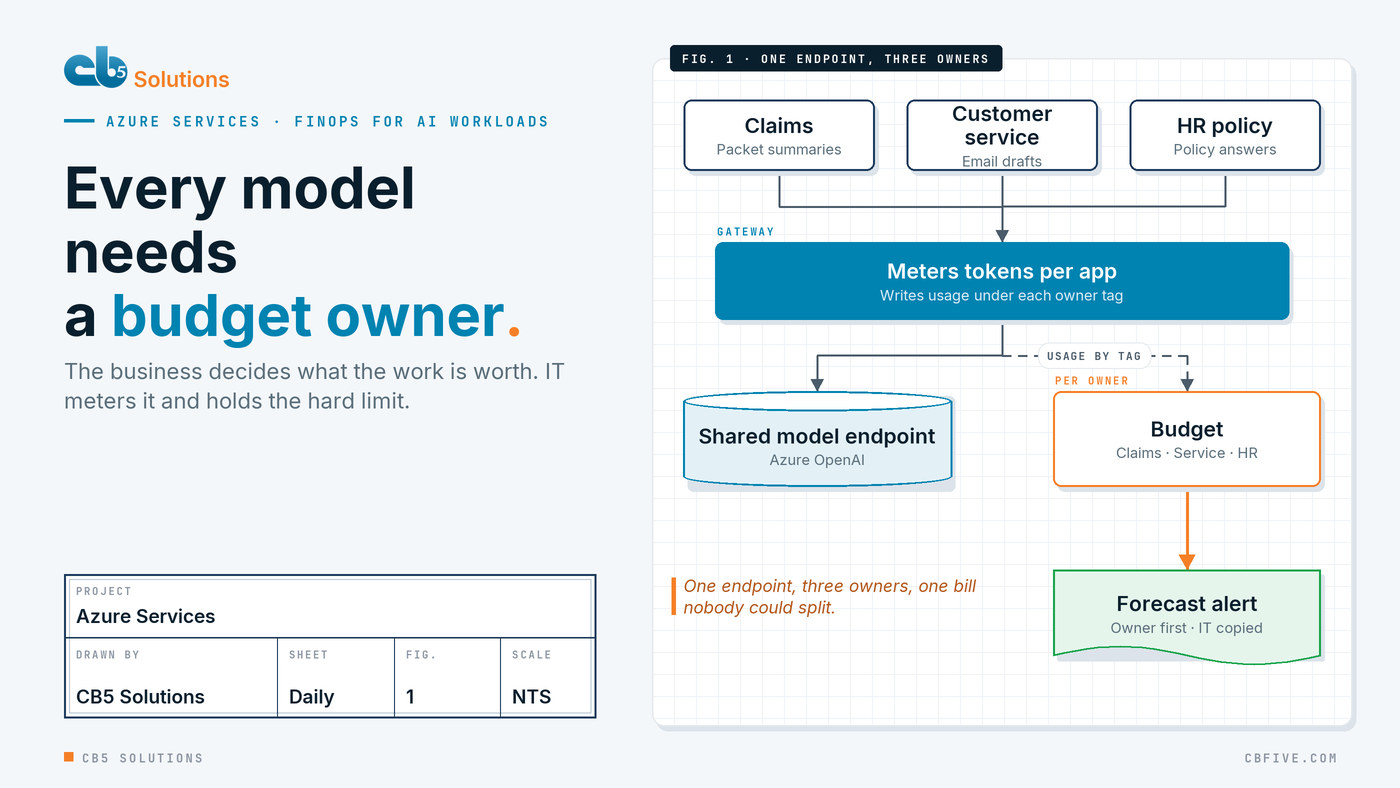
The claims team has had a good quarter. Its document assistant reads incoming claim packets, pulls out the fields an adjuster needs and drafts the first summary, and the backlog that used to build every Monday is gone. Then the month-end Azure invoice lands in finance, the AI line has grown again, and the controller asks a simple question: whose is this? Nobody can answer. Claims, customer service and the HR policy assistant all call the same model endpoint, and the bill shows one resource with one number.
Every department in that room already knows the problem. Finance can’t allocate a cost it can’t see. The claims director can’t defend a budget she’s never been shown. IT is holding a bill for work it didn’t ask for and can’t judge. The fix isn’t a cheaper model. It’s giving every AI workload a business owner, a budget that owner can see, and an alert that goes to them before the invoice does. Azure has the tools for this. The decisions behind them belong to the business.
Why AI spend behaves differently
Most Azure costs follow the infrastructure. A virtual machine costs roughly the same whether anyone logs in. AI workloads don’t work that way. A model deployment on standard, pay-as-you-go pricing charges for tokens: the text going in and the text coming out. Cost follows use, and use follows adoption. The more the claims team trusts its assistant, the more packets it sends through, and the bigger the bill.
That’s good news dressed as bad news. Rising AI spend often means the thing is working. But it only reads as good news if someone can connect the cost to the work it did, and the usual Azure setup makes that hard. Teams start with one model resource because it’s quick to approve, then a second and third app quietly point at the same endpoint. By the time finance asks, the cost is pooled, and the only owner on record is whoever created the resource.
We’ve written about why freed hours aren’t the same as cash when you build the return side of an AI business case. FinOps is the cost side of the same conversation, and it has the same rule: if you can’t attribute it, you can’t defend it.
Tag for the owner, not the server
The first job is making cost land in the right place. In Azure that starts with tags, and the tags that matter for AI are about people and purpose, not technology.
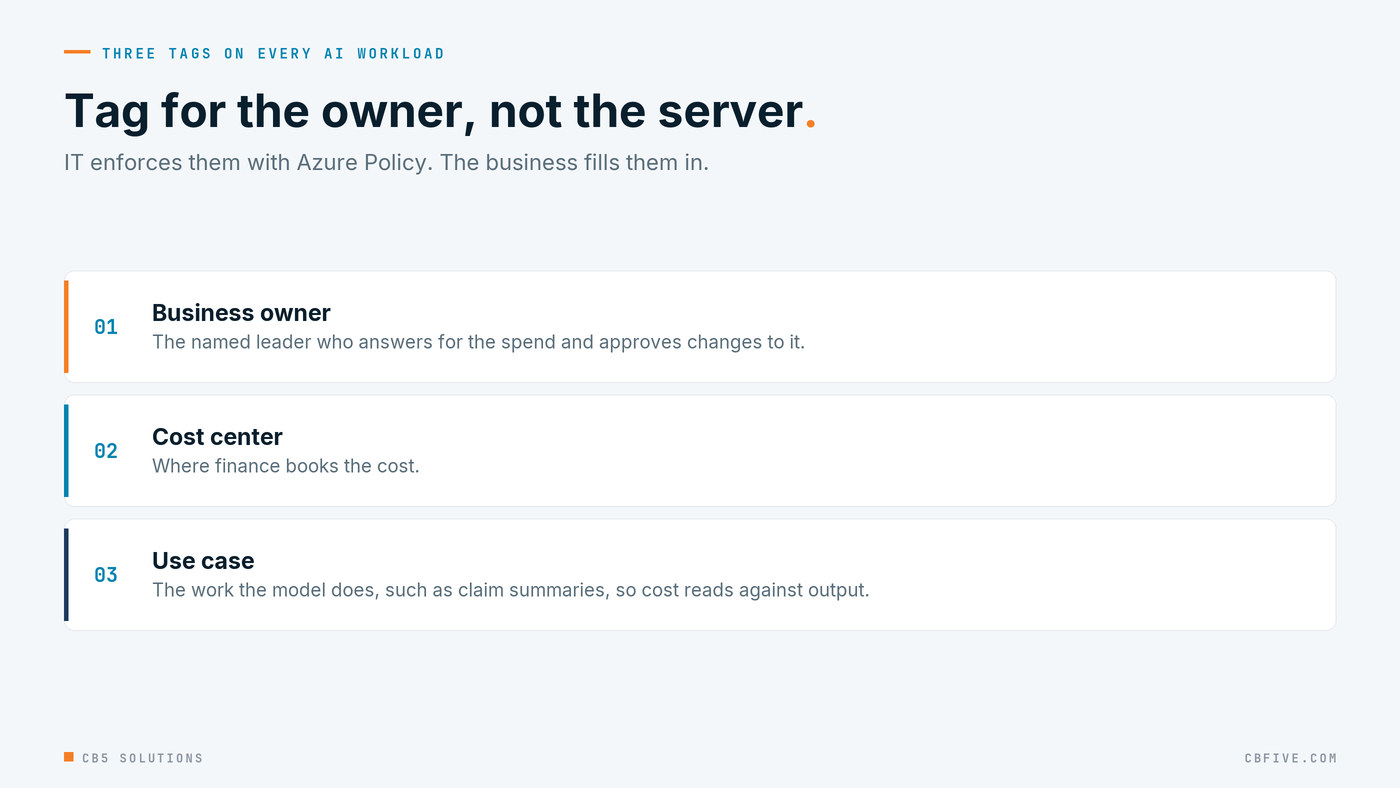
Business owner names the leader who answers for the spend. Not the developer, not the subscription admin. In the opening example that’s the claims director. Cost center tells finance where to book it. Use case names the work: “claim packet summaries”, not “GPT deployment 2”. That last tag is what lets someone later read cost against output.
IT’s part is to make the tags stick. Azure Policy can require these tags on new resources and resource groups and deny deployments without them, and Cost Management can carry resource group tags down to the resources inside them for reporting. Tags that are optional get skipped. Tags that are enforced become the cost model.
Tags alone don’t solve the shared endpoint, because three apps calling one resource still produce one resource’s bill. There are two honest ways out. The simple one is a separate model deployment, or a separate resource, per business owner, so the boundary in the bill matches the boundary in the business. The more scalable one, for organizations with many apps, is a gateway: Azure API Management can sit in front of Azure OpenAI, give each app its own subscription key, and record token usage per key. Either way, the decision about where to draw the lines comes from the business. IT builds the lines.
A budget the business owner can see
Once cost lands under an owner, give that owner a budget. Azure Cost Management budgets can be scoped to a subscription or resource group, filtered by tag, and set to alert at thresholds of both actual and forecasted spend. The forecast alert is the useful one. It tells the claims director in the middle of the month that the run rate will pass the number, while there’s still time to decide what to do.
Two things decide whether budgets work in practice.
Who gets the alert. Budget alerts often go to an IT distribution list, which means the person who can explain the spend hears about it last. Send the alert to the business owner first, with IT and finance copied. The owner knows whether a spike is a busy week of claims or a runaway process.
What happens next. A Cost Management budget is a warning, not a brake. It doesn’t stop spending on its own. So agree in advance what each threshold means.
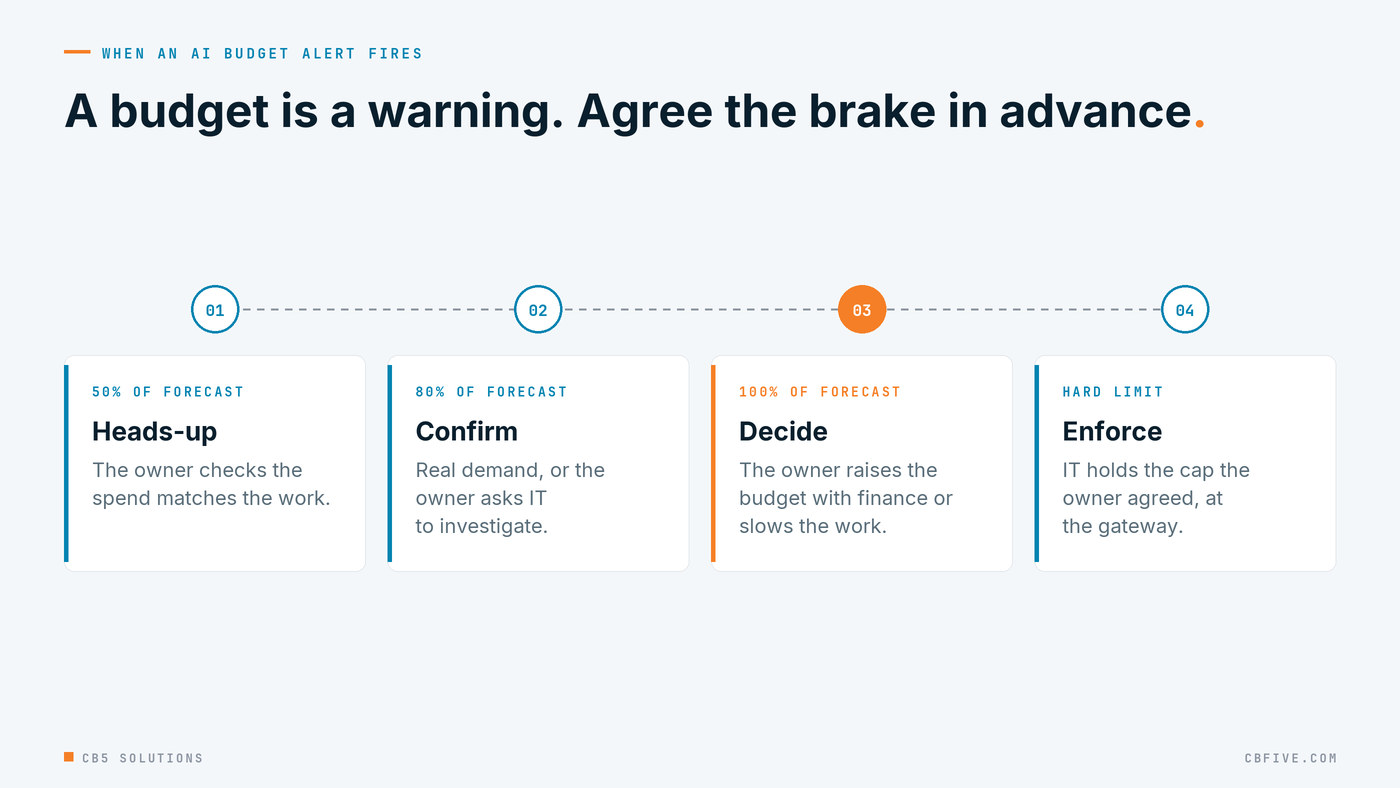
The business decides how much the work is worth. IT holds the hard limit: a token quota on the deployment, or a rate and token limit at the gateway, set at a level the owner signed off. That split matters. Nobody wants IT switching off the claims assistant at month end because a number was crossed. Nobody wants an unbounded meter either.
Capacity or pay-as-you-go is a business choice
Azure gives AI workloads two broad ways to pay. Standard deployments charge per token, with no commitment. Provisioned throughput reserves model capacity for a fixed charge, and can be reserved for longer terms, which suits steady, high-volume work that needs predictable response times. There’s also a batch option for work that can wait hours rather than seconds, priced below standard.
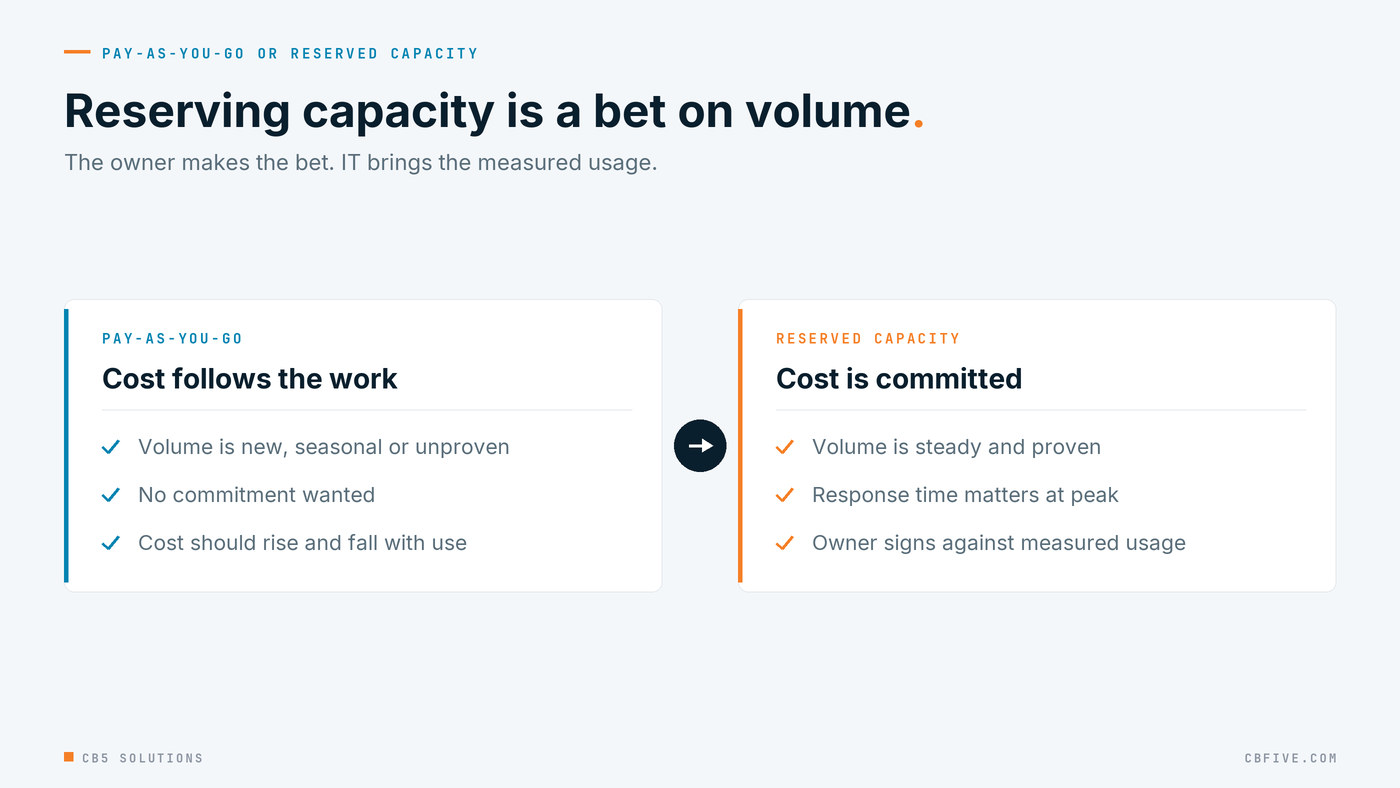
In many organizations this choice gets made by whoever set up the deployment, as a technical default. It shouldn’t be. Reserving capacity is a bet on volume, and the only person who can make that bet is the one who knows whether claims volume will hold through next year. IT’s role is to bring the evidence: a few months of measured token usage per owner, utilization at peak, and what the same work would have cost on the other model. The owner signs the commitment, because the owner carries the budget.
The same logic sorts out batch. If the HR policy assistant reindexes documents overnight, nobody needs that answer in two seconds. Ask each owner which of their work is urgent and which can queue. It’s a business question with a cost answer.
Read cost against the work, not against last month
A rising bill is only a problem if the work didn’t rise with it. The most useful FinOps number for an AI workload isn’t total spend. It’s cost per unit of work: cost per claim packet summarized, per customer email drafted, per policy question answered. The use-case tag and the app’s own volume count are all you need to calculate it.
That number tells the owner things the invoice can’t. If cost per claim climbs while volume is flat, something changed: a longer prompt, a larger model, a retry loop. If total cost doubles while cost per claim holds, the team is simply doing twice the work with the assistant, and that’s a conversation about value, not waste. Our Copilot ROI series covers the return side in detail, including how to grade the evidence behind saved hours. Cost per unit of work is the piece that sits across from it on the same page.
Getting Started
- List every AI workload in Azure and the apps that call it. Mark any endpoint used by more than one team.
- Name a business owner for each. If nobody will take it, ask whether the workload should keep running.
- Agree three tags (business owner, cost center, use case) and have IT enforce them with Azure Policy.
- Split shared endpoints, with separate deployments or a metering gateway, so the bill follows the owners.
- Set a budget per owner with forecast alerts that go to the owner first, IT and finance copied.
- Write down what each threshold means, including the hard limit IT enforces and who can change it.
- Review the pricing model with each owner once a few months of usage are measured: standard, reserved capacity or batch.
- Report cost per unit of work alongside total spend at every monthly review.
CB5 Solutions helps organizations understand the layers of AI, get the most from what they buy, and build an AI program that pays back inside their IT standards. We start every engagement with one business problem and a governance baseline. Let’s pick yours.