
The customer service team has an agent that answers the question they get all day: is this part in stock, and when can it ship? It works. Reps stop toggling between three systems, and the answers match what the warehouse would have said. Then one Monday a distributor calls back, unhappy. The agent told a rep the part was on the shelf. It wasn’t. The inventory table behind the agent had stopped refreshing on Friday, and the agent kept answering from it, fluently and without a flicker of doubt.
Nobody did anything wrong. The pipeline failed quietly, the way pipelines do. What was missing was a person whose job it was to know that table was right, and a rule for what the agent should do when it wasn’t. That gap is common, it’s cheap to close, and it’s a business decision before it’s a technical one.
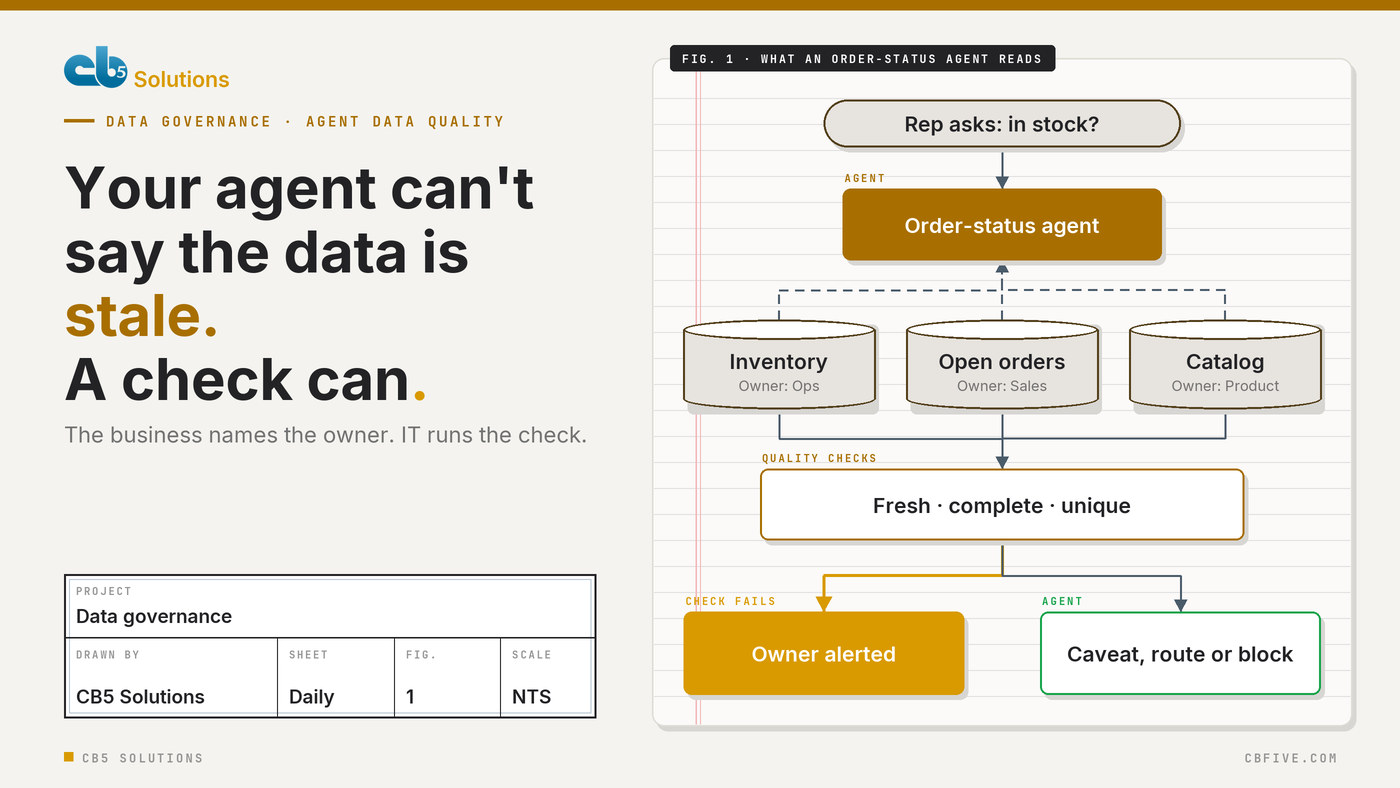
A report shows its age. An agent doesn’t.
Bad data has always existed. What changed is how it reaches people.
A dashboard carries its own warning signs. There’s a “last refreshed” stamp in the corner. An analyst who reads it every week notices when a line goes flat or a total looks wrong, and asks before acting. The people reading reports are usually the people who know the data.
An agent strips those cues away. It turns rows into a confident sentence, and it delivers that sentence to whoever asked: a rep on the phone, a manager in Teams, sometimes a customer. Those readers don’t know the data and have no reason to doubt it. The agent isn’t lying; it’s repeating what it was given, at the same level of confidence whether the table refreshed an hour ago or four days ago.
So the quality bar for a data source goes up the moment an agent starts reading it, even though nothing about the source has changed. A table that was “good enough for the monthly report” may not be good enough to answer a customer.
Most agents depend on a short list of sources
The good news is that you don’t have to fix data quality across the whole estate before an agent goes live. You have to fix it for the sources that agent actually reads.
Ask the team that owns the agent one question: what does it look at to answer? For most business agents, the list is short. An order-status agent reads inventory, open orders, the product catalog and maybe a shipping calendar. An HR policy agent reads a document library and a list of office locations. The number in this post’s title isn’t a rule. The point is that the list fits on one page.
That list is the agent’s dependency map, and it’s the most useful governance artifact you can produce for it. CB5’s own data governance roadmap puts “define AI-accessible data sources” ahead of labeling and DLP for exactly this reason: you can’t protect, check or own what you haven’t listed. If you haven’t counted your agents yet, start there; we covered counting the agents you didn’t know you had separately.
The owner is someone in the business, not the team that runs the pipeline
When we ask “who owns this table?”, the first answer is usually the data platform team. They do own something important: the pipeline, the lakehouse, the refresh schedule. But they can’t answer the questions that matter when an agent gets it wrong.
Is a lead time of zero days possible? Should a discontinued product still show a price? Can two customer records share an account number? Those are business questions, and the person who can answer them is in operations, finance or sales, not IT.
So every source on the dependency map gets two names:
- A business owner who decides what “right” looks like for that data and gets told when it isn’t.
- A technical steward in IT or the data team who builds the checks, keeps the pipeline healthy and fixes the plumbing when a check fails.
This is the same split we recommend for every part of an AI program. The business drives, because it knows where the value and the risk are. IT owns the guardrails that make that safe and keep it auditable. Data quality is just that split applied to the rows an agent reads.
One check for each way the answer can go wrong
Don’t start with a data quality framework. Start with the ways this agent’s answer could be wrong, and give each one a check the business owner can explain in a sentence.
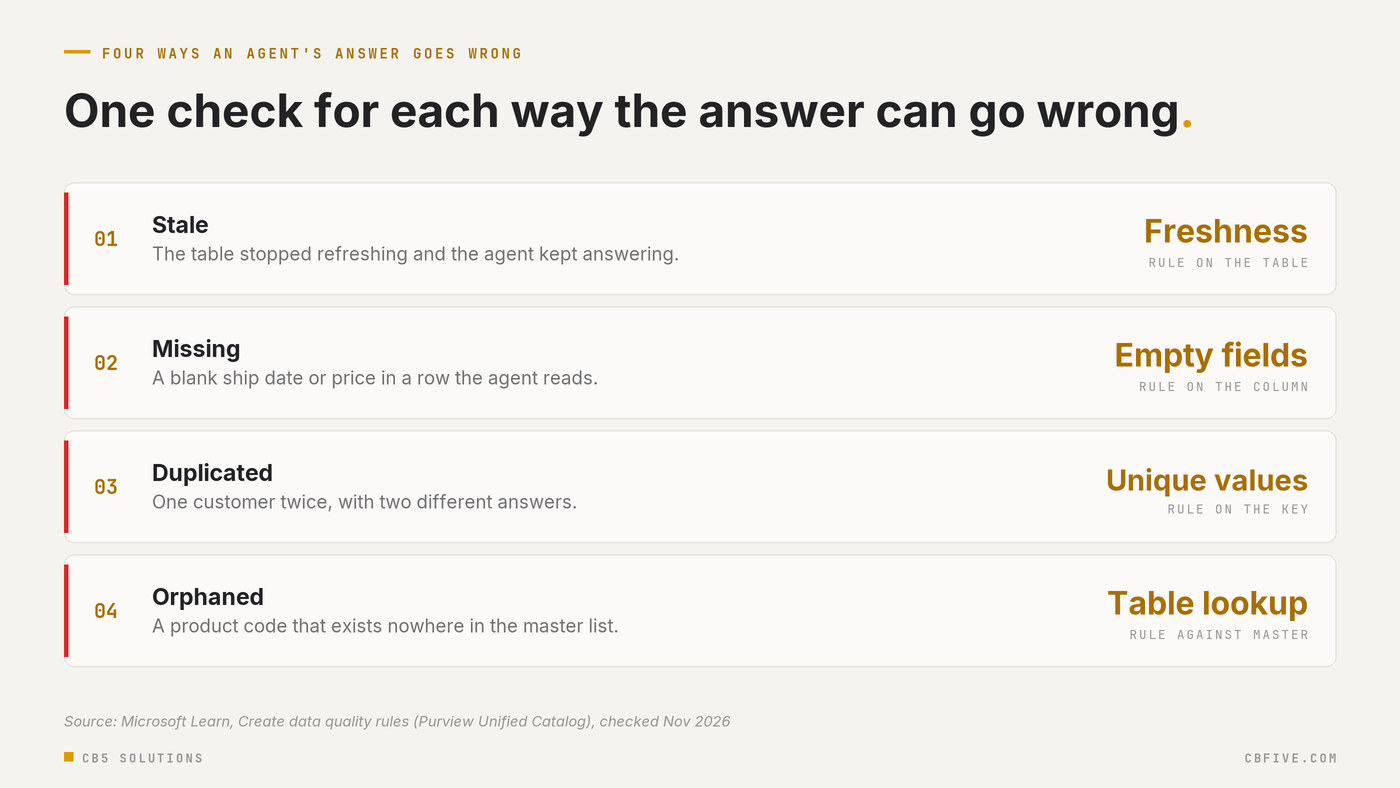
If your data sits in Microsoft Fabric, Microsoft Purview’s Unified Catalog can run most of these without code. Its data quality rules cover freshness, empty fields, unique values, format matches and table lookups, and it scores each rule and rolls the score up to the data product and governance domain. It can also alert the data owners and stewards by email or distribution group when a score drops below the threshold you set (Overview of data quality in Microsoft Purview Unified Catalog, Microsoft Learn, checked November 2026).
Two details from the same documentation are worth knowing before you promise anything. The freshness rule is pass or fail, scored 0 or 100, and it’s applied to the table rather than a column. And it isn’t supported on every source: Microsoft lists Azure Databricks Unity Catalog, Azure SQL, Synapse, Snowflake and BigQuery among the exceptions. For agents that read from those, put the freshness check in the pipeline instead, and fail the load before stale data lands.
Keep the list of checks small. A handful of rules the owner understands beats fifty that nobody reads. Every alert should go to a person who knows what to do with it.
Decide what the agent does when a check fails
This is the step most programs skip, and it’s the one that would have saved the customer service team’s Monday.
An alert tells the owner. It doesn’t change what the agent says to the rep who asks five minutes later. Someone has to decide, in advance, how the agent behaves while a source it depends on is failing. There are really only four choices.
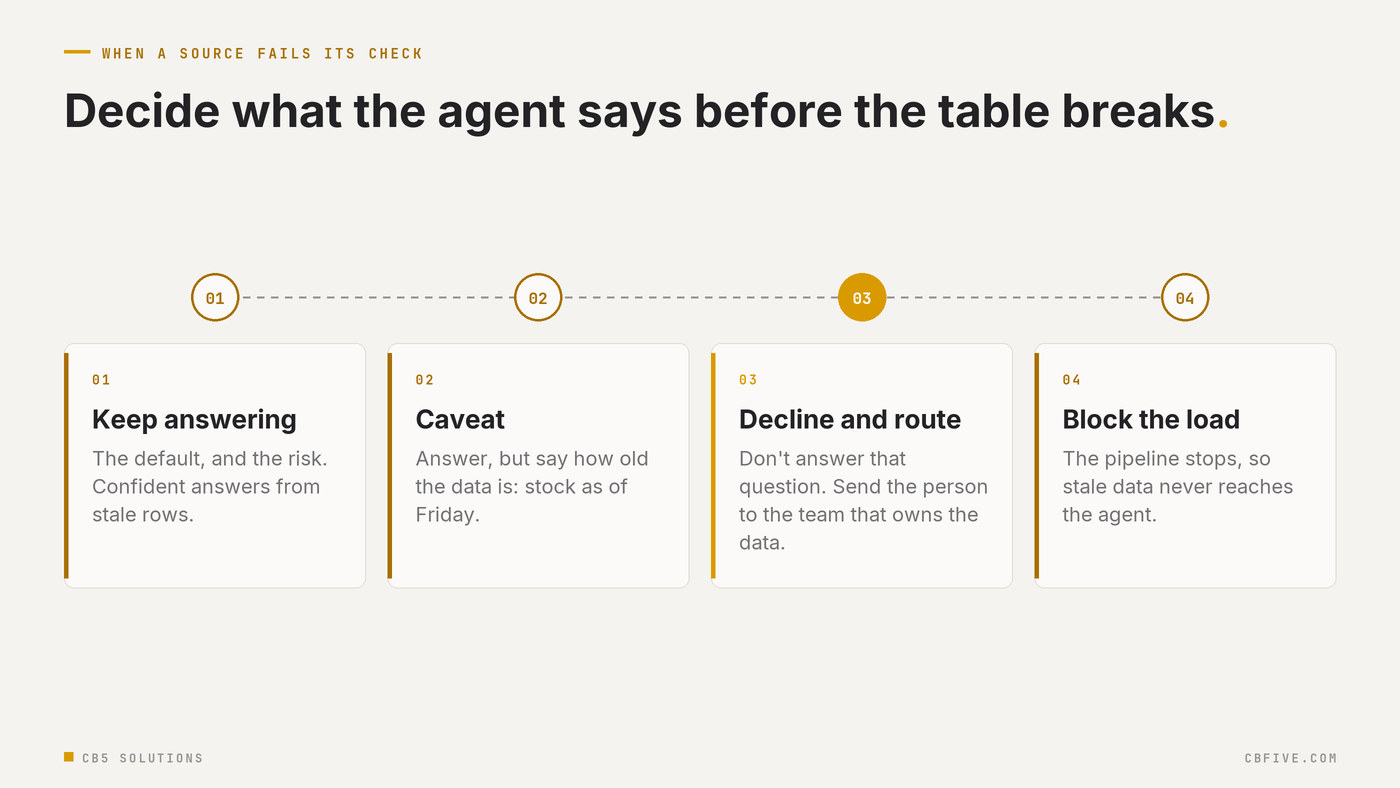
Which one is right depends on the cost of a wrong answer, and that’s a business judgment. A wrong office address in an HR agent is an annoyance; a caveat is fine. A wrong stock level promised to a customer costs money and goodwill; the agent should decline and route the question until the table is fresh. Where an answer leads to an action, such as a quote or an order, it should already pass through a person, which we covered in AI prepares, a human decides.
The business owner makes the call. IT makes it true, whether that’s a status flag the agent’s instructions check, a topic that routes to a queue, or a pipeline gate.
Write it down where the agent is registered
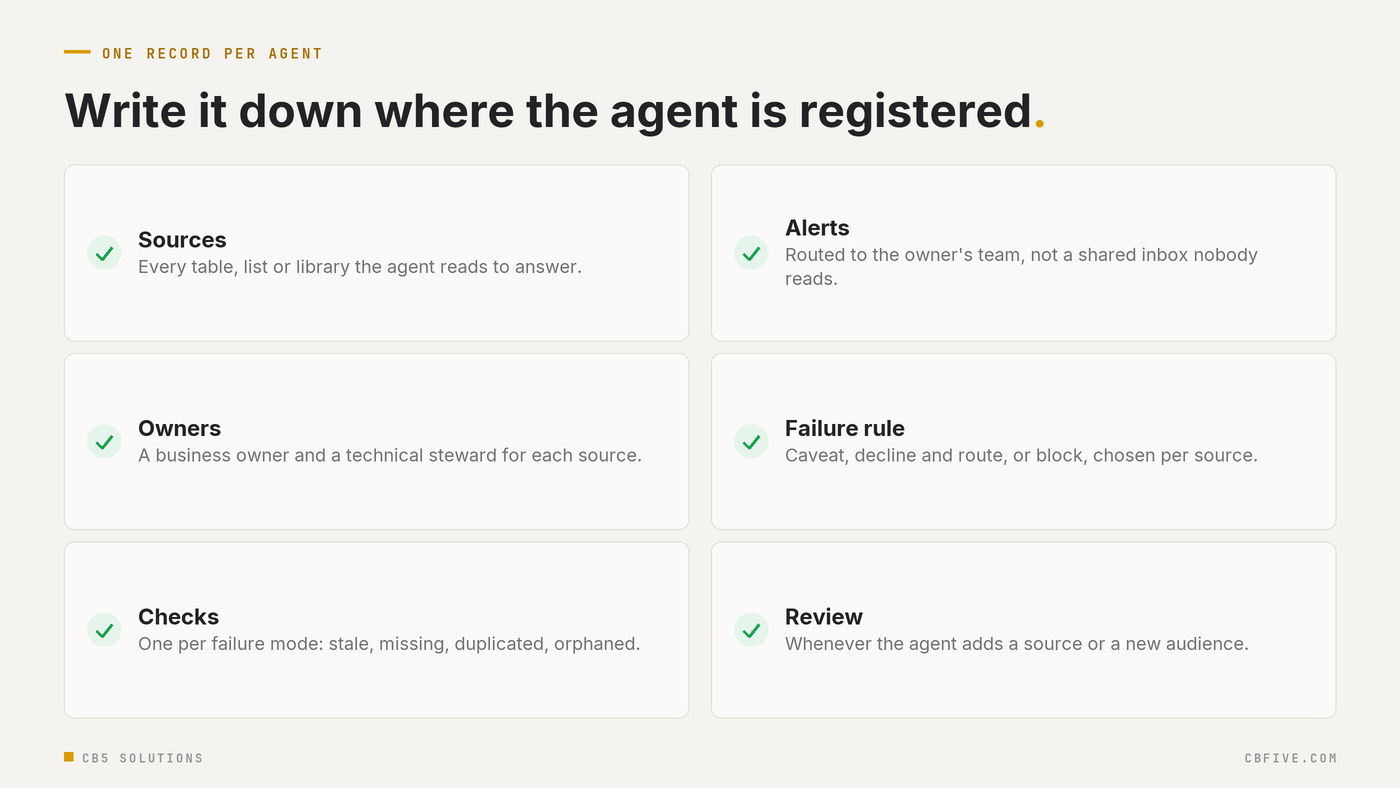
None of this lasts if it lives in someone’s head. Put it in one record per agent: the sources it reads, the business owner and steward of each, the checks that run, who gets the alert and what the agent does when a check fails.
Keep that record next to the agent’s entry in your inventory, alongside its identity and permissions, which we argued every agent needs in every AI agent is an identity. When the agent changes, for a new data source or a new audience, the record gets reviewed before release, not after the first bad answer.
It’s the same idea we applied to Fabric’s tenant settings in Before the First Lakehouse: a decision only counts as governance when you can show someone what was decided, who decided it and how you know it’s still true.
Getting Started
- Pick one agent that people already rely on. Ask its team to list every source it reads to answer.
- Name a business owner and a steward for each source. If nobody in the business will own a source, that’s a sign the agent shouldn’t depend on it yet.
- Choose one check per failure mode. Stale, missing, duplicated and orphaned are enough to start.
- Have the owner choose the failure behavior. Keep answering, caveat, decline and route, or block the load.
- Test it. Let a check fail on purpose in a test environment and confirm the alert reaches the owner and the agent behaves the way they chose.
- File the record with the agent’s inventory entry. Review it whenever the agent’s sources or audience change.
CB5 Solutions helps organizations understand the layers of AI, get the most from what they buy, and build an AI program that pays back inside their IT standards. We start every engagement with one business problem and a governance baseline. Let’s pick yours.