
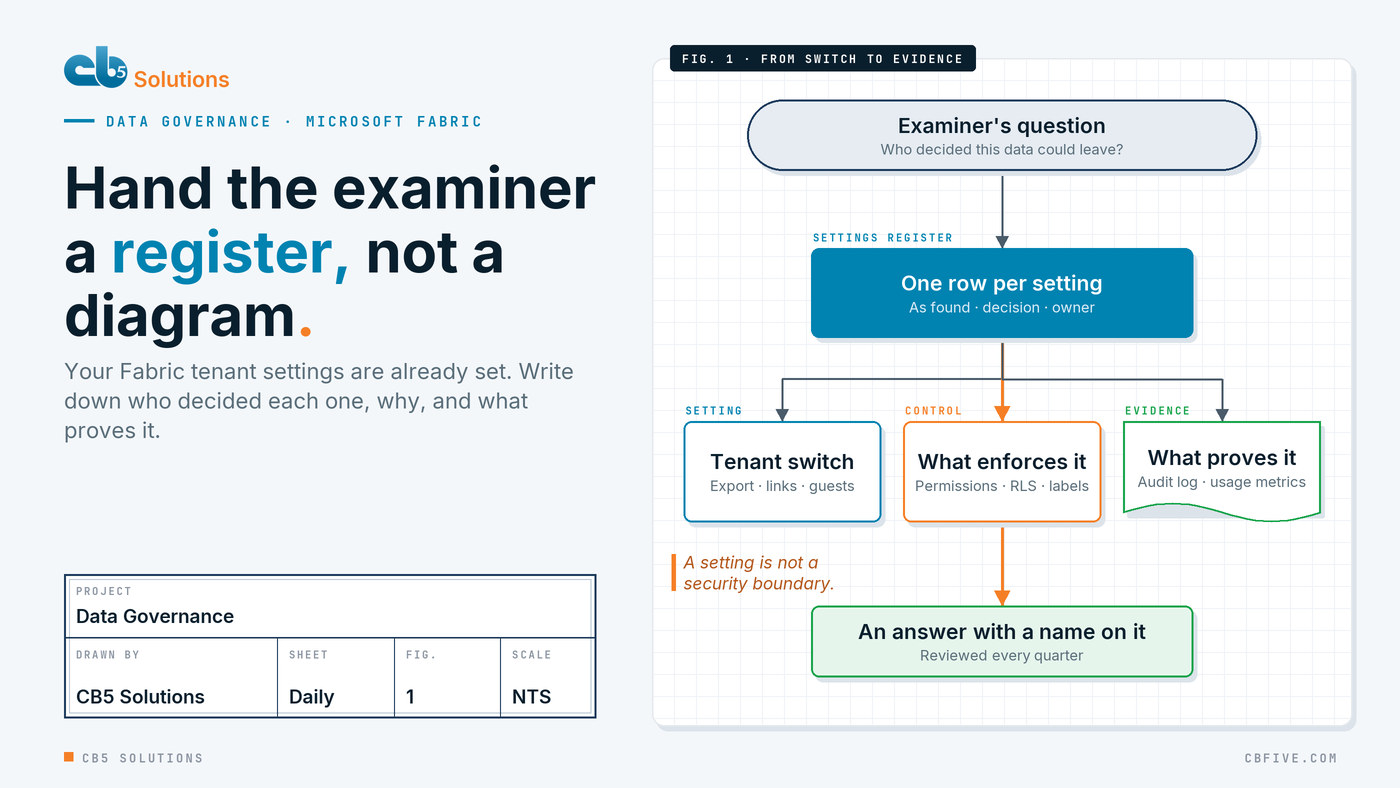
The finance team sends the board’s monthly numbers as an Excel attachment to a handful of inboxes. Internal audit has flagged it more than once: nobody can say who opened the file, who forwarded it, or where the copies live now. The team wants the reporting moved onto a governed data platform, and the chief risk officer agrees on one condition. When the examiner asks how the new platform is controlled, there has to be an answer on paper, with a name next to every decision.
That condition is where a lot of data platform projects stall, because the answer the risk officer needs doesn’t live in the architecture diagram. On Microsoft Fabric, it lives in the tenant settings: the switches in the admin portal that decide who can create, who can share, who from outside can get in, and how data leaves. Those switches are already set, by Microsoft’s defaults and by whoever clicked first. This post is about turning them into a governance baseline document, a settings register that an examiner can read and your own team can keep current.
The examiner doesn’t ask about your architecture
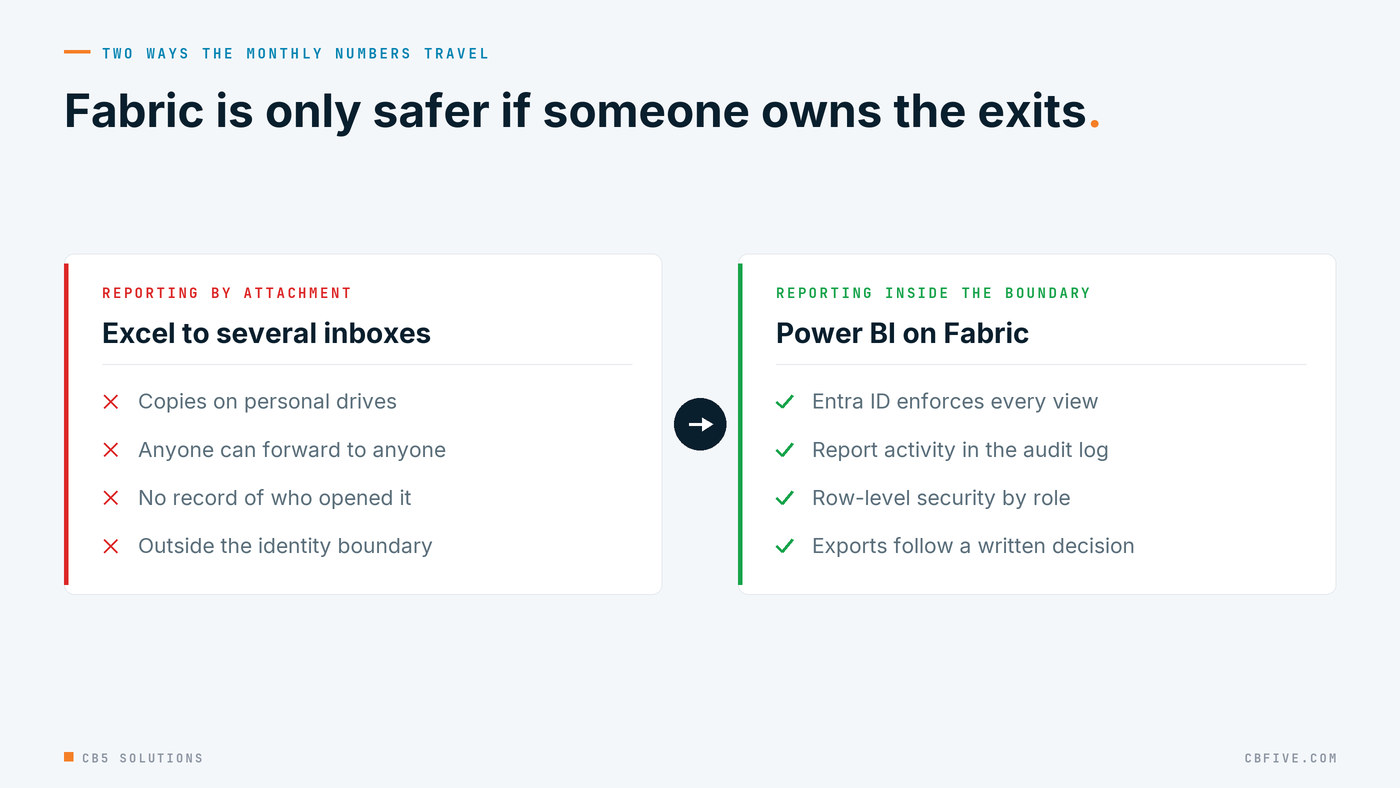
Moving those reports into Power BI on Fabric is a real improvement. Access is enforced by identity, report activity lands in the Microsoft 365 unified audit log, and row-level security can limit each reader to their own slice. But an examiner rarely asks how the lakehouse is layered. They ask questions like these:
- Who decided that report data could be exported, and why?
- Who approved guest access, and who can invite guests today?
- Show me who viewed this report, and when.
- What changed in the platform’s configuration this year, and who changed it?
A lakehouse design can’t answer any of them. A register can.
A setting is not a security boundary
Before writing anything down, get one thing straight, because an examiner will. Microsoft’s own documentation says tenant settings help establish governance policies but aren’t a security measure. Its example is the export setting: turning off export in the report interface doesn’t change what a user with read access to a semantic model can query.
So a register that says “export to CSV: disabled” and stops there is overclaiming. Every entry should name the setting and the control that actually enforces the decision: workspace roles, semantic model permissions, row-level security, sensitivity labels. That pairing is what makes the document honest, and it’s what makes it hold up.
What one entry in the register looks like
The register is a table with one row per tenant setting. Most of the work is in six columns:
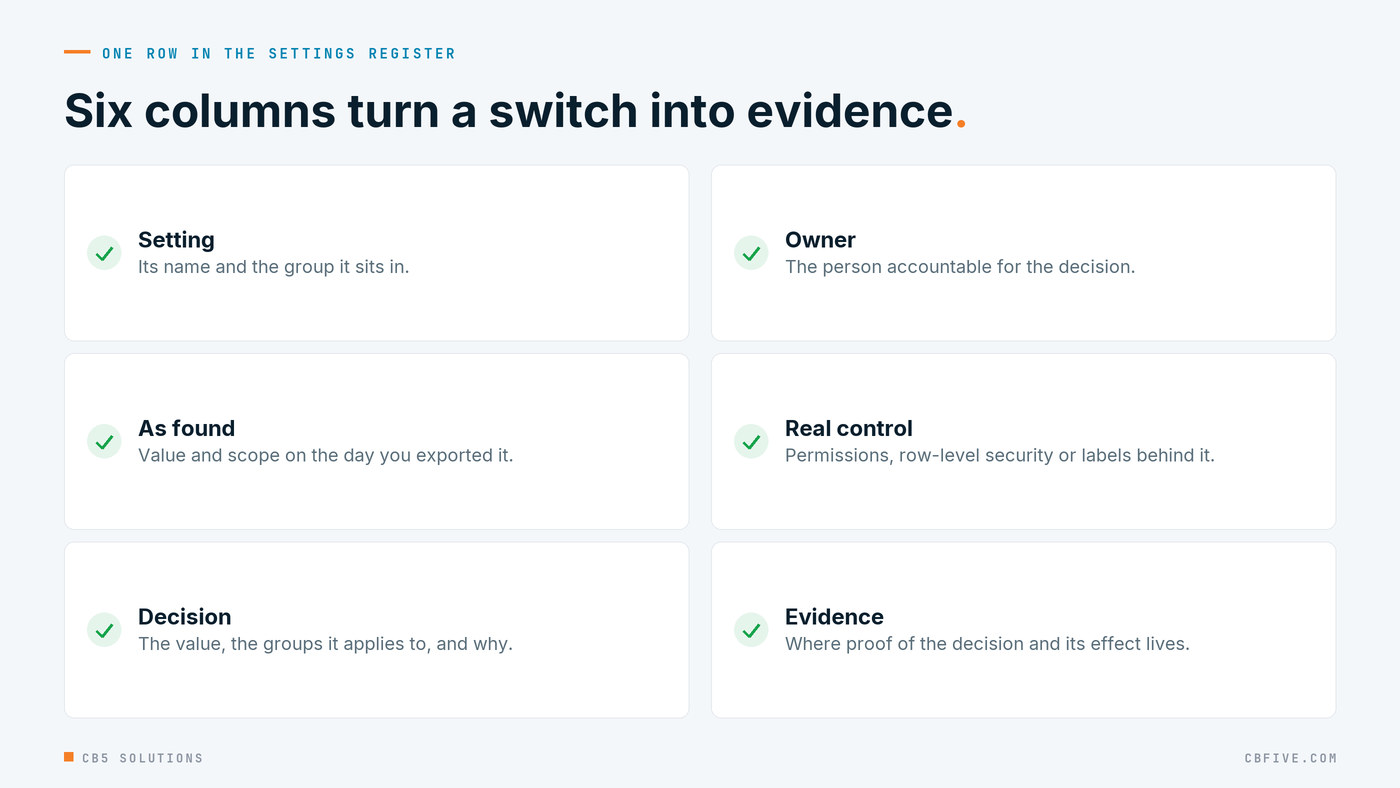
The “as found” column matters more than it looks. Capture it before you change anything, using the admin portal or the Fabric admin API’s List Tenant Settings call, which returns every setting with its state and the security groups it applies to. It’s your record of where you started, and it shows the examiner that every change from there was deliberate.
Four questions decide most of the entries
You don’t need to argue every setting from scratch. Group them by the question an examiner would ask, and decide each group with security, compliance, the BI team and the business owner of the reports in the same meeting.
Who can create? “Users can create Fabric items” and “Create workspaces” decide whether the platform team knows what exists. The Fabric items setting can also be overridden by capacity admins, so the register should record any capacity-level overrides too.
How can data leave? Publish to web, which makes a report public with no sign-in; export to Excel and .csv; report downloads; shareable links that grant access to everyone in the organization; external data sharing from OneLake; and accepting shares from other tenants. Microsoft’s implementation guidance generally recommends keeping export available to most users so you don’t block productivity, and Fabric applies the report’s sensitivity label to exported Excel files. So the right entry is often “enabled, for these groups, because…” rather than “off”. What matters is that someone decided it and wrote down why.
Who from outside can get in? “Guest users can access Microsoft Fabric” and “Users can invite guest users to collaborate through item sharing and permissions” are separate switches with separate decisions.
What is switched on before anyone asked? Some settings are on by default. “Share Fabric data with your Microsoft 365 services” is turned on automatically when your Fabric and Microsoft 365 tenants are in the same region. AI features deserve their own rows. Microsoft notes that when a Fabric data agent is used from Copilot Studio, Microsoft Foundry, Microsoft 365 Copilot or as an MCP server, its responses may leave Fabric’s compliance boundary or region. The Power BI MCP server endpoint, still in preview, respects the user’s permissions and row-level security, but it’s a new route out of the report experience that none of your export decisions were written for. Each of these is a legitimate feature. Each needs an owner’s name next to it.
Switch on the settings that produce the evidence
Half of governance is proving it. A handful of settings decide whether you can:
- Usage metrics for content creators, with per-user data where your privacy policy allows it, so report owners can see who uses what.
- Azure Log Analytics connections for workspace administrators, so workspace activity lands somewhere the security team can query and keep.
- Workspace retention. Deleted collaborative workspaces are kept for seven days by default, adjustable up to 90. Item recovery is on by default at three days, also adjustable up to 90. Set both from your records policy, not from the default.
- A custom message before publishing reports, pointing to your standards. It’s a small thing, and it’s the one governance control most report authors will actually read.
Then sequence information protection behind your Purview label taxonomy: agree the labels first, pilot with the creator group, and only then turn on inheritance, downstream propagation and the restriction on sharing protected content with the whole organization. Record each of those as its own register decision, with its own date.
Keep the register true
A register written once and filed is out of date by the next audit. The tenant settings page flags new and changed settings at the top when Microsoft adds them, and the List Tenant Settings API lets you compare what’s live against what the register says. Put that comparison on a quarterly calendar with a named owner. Treat a new setting that arrived switched on the way you’d treat a firewall rule that appeared by itself: it gets a decision and a row.
Getting started
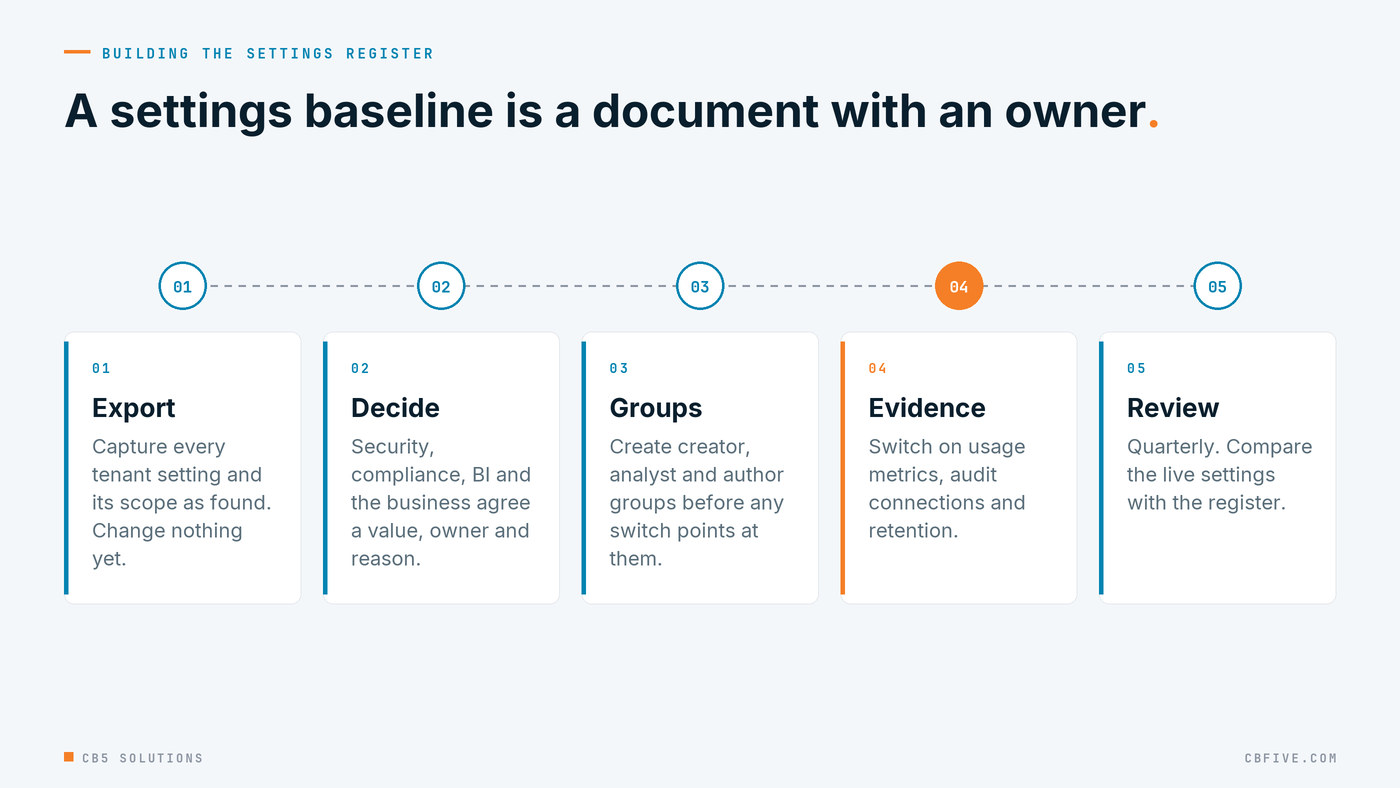
If Fabric capacity is already live in your tenant, this is the order we recommend:
- Export the settings as found. Capture every setting, its state and its scope before changing anything.
- Decide the four questions first. Who can create, how data leaves, who gets in from outside, and what was on before anyone asked. The business owner of the first reports belongs in that meeting.
- Create the security groups before flipping switches. Workspace creators, Fabric item creators, analysts with export rights, report authors with download rights.
- Pair every setting with its real control. If no permission, label or row-level rule backs the decision, the register should say so.
- Switch on the evidence settings, and sequence labels behind your Purview taxonomy.
- Put the register on a quarterly calendar with a named owner, and file it where the examiner’s request will land.
Most of this needs decisions rather than new licences: written down, owned, and kept current.
CB5 Solutions helps organizations understand the layers of AI, get the most from what they buy, and build an AI program that pays back inside their IT standards. We start every engagement with one business problem and a governance baseline. Let’s pick yours.