
The accounts payable team doesn’t know what Windows Server 2016 is. They know the invoice-matching application that turns supplier bills into payments, the nightly job that posts to the ledger, and the one report the controller asks for at every month-end close. If any of those stop, they find out before IT does.
Somewhere underneath that application is a server that reaches end of support on January 12, 2027. After that date it gets no more security updates unless someone has made a decision about it. In most organizations we talk to, the IT team has a list of these servers. What the list usually lacks is a name in the “owner” column that belongs to the person who would notice if the application went away. That gap, not the operating system, is what makes end of support hard.
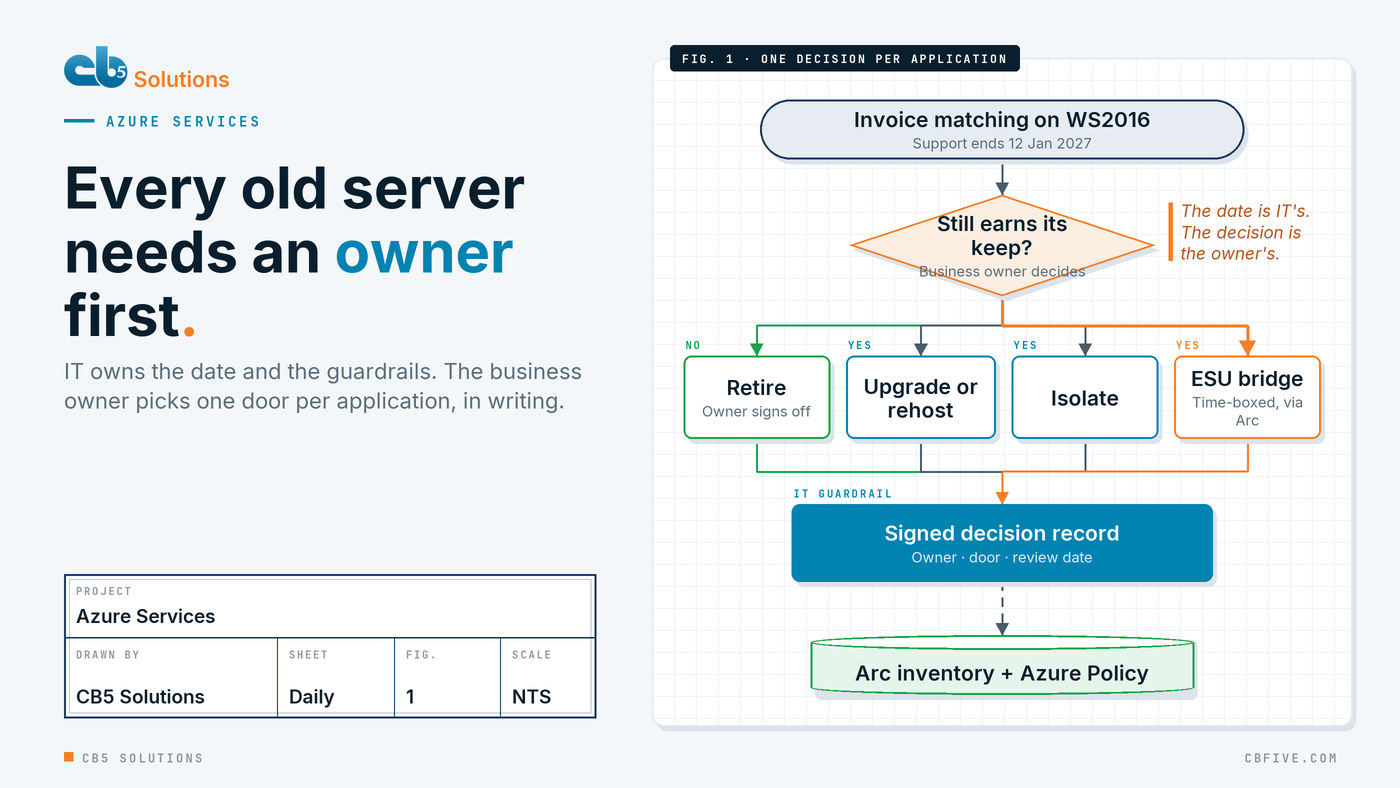
The date belongs to IT. The decision belongs to the business.
End of support arrives as an IT problem because IT sees the operating system. But the choice of what to do about each server is a business choice in disguise. Should this application keep running at all? Is it worth upgrading, or is the business already planning to replace it? Can the team live with it being isolated from the rest of the network for a year?
Those are questions about the work, not the server. The person who can answer them is the owner of the process the application supports: the AP manager, the plant scheduler, the head of claims. When IT makes those calls alone, it makes them with the least information in the room. Usually that means the default: buy extra time for everything and decide later.
The pattern we recommend flips that. IT owns the date, the inventory and the guardrails. The business owner makes one decision per application, in writing, and IT carries it out inside its standards. That’s the same split CB5 argues for in AI programs, and it works for a server estate for the same reason: the people who do the work know what it’s worth.
Five doors for every server
Every Windows Server 2016 workload goes through one of five doors. None is right for everything, and the point of the exercise is that each application gets the door that fits it, not the one that was easiest to buy in bulk.
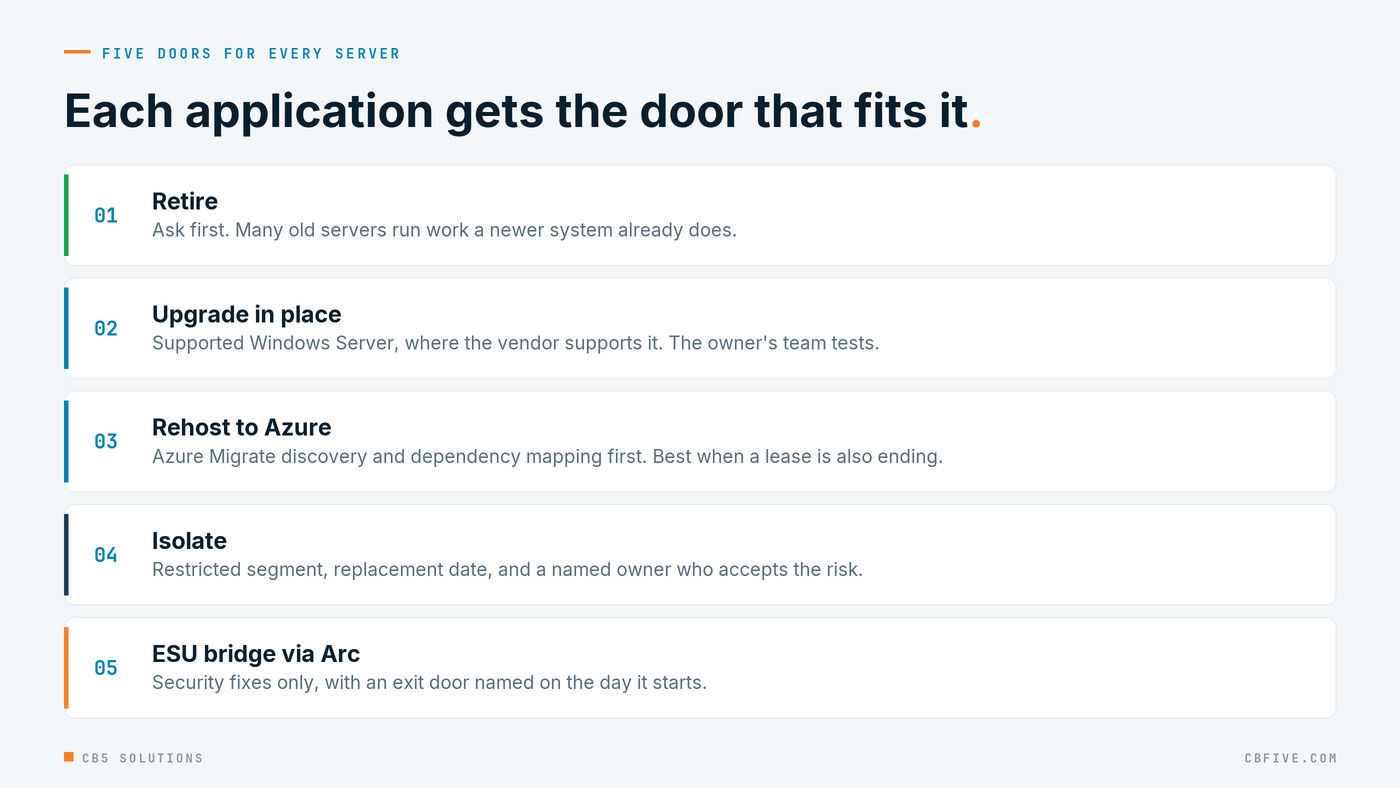
- Retire. The best outcome and the most overlooked. Ask the owner whether the application still earns its keep. A surprising share of old servers run something that a newer system already does, or that nobody has opened in a year.
- Upgrade in place. Move the operating system to a supported Windows Server version where the application vendor supports it. Cheap on paper; the risk is in the application, so the owner’s team tests it, not IT.
- Rehost to Azure. Lift the workload into Azure, with Azure Migrate doing the discovery and dependency analysis first. This makes most sense when a hardware refresh or a datacenter lease is also on the table, so one move answers two dates.
- Isolate. Put the server on a restricted segment, cut its paths to the internet and to sensitive data, and set a date for its replacement. This is a risk decision, so it needs a named owner who accepts the risk, not just a firewall change.
- Bridge with Extended Security Updates. Keep it patched for critical and important security fixes while something better is built. This is the door everyone reaches for first. It should be the one with the strictest conditions attached.
Extended Security Updates are a bridge with a toll
Microsoft’s Extended Security Updates (ESUs) for Windows Server 2016 are delivered through Azure Arc for servers that aren’t hosted in Azure. They’re useful, and for some applications they’re the right answer. But it helps to know what they are before treating them as the plan.
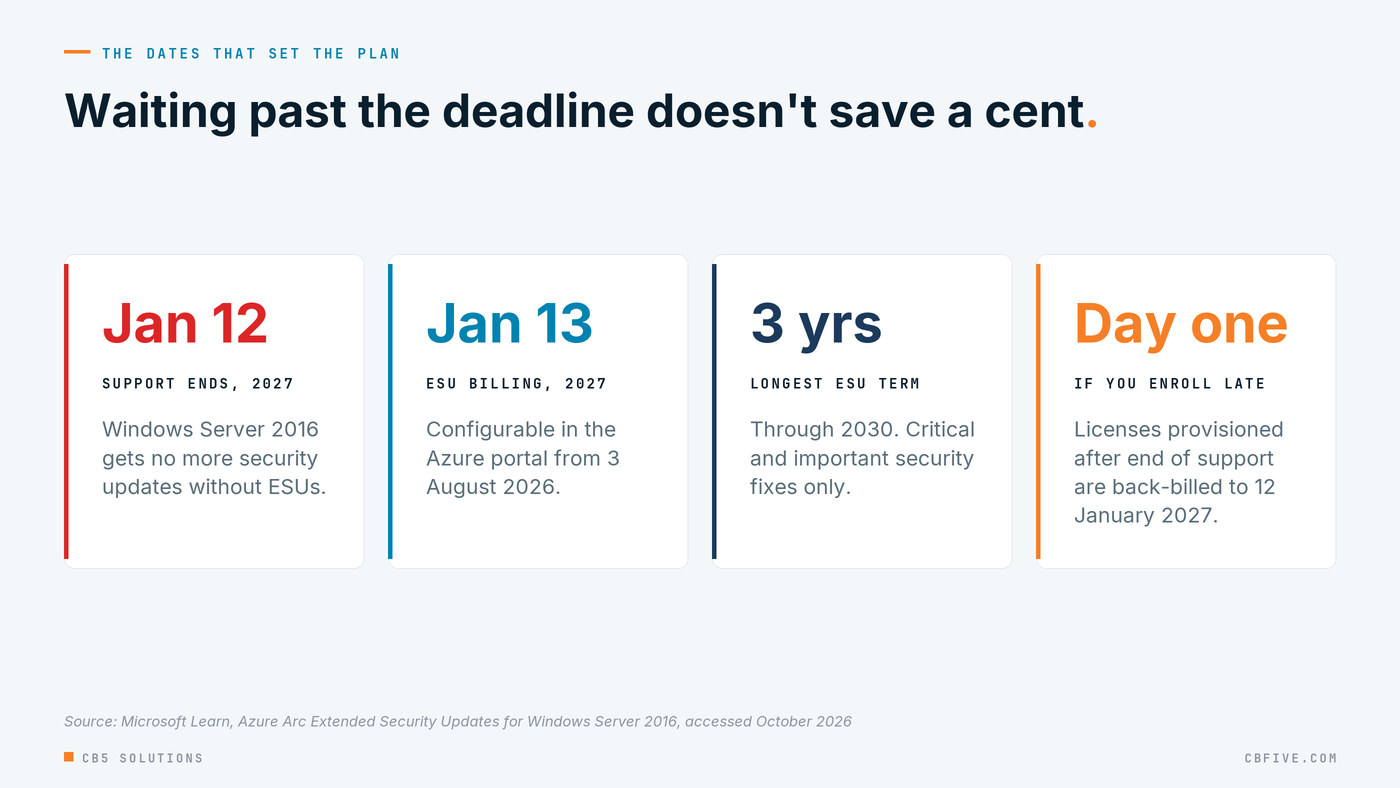
According to Microsoft Learn (Azure Arc ESU documentation, accessed October 2026), ESUs for Windows Server 2016 provide critical and important security updates for up to three years, through 2030. They don’t include new features or non-security fixes. You can configure them in the Azure portal from August 3, 2026, and billing begins on January 13, 2027. They’re pay-as-you-go monthly, billed through Azure, and enrollment happens through the Arc Connected Machine agent rather than product keys on each server.
Two details change how a finance team should think about them:
- Waiting doesn’t save money. Microsoft’s documentation says licenses provisioned after the end-of-support date are back-billed to January 12, 2027. A late decision costs the same and leaves the server unpatched in the meantime.
- The bridge has an end. Windows Server 2012 is the precedent. Its ESU period ended on October 13, 2026, and Microsoft Learn states that update was the final one. Anything still running 2012 today is unpatched. Three years sounds like a long time until you look at how many organizations are crossing that bridge right now with nowhere to land.
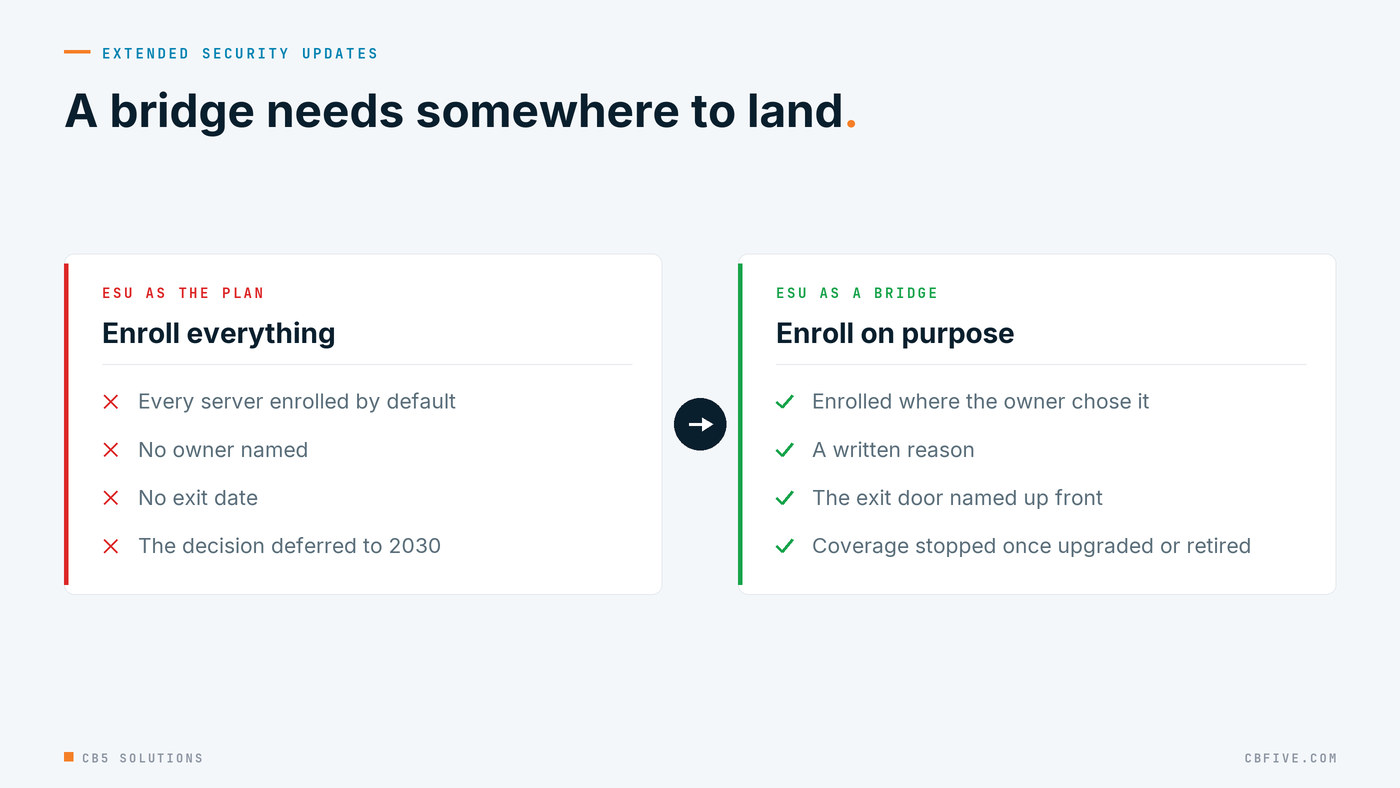
So treat ESUs as a bridge with an exit date written on it. Every server on the bridge should have an owner, a reason, and the door it will go through when the bridge ends.
You can’t decide about servers you can’t see
Every end-of-support program starts with an inventory, and every inventory is wrong at first. CB5’s own planning assumptions for this kind of work allow for a meaningful share of very old servers that discovery tools simply won’t find. The ones nobody can find tend to be the ones nobody owns.
Two pieces of Microsoft tooling do most of the seeing:
- Azure Migrate discovers servers and maps their dependencies, so you learn that the invoice-matching server also feeds the warehouse system before you move it, not after.
- Azure Arc puts on-premises servers into the Azure portal alongside everything else. That gives IT one view of which servers are covered by ESUs and which aren’t, which is exactly the evidence an auditor will ask for.
The inventory then needs one column the tools can’t fill: the business owner. Run short workshops with the people who run each process, show them the servers their work depends on, and ask them to claim them. Anything left unclaimed at the end is a candidate for retirement, and the owner of the risk becomes whoever signs off on keeping it.
IT’s guardrails make the decisions hold
Letting the business choose doesn’t mean letting it choose anything. IT sets the rails each decision has to run on:
- One decision record per application. Which door, why, who decided, and the date it will be reviewed. This is the Azure version of the architecture decision log CB5 uses in every infrastructure engagement, and it’s the document that turns a server list into something you can defend.
- Owner tags and Azure Policy. Once servers are visible through Arc, tag each one with its owner and its chosen door, and use Azure Policy to flag any server with no owner or no decision. The guardrail is the report that shows the gaps, reviewed on a fixed schedule.
- Licensing checked early. ESUs through Arc depend on the right licensing being in place, and Azure Hybrid Benefit depends on Software Assurance. Find this out at the start, not when the invoice arrives.
- Rehosts go in waves the pilot proves. If workloads move to Azure, start with low-risk servers, measure them end to end, and let the application owner sign off each wave before the next one starts. The pace comes from the pilot, never from a promised rate.
Getting started
You don’t need a migration program to begin. You need a list, an owner per line and one decision per owner.

- Pull every server running Windows Server 2016 or older, and flag any 2012 server still in production as urgent: it’s already past its last update.
- Connect them to Azure Arc so ESU coverage and gaps show up in one place.
- Run discovery and dependency mapping before anyone picks a door.
- Put a business owner’s name against every application, and ask the retire question first.
- Write one decision record per application, with a review date, and let Azure Policy show you who is still missing.
Do that, and January 12 becomes a date on a plan rather than the day a forgotten server stopped getting patched.
CB5 Solutions helps organizations understand the layers of AI, get the most from what they buy, and build an AI program that pays back inside their IT standards. We start every engagement with one business problem and a governance baseline. Let’s pick yours.