
Sooner or later, someone asks what changed. It might be legal, after a hold looks different from last week. It might be an auditor, reviewing a control that runs every night. It might be the client, who has watched you ship a fix every day for a week. The question is simple, and the honest answer for most low-code automation is “let me go and look”.
If you’re joining here, the first post describes the system. Membership of one Entra group drives Purview legal holds through two scheduled Power Automate flows, Add and Remove, calling the Microsoft Graph eDiscovery (Premium) API. Every result is written back to a SharePoint list that doubles as the audit trail.
The last seven posts were about what the platform did that we didn’t expect. This one is about how we changed the flows while all of that was happening, and why the method mattered as much as the fixes.
The symptom: a live control, changing every day
The Add flow went through ten production versions, 1.0.4.12 to 1.0.4.21, in about five days. Each one fixed something we had watched happen in a real run: a 409 from Purview’s own retries, a hold changed before it deployed, a list that stopped at page one, a nesting limit, a self-referencing variable. The Remove flow had its own run of versions alongside.
Not every version was right. In post 3’s story, v1.0.4.16 skipped source attachment on new holds until the next day’s run, and v1.0.4.17 wrapped it in a retry loop of up to 15 attempts. Neither fixed the problem. The root cause turned up in v1.0.4.19. Wrong turns are normal when you’re fixing a production system from its run logs. What matters is whether you can still say, afterwards, exactly which version did what.
That’s a lot of change to a compliance control in one week. And post 7 showed what a single bad change can do. In v1.0.4.21 a failed import deactivated and replaced the previous definition, so the flow that puts people on hold every night was off.
The risk wasn’t any one fix. It was the number of changes to a live control in a short time, each one a chance to break something that already worked.
What we treated as the default
The obvious way to change a Power Automate flow is to open it in the designer, change it and save. That’s how the tool presents itself, and for a single small change it’s fine.
Over ten changes in five days, it stops being fine. The flow in the environment becomes the only copy of the truth. It shows you its current state. It doesn’t tell you, in a form you can hand to someone, which change came in which version, why it was made, or whether the package you imported is the one you tested.
A flow edited by hand has a current state, but not a record you can prove. For most automation that’s an inconvenience. For a legal-hold control, it’s a gap in the evidence.
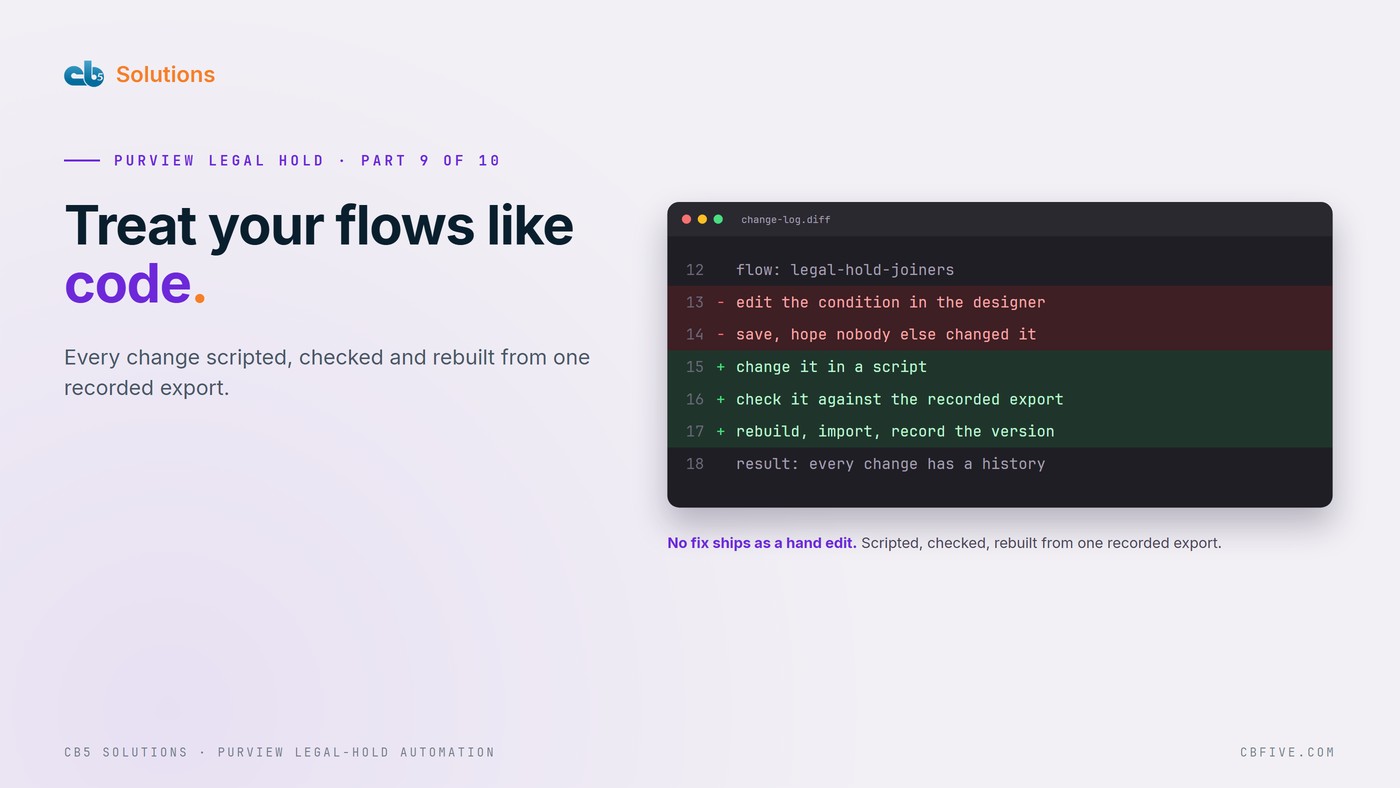
So we set a rule: never hand-edit in the designer to ship a fix.
What a flow actually is
Export a solution and open the zip, and the flow is a JSON document. Actions, their inputs, the runAfter links between them, nested scopes, expressions. Everything you see in the designer is a view of that document.
A Power Automate flow is a JSON program, and it can be treated like one. Once you see it that way, the usual disciplines of software change control apply: a known starting point, scripted changes, checks before release, and a build anyone can reproduce.
The fix, part one: one script per version
We exported the production solution once and snapshotted the workflow JSON into a source/ folder, recording its MD5. For the base export that hash starts 5f61…. From then on, nothing started from the live flow. Every build started from that file.
Each version got its own script, from _build_add_v10412/build_add_v10412.py through to v10421. Each one does the same five things:
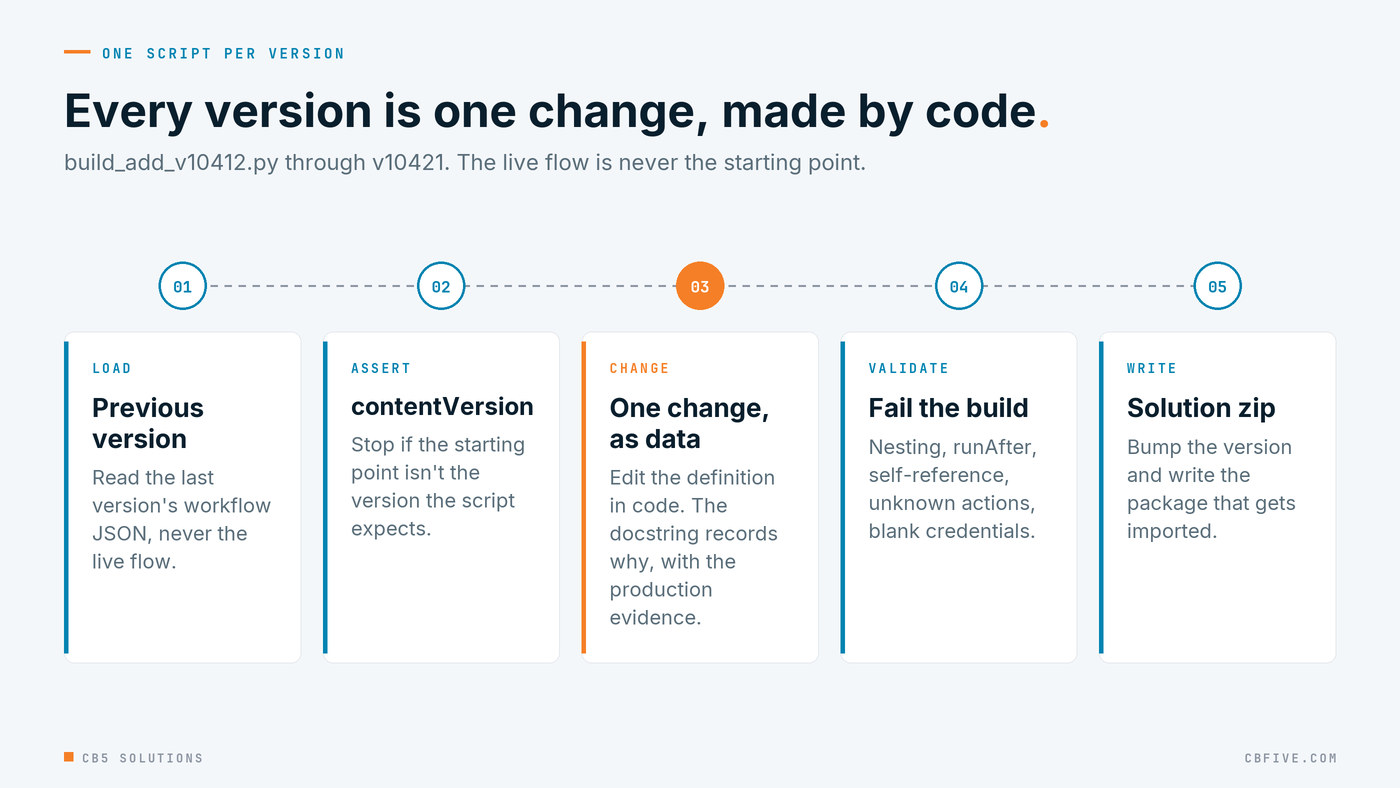
It loads the previous version’s JSON and asserts the expected contentVersion, so a script can’t run against the wrong starting point. It applies one documented change to the definition as data, bumps the version, runs the validator, and writes the solution zip.
The docstring at the top of each script explains why the change was made, including the production evidence that prompted it. That’s the part we’d keep if we kept nothing else. Six months from now, nobody will remember why the recovery branch was flattened. The script will.
Each version is one change, made by code, with its reason written next to it.
Fix the class, not the instance
Because the change is code, it can be written generically. When Power Automate refused to save v1.0.4.21 with this:
WorkflowRunActionInputsInvalidProperty: The inputs of workflow run action
'Set_varSourceAttachError_Site' of type 'SetVariable' are not valid. Self
reference is not supported when updating the value of variable
'varSourceAttachError'.
the fix wasn’t to repair the one action the error named. It was to find every Set variable in the definition that reads its own variable, and insert a Compose that snapshots the value first. There were two. A simplified sketch of that kind of rewrite, walking every scope:
def scopes(actions):
    """Yield every actions dict in the definition, including nested ones."""
    yield actions
    for a in actions.values():
        for child in (a.get("actions"),
                      a.get("else", {}).get("actions"),
                      a.get("default", {}).get("actions"),
                      *[c.get("actions") for c in a.get("cases", {}).values()]):
            if child:
                yield from scopes(child)

def fix_self_referencing_setvariable(definition):
    fixed = 0
    for actions in list(scopes(definition["actions"])):
        for name, a in list(actions.items()):
            if a.get("type") != "SetVariable":
                continue
            var = a["inputs"]["name"]
            ref = f"variables('{var}')"
            if ref not in str(a["inputs"]["value"]):
                continue
            snap = f"Snapshot_{name}"
            actions[snap] = {"type": "Compose",
                             "inputs": f"@{ref}",
                             "runAfter": a.get("runAfter", {})}
            a["runAfter"] = {snap: ["Succeeded"]}
            a["inputs"]["value"] = str(a["inputs"]["value"]).replace(
                ref, f"outputs('{snap}')")
            fixed += 1
    return fixed
Then the validator from post 7 makes the bug class impossible to ship again. It walks the action tree and fails the build on duplicate action names, runAfter pointing anywhere but a sibling, more than one root action in a scope, nesting deeper than 8, a self-referencing SetVariable, a reference to an unknown action, or credentials left in the shipped package. On the final Add flow it reports:
validation: 245 actions, deepest nesting 7 (limit 8), 0 errors
A generic fix plus a failing check turns one bug into a class of bug that can’t come back.
The fix, part two: prove the rebuild
Ten scripts in a folder are only useful if they’re run the same way every time. build_all.py does that, and it’s the piece that turns a tidy process into evidence.
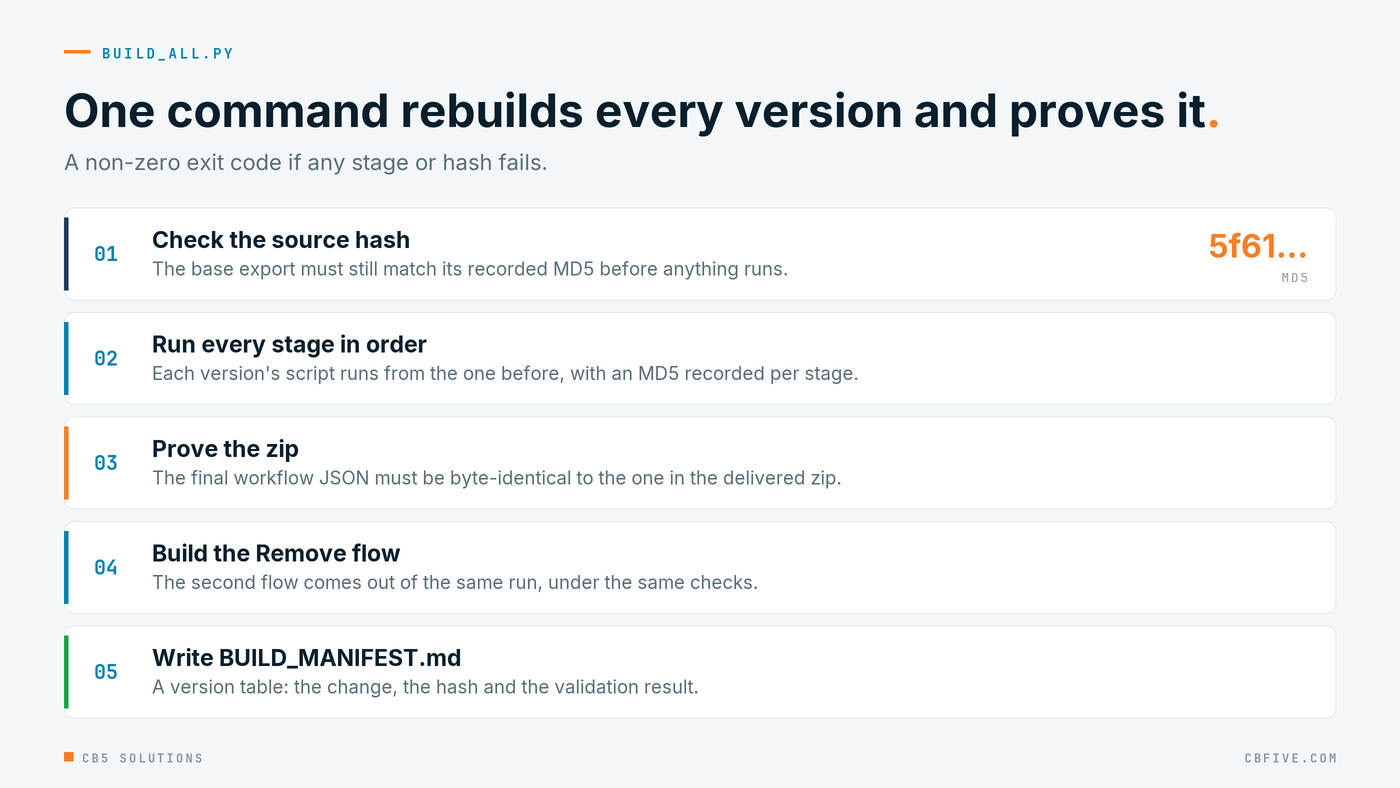
It checks the hash of the source export before it starts. It runs every stage in order and records an MD5 for each one. It proves the final workflow JSON is byte-identical to the one inside the zip we delivered. It builds the Remove flow. Then it writes BUILD_MANIFEST.md: a version table with the change, the hash and the validation result for each version. If any stage fails, or any hash doesn’t match, the exit code is non-zero.
The byte-identical check is the point. It doesn’t say “we think this is what we shipped”. It proves that the delivered package is exactly what the scripts produce from the recorded source. Anyone with the folder can rebuild it and get the same bytes.
That matters because the zip is what actually gets imported, and the scripts are what actually got reviewed. Without the check, those are two artefacts that are probably the same. With it, they’re provably the same, and the manifest records the proof next to each version. If someone asks in three months whether the flow running tonight is the one that was signed off, the answer is a hash comparison, not a recollection.
What it bought us
Ten production versions in about five days, with no regressions. An exact answer to “what changed?” for the client, version by version, with the reason and the evidence. And two catches we wouldn’t have made by looking at the flow in the portal.

The first was version drift. The Remove zip’s name and the workflow’s own contentVersion had drifted apart: the zip said 1.0.3.3 and the content said 1.0.3.4. Nothing was broken, but two records disagreed about which version was running, and that’s exactly the kind of discrepancy an audit finds. The build lined them up at 1.0.3.5.
The second was a warning rather than a bug. A build that starts from a template containing placeholders must not be imported over a production flow that already has real values in it, because the placeholders would go in over the real settings. The manifest says so in plain words, where the person doing the import will read it.
The build didn’t just ship fixes faster. It found problems that a person reading the portal would not have seen.
The rule to take away
The technical rule is the one we started with. A Power Automate flow is a JSON program: version it, change it with scripts, validate it before import, and make every build provable. Start from one recorded export. One script per version, with its reason in the docstring. A validator that fails the build. A rebuild that proves its output byte for byte, and a manifest that a person can read.
If you’re starting from a flow that has only ever lived in the designer, you don’t have to rebuild your history. Export what’s in production today, record its hash, and make that the source. Every change from then on goes through a script. None of that needs special tooling. It needs a decision that the designer is where you look at a flow, not where you ship changes to it.
The governance lesson is about what you can say afterwards. Change control you can prove means IT can tell auditors and the business exactly what changed, when, and why, and show that what’s running is what was approved. A change log someone typed up after the fact is a claim. A manifest with hashes that a rebuild reproduces is evidence.
That’s the same standard we apply when the business builds its own AI and automation. Legal set the rule here, and the business should be shaping its own tools elsewhere. IT’s part is to make sure every change to the control underneath can be traced and reproduced.
Next: running it after go-live.
The engagement behind this series was for a large enterprise client. Names, domains, hold prefixes and identifiers have been replaced throughout. Error messages, endpoints and platform behaviour are reported exactly as observed.
CB5 Solutions helps organizations understand the layers of AI, get the most from what they buy, and build an AI program that pays back inside their IT standards. We start every engagement with one business problem and a governance baseline. Let’s pick yours.