
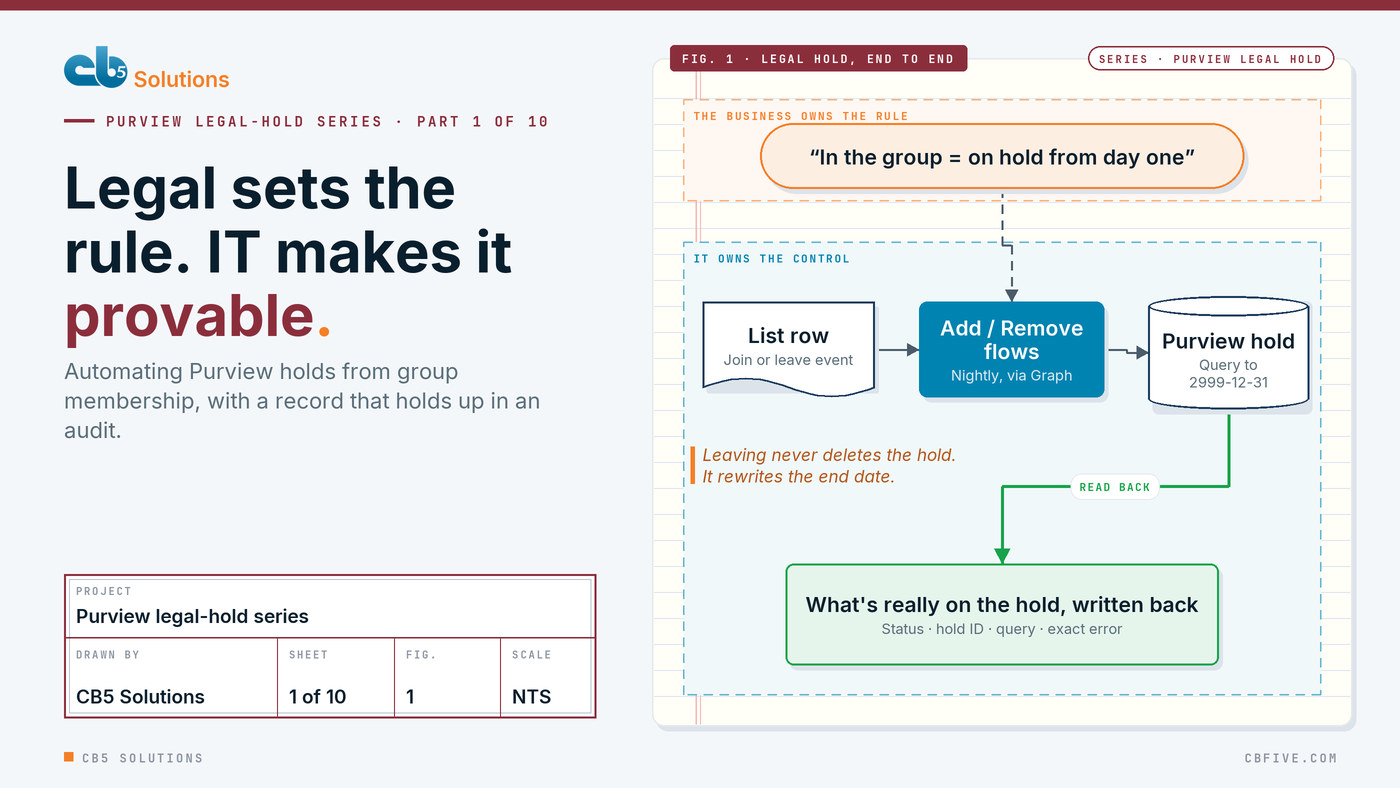
If your legal team has ever asked why a hold went on three days after someone joined the custodian group, you already know the problem this series is about.
The rule itself came from the business. Legal decided that anyone in a particular group must be preserved from the day they join, and released from new capture the day they leave. Nobody in IT wrote that rule, and nobody in IT should. What IT owns is making that rule happen accurately, every time, with a record legal can defend. That’s the half of the AI and compliance story that rarely gets written about, and it’s what this series is about.
We spend a lot of time telling organizations that the business should drive AI and IT should own the guardrails: security, compliance, governance and auditing. Our Copilot series showed the first half, with people who know the work shaping the tools around their own problems. This series is the second half. It shows what owning a guardrail looks like when it’s done properly, in production, with Microsoft Purview.
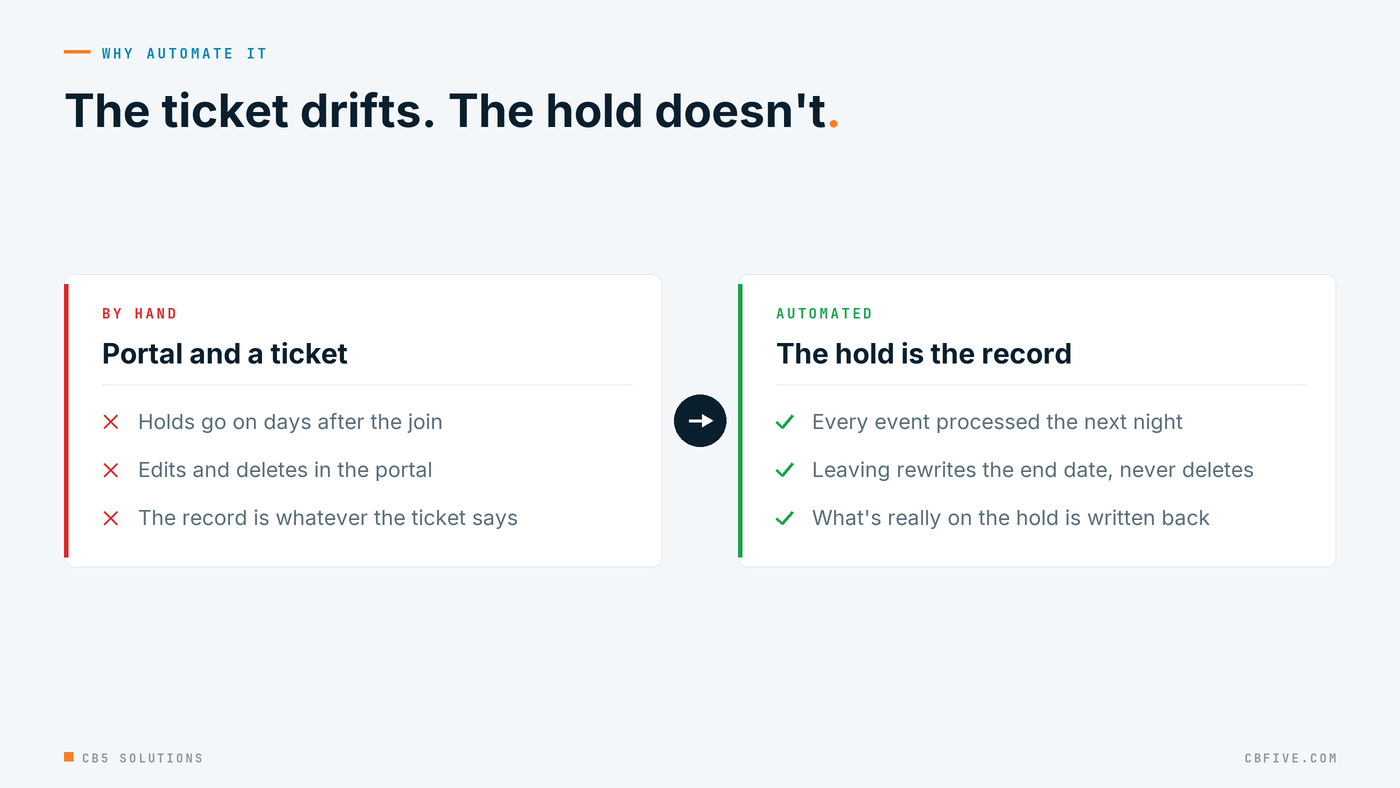
Legal hold in Purview isn’t hard to do once. The problem is that nobody needs to do it once. People join the hold population and leave it every week, and each event has to land in Purview on the right date, with a record of who did what and when. Done by hand, that’s slow, it drifts, and the audit trail is whatever someone remembered to write in a ticket.
We built this for a large enterprise client earlier this year: membership of one Entra group drives Purview holds end to end, with no one touching the portal. It went through ten production releases in about five days, each fixing something we watched happen in a real run. This post covers what it does and the three design choices that make it auditable. The nine that follow cover what the platform did that we didn’t expect.
The shape of the system
The business rule is a single sentence. If a person is in the group, their mailbox and OneDrive are under hold from the day they joined; when they leave, preservation of new content stops on the day they left, and everything from their time in scope stays preserved.
Three parts turn that sentence into a system.
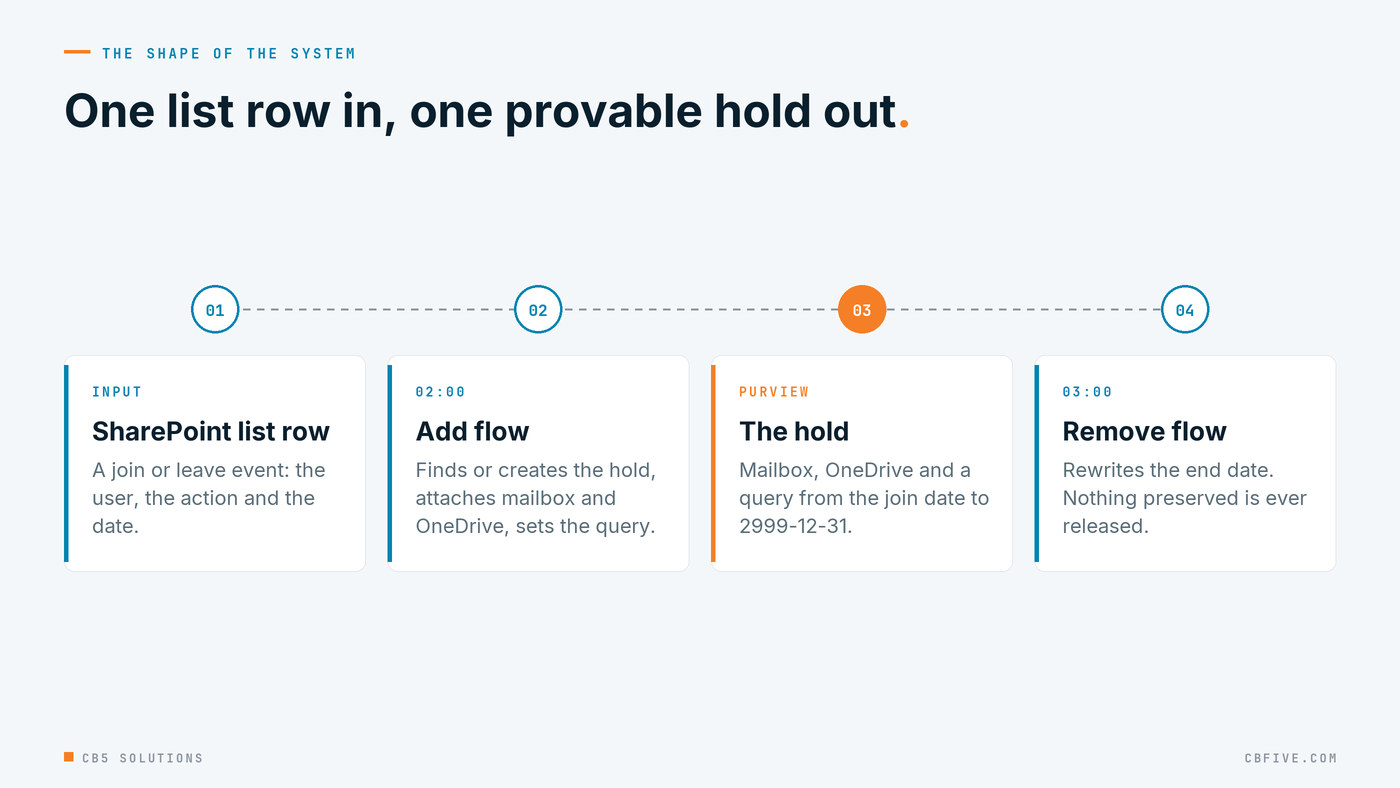
The input is a SharePoint list. Each row is one membership event: the user’s UPN, an action (Added to Group or Removed from Group) and the date it happened. The flows write their results back to the same row, so the list is the queue and the audit trail at the same time. That turns out to matter more than anything else in the design.
Two Power Automate cloud flows do the work, packaged as solutions and run on a daily schedule. Add runs at 02:00 and Remove at 03:00. The order isn’t cosmetic. A hold has to exist before anything tries to close it, and a join and a leave for the same person on the same day have to land in that sequence.
Microsoft Graph’s eDiscovery (Premium) API does the Purview side. This is where knowing the layers matters. Purview offers standard and Premium eDiscovery, a portal, PowerShell and a Graph API, and they don’t all do the same things. Only the Premium API could do what this design needed from a scheduled, unattended flow. The flows call it with HTTP actions under app-only authentication: client credentials, scope=https://graph.microsoft.com/.default. The app registration carries application permissions for eDiscovery.ReadWrite.All, eDiscovery.Read.All, User.Read.All and Sites.FullControl.All, with admin consent. It also has to be added as a member of the eDiscovery case itself. Permissions alone aren’t enough, and that’s the first of many things you learn by watching a call fail rather than by reading the documentation.
Every endpoint lives under one case path, /v1.0/security/cases/ediscoveryCases/{caseId}:
- GET /legalHolds?$top=999 to list holds
- POST /legalHolds to create one
- GET /legalHolds/{holdId} to read one, which is the only place the content query is actually populated
- PATCH /legalHolds/{holdId} to set or replace the query
- POST /legalHolds/{holdId}/userSources to attach the mailbox
- POST /legalHolds/{holdId}/siteSources to attach the OneDrive site
- GET /custodians?$top=999 and POST /custodians to make sure the person exists as a custodian when a new hold is created
Design choice one: two cases
Holds live in eDiscovery cases, and a case is also the unit of capacity, access and lifecycle. We used two. Case A holds older and closed holds. Case B holds active ones. Every new hold goes into Case B. Before creating anything, the Add flow searches both cases for an existing hold on that person.
The reason is operational. Legal wants to open one case and see who is currently preserved, capacity planning wants a case that isn’t accumulating closed holds forever, and a two-case split keeps any repair to the active set. With one case, the design still works: put the same ID in both slots.
Design choice two: one hold per person, named predictably
Each person gets exactly one hold, named with a prefix and their UPN with the @ swapped for an underscore: LH-Bot-jane.doe_contoso.com, described as CSV sync for jane.doe@contoso.com. The hold holds two sources, the mailbox and the OneDrive site.
A predictable name is what lets the flows find a hold again without storing anything outside Purview. It’s also, as post 2 covers, where we found out that hold names are unique across the entire tenant and not per case, which isn’t what the portal leads you to believe.
Design choice three: an open-ended date range, closed by rewriting the query
This is the idea the whole system rests on. Each hold’s content query covers a date range from the join date to the end of time, and leaving the group doesn’t remove the hold. It rewrites the end date.
The query on a newly created hold looks like this:
(kind:email AND ((Received>=2026-03-02 AND Received<=2999-12-31)
              OR (Sent>=2026-03-02 AND Sent<=2999-12-31)))
OR
(NOT kind:email AND ((Created>=2026-03-02 AND Created<=2999-12-31)
                  OR (LastModifiedTime>=2026-03-02 AND LastModifiedTime<=2999-12-31)))
Email is matched on received or sent date. Everything else, which in practice means OneDrive content, is matched on created or last-modified date. The far end of each range is 2999-12-31.
When the person leaves the group, the Remove flow finds their hold by matching their mailbox in the hold’s user sources, and replaces every <=2999-12-31 with <= the leave date. The hold stays. Nothing already preserved is released. New content after the leave date simply stops being captured.
When the person joins again later, the Add flow finds the existing hold and appends a second range with an OR. The query becomes a record of every period that person was in scope, and the row is marked Updated rather than Complete.
Three things fall out of this that we didn’t fully appreciate until production.
First, the query is the hold’s own record of when the person was in scope. It isn’t metadata in a list somewhere. It’s on the hold, readable by anyone with case access, and it travels with the hold if the list is ever lost.
Second, a hold with no query can’t be closed, because there’s no end date to rewrite. That sounds like an edge case. It turned into post 4, when an API call reported failure after six and a half minutes, had actually succeeded, and had quietly dropped the query on the way.
Third, the flows never delete anything. Every action is additive or a rewrite, which means a mistaken run can be corrected by another run. That’s the property that made ten production versions in five days survivable, and it’s a governance property as much as a technical one.
What the list records
Every row ends in one of six states (Complete, Already Exists, Updated, Already Closed Today, No Hold Found or Failed), next to the hold ID, the case, the query as it really is on the hold after the run, the query the flow intended, the processing time and the exact error when there is one. That’s the audit trail legal can be handed. Not “we think the hold went on around the third,” but “the row was processed at 02:04 on this date, created this hold in this case, with this query.”
The rule to take away
Treat the hold as the system of record and the automation as a way to write to it accurately. That sounds obvious. In practice most legal-hold automation we’ve seen does the opposite: it keeps the truth in a spreadsheet or a ticket and treats Purview as the place the result is pushed to. When those two drift, and they do, legal ends up trusting the wrong one. Putting the date range on the hold itself, and writing back what’s actually there rather than what you intended, is the difference between automation that saves time and automation that can be defended.
The same rule carries over to the AI work the business is driving everywhere else. The more departments shape their own tools, the more the compliance controls underneath them have to be exact, current and provable. Business-led innovation only lasts on top of guardrails that hold up in an audit. That’s the work this series is about.
The rest of the series
The Graph calls were the easy part. The next nine posts are about what the platform doesn’t tell you, each with a governance lesson that applies well beyond legal hold.
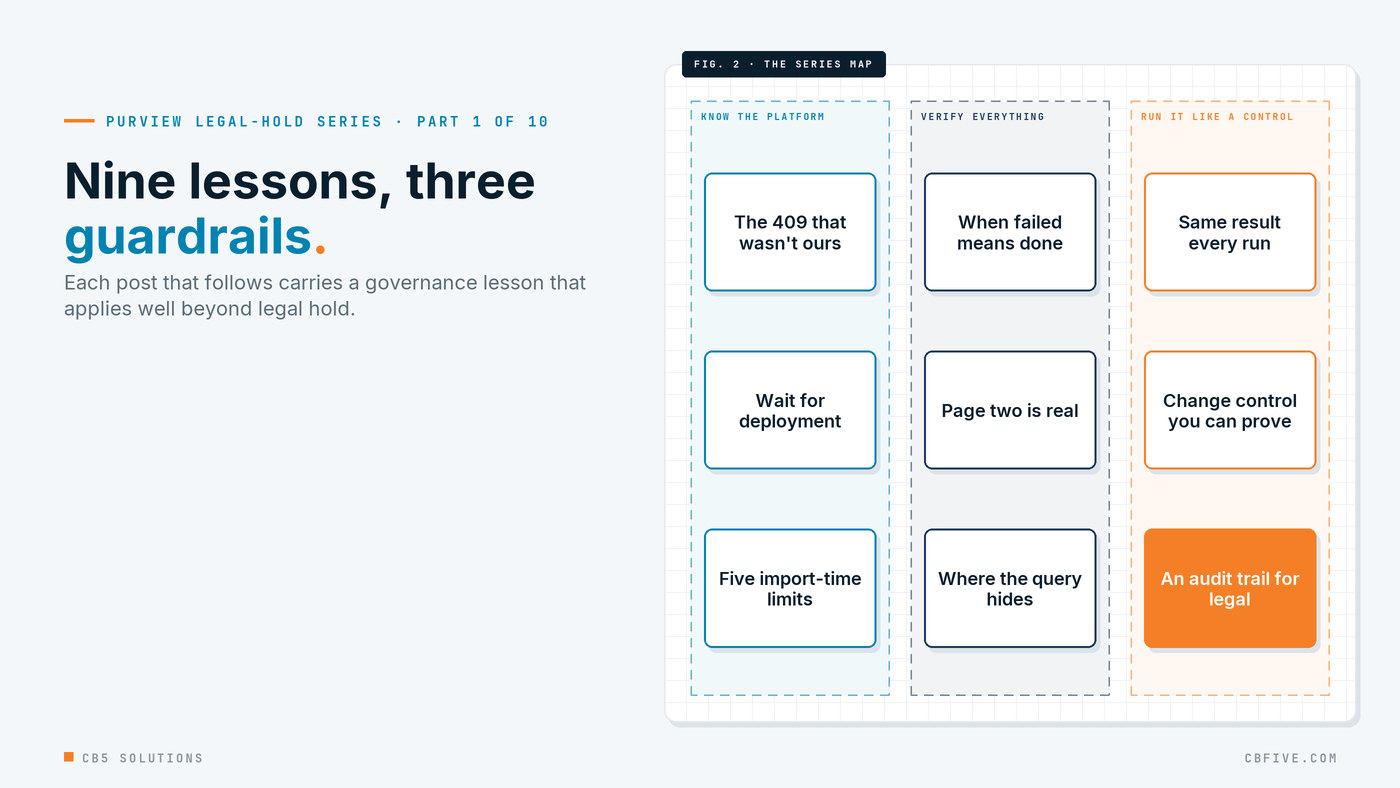
- The 409 that wasn’t our fault. Hold names are tenant-wide, and Purview retries its own create requests. Know the scope of the layer you’re working in.
- Don’t touch a hold until it deploys. Policy distribution has a lifecycle, and changing a control mid-flight breaks it.
- When “failed” means “done.” A 500 after 6m22s, a source that was added anyway, and a query that vanished. Verify state, don’t trust the response code.
- $top=999 is a request, not a promise. A guardrail that misses page two isn’t a guardrail.
- The list endpoint lies by omission. Where Purview actually keeps contentQuery, and why it matters to the audit trail.
- Five Power Automate limits that only show up at import time. Know the platform’s limits before you design.
- Idempotency in scheduled flows. A control has to behave the same way every run.
- Treat your flows like code. Change control you can prove: ten versions in five days with a provable rebuild.
- Running it after go-live. Alerts by severity, capacity, and an audit trail you can hand to legal.
Next: the 409 that wasn’t our fault.
The engagement behind this series was for a large enterprise client. Names, domains, hold prefixes and identifiers have been replaced throughout. Error messages, endpoints and platform behaviour are reported exactly as observed.
CB5 Solutions helps organizations understand the layers of AI, get the most from what they buy, and build an AI program that pays back inside their IT standards. We start every engagement with one business problem and a governance baseline. Let’s pick yours.