
In the first post we described the system: a SharePoint list of join and leave events, two scheduled Power Automate flows, and the Microsoft Graph eDiscovery (Premium) API putting people on legal hold and closing the date range when they leave. The last few posts were mostly about Purview and Graph. This one is about Power Automate itself.
The final Add flow is 245 actions, and its deepest nesting is 7 levels out of a maximum of 8. That second number isn’t an accident. We found the maximum by going past it.
Five times in this build, a flow definition that looked reasonable was rejected at import, rejected on save, or imported cleanly and then quietly did the wrong thing. Each one broke a real build. None of them was flagged while we were making the change. This post walks through all five, what we assumed, what the platform was actually enforcing, and the check that now stops each one before it ships.
The symptom: a fix that wouldn’t land
The first one arrived in the middle of the 409 work from post 2. Version 1.0.4.14 added a per-run dedupe, so the same person appearing twice in one run is only processed once. It was a small, sensible change. The package wouldn’t import.
The later ones looked different each time. A flow that imported but wouldn’t save. A Remove flow that saved and ran, but let state from one SharePoint row leak into the next. A save rejected over a variable. And rows stuck at Failed / Processing did not complete for holds that had, in fact, been closed correctly.
Each failure came from a rule the platform enforces but the build never surfaced until import, save or run time. That’s the thread through all five.

What we assumed
We assumed what most people assume about a low-code platform: if you can express it, the platform will run it. Nothing in the build told us otherwise. A ninth level of nesting, or a Set variable that reads its own value, looks like any other action until you import or save it. A runAfter aimed at the wrong place doesn’t complain at all.
That assumption cost us a production version each time, and in one case it cost more. The designer is an editor, not a validator. Most of these limits show up only at import or save time, and you meet them at the worst moment: when you’re trying to ship a fix.
Limit one: eight levels of nesting
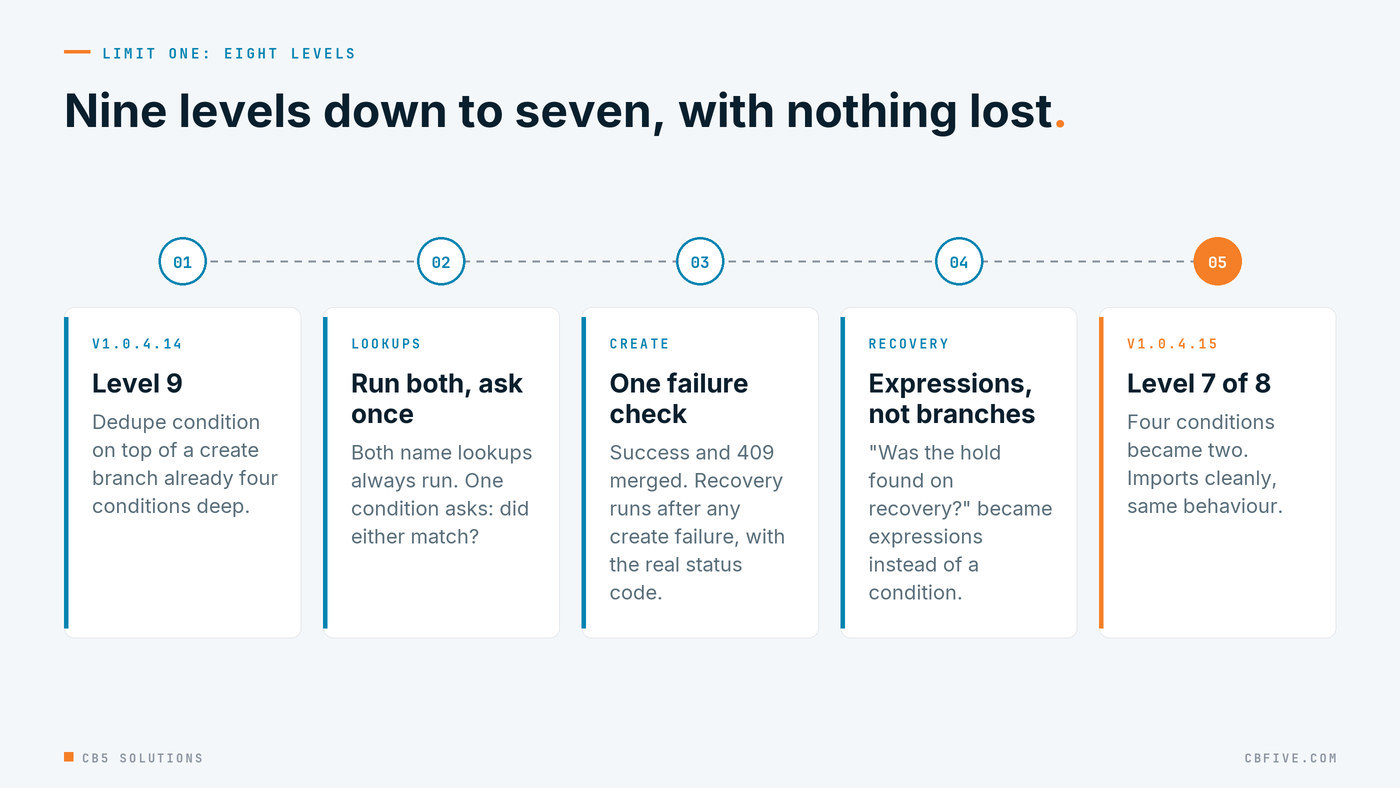
Power Automate rejects any definition nested deeper than 8 levels. Our conflict-recovery actions sat at level 9.
They got there honestly. The create branch was already four nested conditions deep, and the per-run dedupe condition in v1.0.4.14 added a level on top of it. Every one of those conditions was doing real work, and the extra level was a bug fix.
The fix in v1.0.4.15 was to flatten the logic, not delete it. The four conditions became two. Both name lookups now run unconditionally, a single condition asks “did either match?”, and an expression picks the winning case. “Did the create succeed?” and “was it a 409?” merged into one condition, so recovery runs after any create failure and the error text carries the real status code. “Was the hold found on recovery?” became expressions.
Deepest nesting went from 9 to 7 with no behaviour lost. The merge also made recovery broader, which was a quiet improvement: it now handles every create failure, not just the one we’d seen.
Limit two: Set variable can’t read its own variable
This one is the reason we take import seriously. In v1.0.4.21 the import succeeded but the flow wouldn’t save:
WorkflowRunActionInputsInvalidProperty: The inputs of workflow run action
'Set_varSourceAttachError_Site' of type 'SetVariable' are not valid. Self
reference is not supported when updating the value of variable
'varSourceAttachError'.
The pattern was ordinary: keep the existing error unless this step produced one. In most languages that’s x = newError or x. In Power Automate, a Set variable action can’t read the variable it’s setting.
The fix is to put a Compose just before it that snapshots the current value, and have the Set variable read outputs('<Compose>') instead. There were two cases, and we fixed them generically: every self-referencing Set variable in the definition, not just the one the error named.
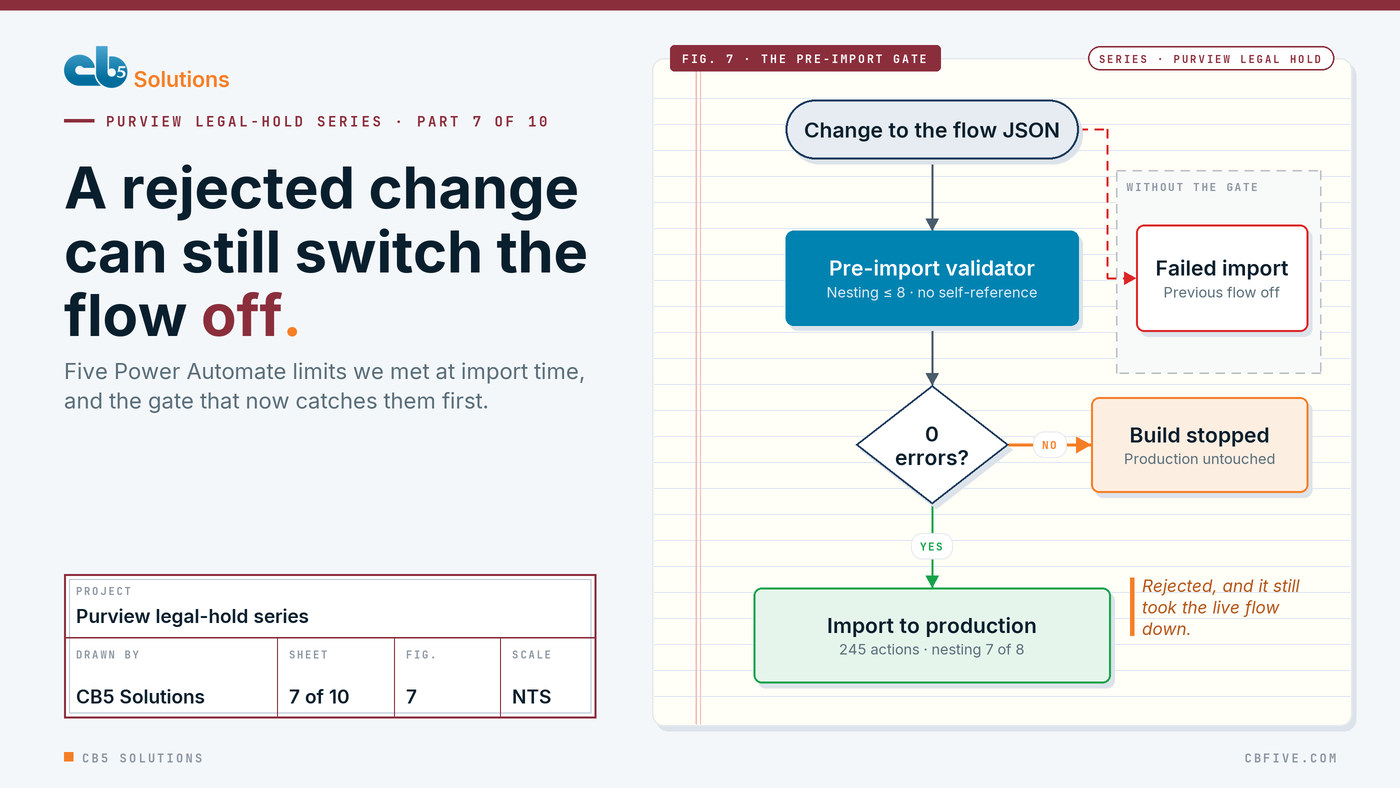
The side effect is the part to remember. The failed import had deactivated and replaced the previous definition, so the flow was off. A rejected change didn’t leave production alone. It took production down. For a control that’s supposed to run every night, a silent “off” is about the worst state there is.
Limit three: runAfter that points outside its scope
The next three came from the Remove flow.
In v1.0.3.1, a per-iteration reset chain, six Reset_var… actions meant to clear state at the start of each row, had its runAfter pointing at an action inside a nested loop. Nothing rejected it. The chain simply never ran, and state from one SharePoint row leaked into the next.
That’s worse than an import error, because there’s no error. The fix was to anchor the chain to a sibling at the start of the iteration. The rule behind it is that runAfter should only ever point at a sibling in the same scope. Post 8 covers why per-row state matters so much in a scheduled flow.
Limit four: a variable used but never declared
In v1.0.3.2, filters referenced variables('varUserUPN'), which didn’t exist. The save was rejected with InvalidVariableOperation. The fix was to add the Initialize and Set actions.
It’s the least interesting of the five, and it’s here for that reason. A definition can reference things that aren’t there, and you find out on save. It’s a simple check to automate, so leaving it to the platform is a choice.
Limit five: status logic gated on a loop’s success
In v1.0.3.3, the status decision ran after Foreach_OverCases with runAfter set to “Succeeded” only.
If one case failed (for example, a placeholder case ID returning a 4xx), the whole loop reported Failed, the status logic was skipped, and the row stayed at Failed / Processing did not complete. That happened even though the other case had matched and patched the hold. The hold was closed correctly. The audit trail said it wasn’t.
The fix was to set runAfter to Succeeded, Failed, TimedOut and Skipped, so the status logic always runs, and to decide the status from the counters (varMatchedCount, varPatchedCount). Those reflect what actually happened, not how the loop as a whole was graded.
A loop’s outcome is a summary, and a summary isn’t the record. For legal hold, the list has to say what’s really on the hold, as post 4 argued.
The small ones
A few smaller limits are worth a sidebar, because each cost us time:
- A trailing newline pasted into a config variable produced an invalid-name error (0x00, 0x0A). Apply trim() defensively to anything a person types into configuration.
- The SharePoint Action filter is case-sensitive. Removed from Group and Removed from group are different values.
- Import can fail with “ActiveUnpublished” until you open and save the existing flow, or use Publish all customizations.
The fix: validate before import
Each fix above closed one bug. The real fix was making sure none of them could come back. Every build now goes through a validator that walks the action tree before the package is allowed out. It fails the build on any of these:
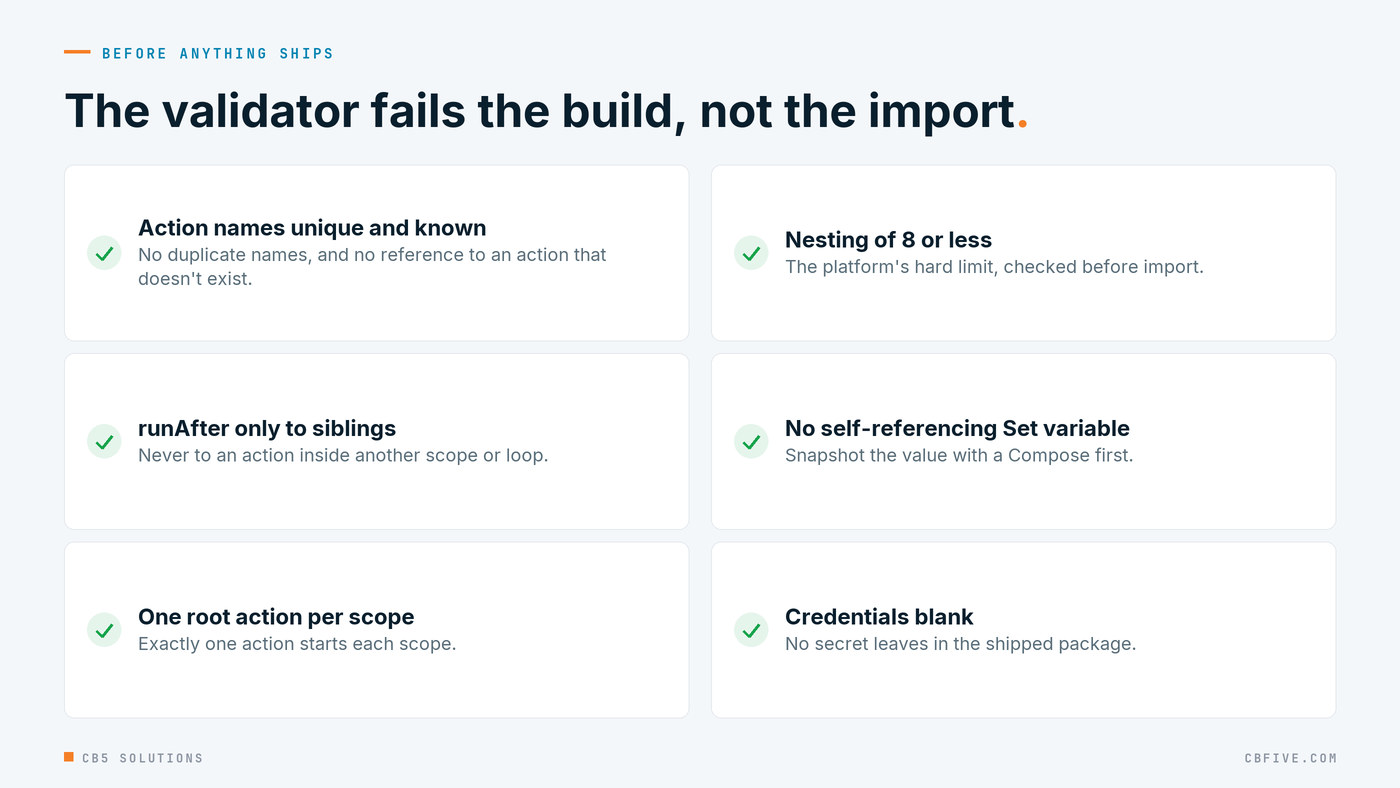
- unique action names
- runAfter only to siblings
- exactly one root action per scope
- nesting ≤ 8
- no self-referencing SetVariable
- no reference to an unknown action
- credentials blank in the shipped package
On the final Add flow its output reads:
validation: 245 actions, deepest nesting 7 (limit 8), 0 errors
The last item isn’t a platform limit, but it belongs on the same list: a shipped package should never carry a secret. Post 9 covers how the validator fits into a scripted, provable build. The point here is narrower. A fix applied generically, plus a check that fails the build, turns one bug into a class of bug that can’t ship again.
The rule to take away
The technical rule: every layer has hard limits its designer doesn’t surface, so write them down and check against them before import, not after. Nesting depth, self-reference, scope boundaries, declarations and run-after conditions are all knowable in advance. None of them should be discovered in production.
Knowing them also changes how you design. The final Add flow sits at 7 levels of a maximum 8, which means the next fix that needs a condition has one level to spend. We’d rather know that before the next production issue arrives than find out from a rejected import while a person waits to go on hold. The same goes for the pattern behind limit two: once you know Set variable can’t read itself, you reach for the Compose snapshot from the start instead of writing it twice.
The governance lesson is about what a failed change does. We’d assumed a rejected import was harmless: the old version keeps running, and you try again. It isn’t. In v1.0.4.21 a failed import switched the production flow off. A change process for a compliance control has to assume a bad change can disable the control, and stop the bad change before it gets near production. That means validation as a gate, not as a habit.
It’s the same reason we ask organizations to understand the layers of whatever platform they buy, AI included. The business should be shaping its own automation and its own AI tools, but that only lasts on guardrails that hold up in an audit. Knowing where the platform’s limits are, before anyone designs against them, is part of the layer IT owns.
Next: idempotency in scheduled flows.
The engagement behind this series was for a large enterprise client. Names, domains, hold prefixes and identifiers have been replaced throughout. Error messages, endpoints and platform behaviour are reported exactly as observed.
CB5 Solutions helps organizations understand the layers of AI, get the most from what they buy, and build an AI program that pays back inside their IT standards. We start every engagement with one business problem and a governance baseline. Let’s pick yours.