
A legal hold that exists in the portal but holds the wrong things is worse than no hold at all, because everyone assumes it’s working. This post is about how we made one of those, why our first two fixes made no difference, and the rule we now apply to every compliance control we automate.
If you’re new to the series, the first post describes the system: a SharePoint list of group join and leave events, two Power Automate flows on a nightly schedule, and the Microsoft Graph eDiscovery (Premium) API creating one Purview hold per person. Each hold carries the person’s mailbox, their OneDrive site and a content query whose date range is the record of when they were in scope.
This one is about the moment just after a hold is created, and what happens if you touch it too soon.
The symptom
On version 1.0.4.16, a newly created hold failed at the step that attaches the mailbox. That action, Add_UserSource, already had a five-minute retry policy. It used all of it and still failed, after 6 minutes 22 seconds, with an error from Exchange’s unified-policy layer:
PolicyDeploymentException: Policy '…' failed to be deployed. To fix this
issue, please retry the policy operation after some time.
The Purview portal told a slightly different story. The mailbox source was there. The OneDrive source wasn’t. There was no KQL on the hold at all, and the hold itself showed a deployment error.
So the call that “failed” had half-worked, and the hold it left behind was in a state no one would choose. It had a mailbox but no query, which means no date range, which means the Remove flow would have had nothing to close when the person eventually left the group. And it had no OneDrive at all.
The error text reads like advice: retry after some time. We took it at its word. That was the first mistake.
What we assumed
We read the exception as a timing problem. Purview was still busy with the new hold, the mailbox attach arrived too early, and the service told us to come back later. Under that reading, the fix is to come back later. We tried that twice, in two different ways.
Wrong fix one: wait until tomorrow
In the same version, 1.0.4.16, we added a guard: if the hold had been created in the last 30 minutes, skip attaching sources and let the next night’s run do it. By then the hold would surely have settled.
It’s a tidy fix, and we rejected it. The rule legal set is that a person is on hold from the day they join, with their mailbox and OneDrive, and “tomorrow, probably” isn’t that rule. A hold with no sources holds nothing. Deferring the attach by a day trades a technical error for a compliance gap, and the second one is the one legal ends up having to explain. We’re keeping it in this post because the trade-off is real and a lot of automation quietly makes it.
Wrong fix two: retry harder
Version 1.0.4.17 kept the same-day requirement and put the effort into retrying. We wrapped the mailbox attach in an Until loop. POST the user source; on a 5xx, a 429 or a timeout, wait two minutes and try again, up to 15 attempts or 45 minutes. A 409 was treated as “already attached” and ended the loop. Any other 4xx stopped it, since retrying a bad request never helps.
That’s a reasonable retry policy for a transient fault. It didn’t help at all. Every one of those retries was hitting a policy that was already broken, and no amount of waiting fixes a broken policy. We had built a careful, well-bounded way to ask the same question 15 times of a system that had already given its final answer.
What was actually happening
Version 1.0.4.19 is where we stopped reading the error message and started reading the hold. The hold’s deployment wasn’t pending. It had failed. There’s a difference, and the exception text doesn’t make it.
Purview holds are compliance policies, and compliance policies have a distribution lifecycle. When you create one, Purview distributes it to the workloads it covers, and that takes time. Changing a compliance policy while its first distribution is still pending is a known way to put it into a failed state. And that’s exactly what our flow did. It created the hold and, within seconds, POSTed the mailbox source.
Put the pieces back together and the portal state makes sense. The source change was saved. The change landed in the middle of the first distribution, and the distribution broke. The KQL, which was meant to follow, never landed. From then on, every operation against that hold ran into the same failed deployment, which is why the five-minute retry, the 45-minute Until loop and the next morning’s run would all have got the same answer.
In hindsight, the hold had been telling us this all along. It exposes a status, and the portal showed the deployment error plainly. We were reading the response to our own request instead of the state of the thing we were changing.
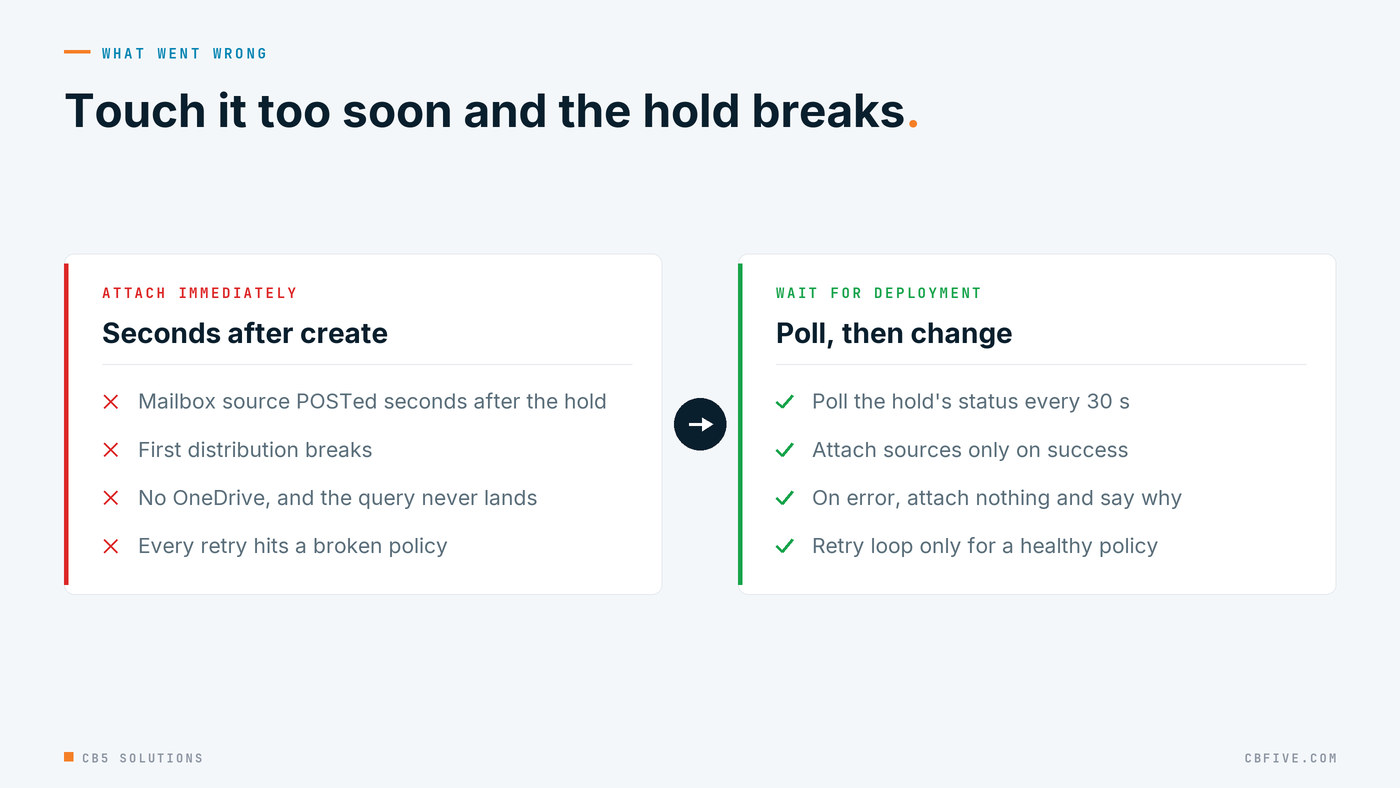
The retry advice in the exception is genuine. It just doesn’t mean “retry your operation”. It means retry the policy’s distribution, which is a different action, and one our flow had no way to take.
The fix
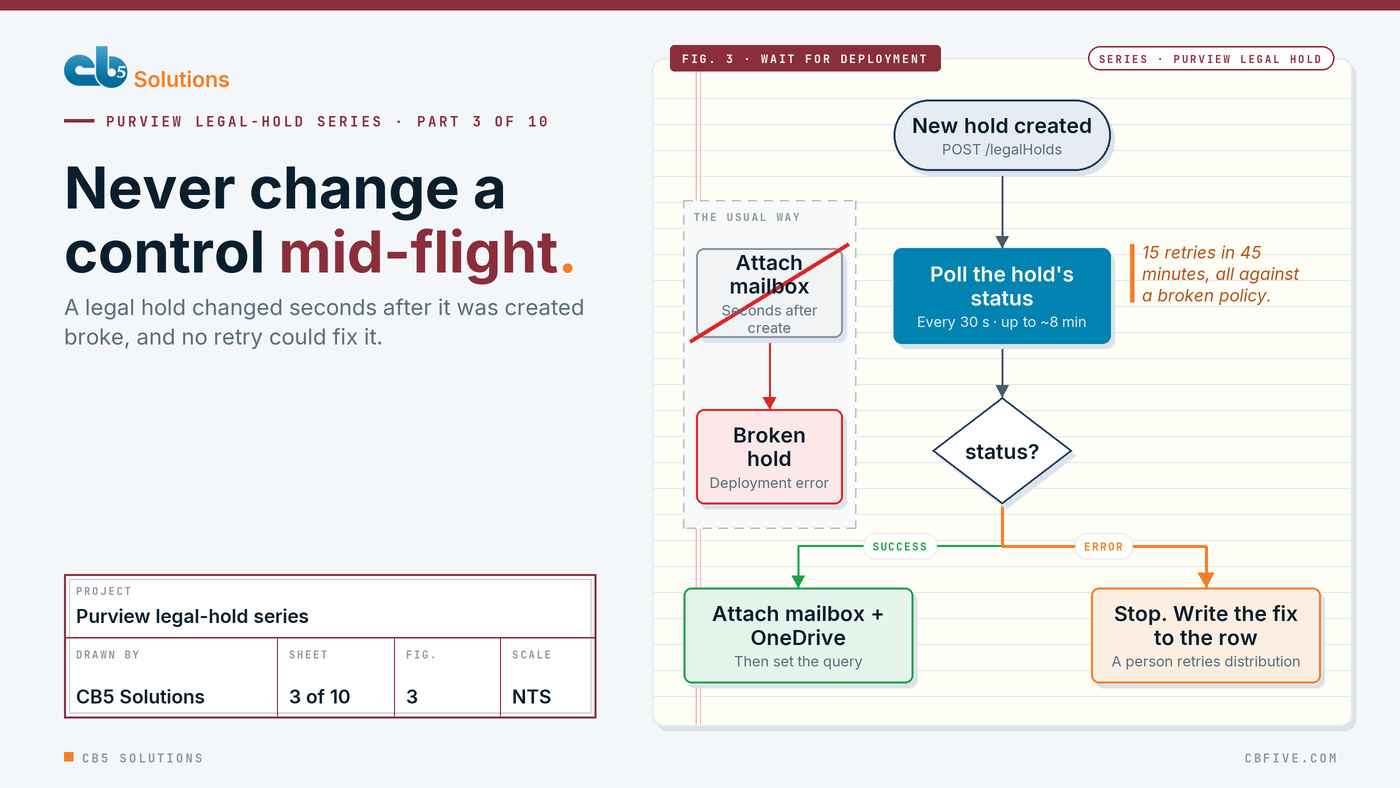
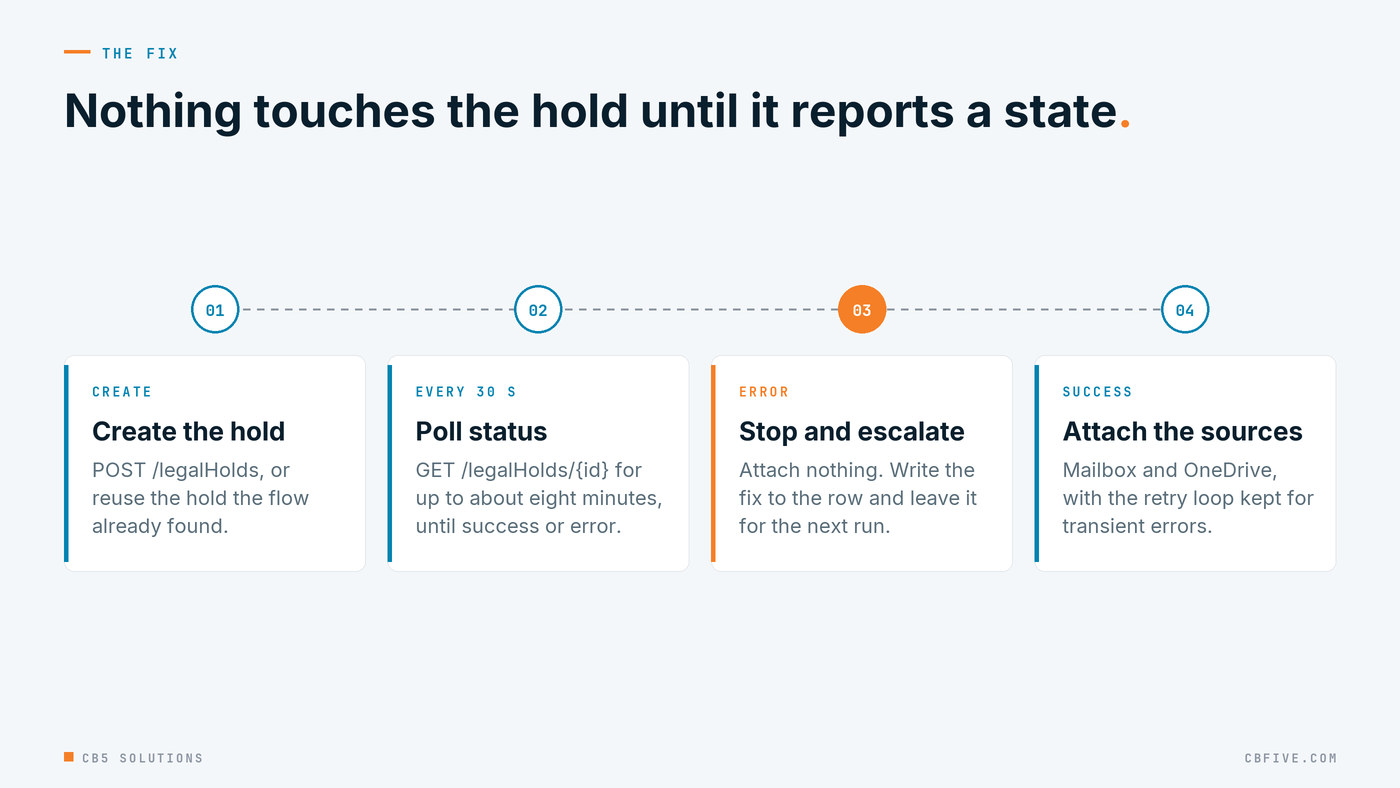
The fix is ordering, plus one honest stop. Nothing touches a hold until the hold says it has finished deploying.
- Wait first. After the flow creates a hold, or finds an existing one, it polls GET /legalHolds/{id} every 30 seconds, for up to about eight minutes, until the hold’s status reads success or error. Only then does anything else happen. We added one escape hatch: if status never gets populated at all, the flow carries on after the timeout. A missing field shouldn’t be able to block the whole run.
- Stop if it’s in error. If the hold reports error, the flow attaches nothing. It writes an explicit message to the list row that says what’s wrong and how to fix it, and it leaves the row so the next run picks it up again. It doesn’t retry, it doesn’t guess and it doesn’t mark the row done.
- Only loop when it’s healthy. We kept the Until loop from 1.0.4.17 for the mailbox attach, because transient 5xx and 429 responses are real. It now runs only when the policy isn’t in error. The retry loop is for a healthy control having a bad moment, not for a broken one.
The second step is the one that changed how the system behaves in front of legal. Before, a broken hold meant a long run that ended in a failure only after every retry had run out. Now the row says plainly that this hold is in a failed deployment and what to do about it. It stays in the queue, so it can’t be forgotten, and the run moves on to the next person instead of burning 45 minutes on a hold that was never going to accept a change. The person reading the list gets a decision to make, not a mystery to investigate.
This change also shaped the final create sequence that came out of post 2’s investigation: create the hold with no query, wait for it to deploy, attach the sources, then PATCH the query and verify it, and wait another 60 seconds after the PATCH to check that the deployment didn’t flip to error. Every change to the hold now waits for the hold to be in a known state first.
Recovering a hold that’s already broken
The new ordering stops the flow from breaking holds. It can’t repair the ones that were already broken, and we decided it shouldn’t try. Repairing a failed compliance policy is an administrative act on a legal control, and it should be a person’s decision with a person’s name on it.
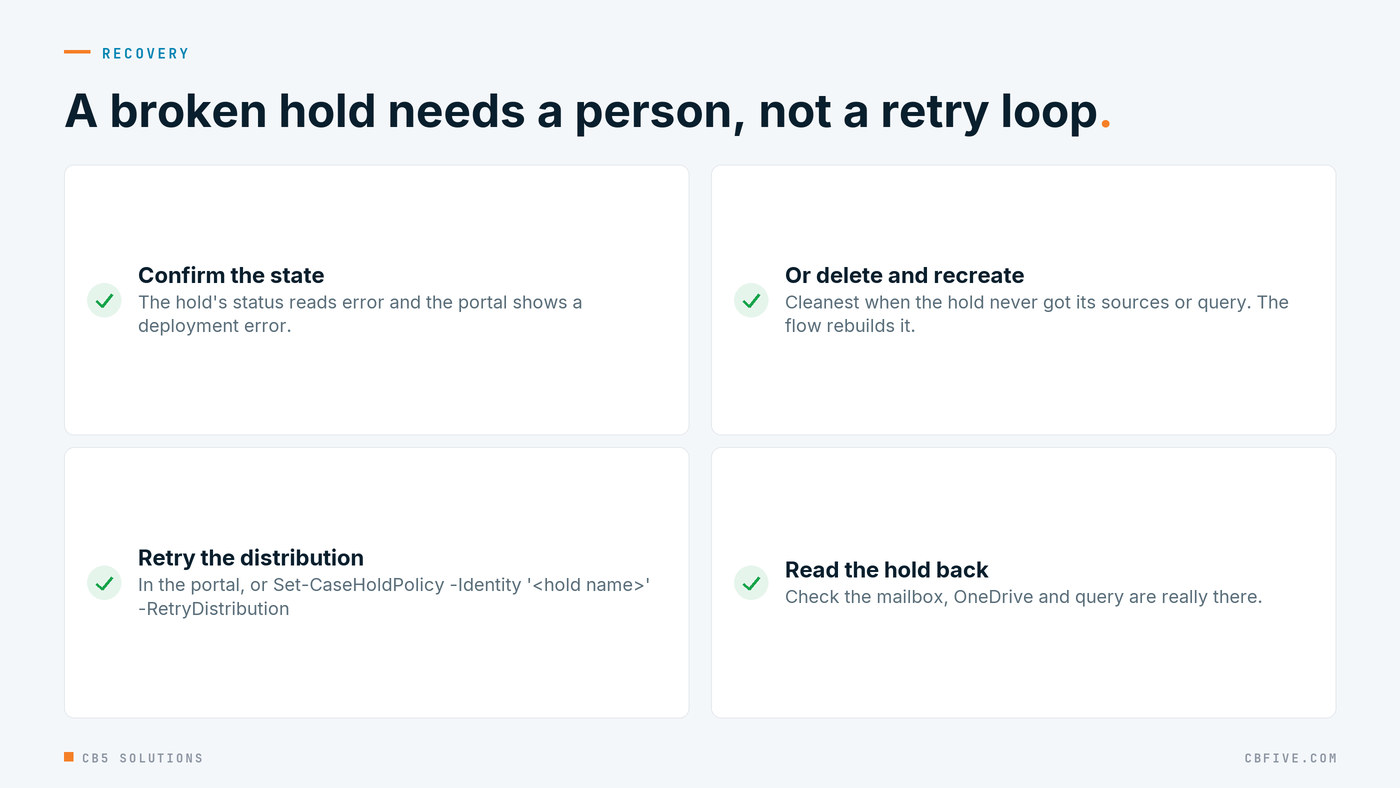
There are three ways back.
First, retry the distribution in the Purview portal. Second, do the same in PowerShell:
Set-CaseHoldPolicy -Identity '<hold name>' -RetryDistribution
Third, delete the hold and let the flow create it again on the next run, this time with the new ordering. That’s the cleanest route for a hold that never got its sources or its query, because nothing meaningful is lost. For any hold that’s been live and preserving content, retrying distribution is the safer choice.
Whichever you choose, check the hold afterwards rather than trusting the command. That habit turns into the whole of the next post.
The rule to take away
The technical rule is short. Compliance policies have a distribution lifecycle, so treat “created” and “ready” as two separate states and check which one you’re in before you change anything. Poll the status. Make your next move only on success. On error, stop.
The governance lesson is the one we’d put in front of any team that automates controls. Never change a control mid-flight. A legal hold isn’t in force because the create call came back successful. It’s in force when the platform says it has finished distributing it, and until then it’s in transit. We’d assume the same of any policy the platform has to distribute. Changes to it have to wait for a known-good state. And a control that reports an error has to stop and escalate to a person with the fix in hand, not keep retrying blindly in the hope that the 15th attempt is different. Blind retries don’t only waste time. They hide a broken control behind a busy-looking run history.
This is the layer IT owns. The business can and should shape its own AI tools around its own problems, and that only lasts on top of guardrails that hold up in an audit. A guardrail that’s half-deployed, with a mailbox and no query, doesn’t hold up in anything.
Next: when “failed” means “done”.
The engagement behind this series was for a large enterprise client. Names, domains, hold prefixes and identifiers have been replaced throughout. Error messages, endpoints and platform behaviour are reported exactly as observed.
CB5 Solutions helps organizations understand the layers of AI, get the most from what they buy, and build an AI program that pays back inside their IT standards. We start every engagement with one business problem and a governance baseline. Let’s pick yours.