
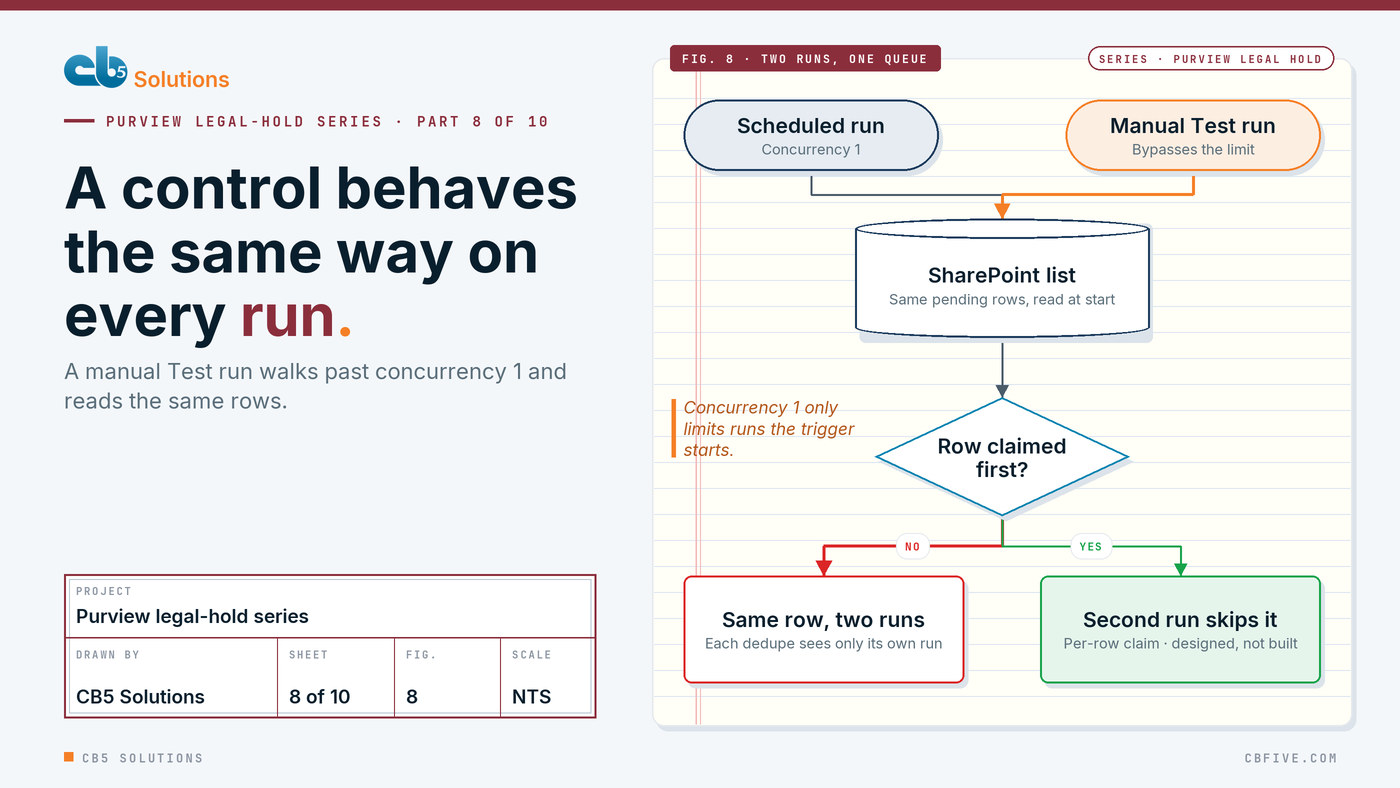
A legal hold that goes on correctly most nights isn’t a control. It’s a habit. The reason to automate the rule at all is that it behaves the same way every time it runs, whether the list has one row or many, and whether the run came from the schedule or from someone pressing Test.
This post is about three ways ours didn’t, all found in production, and about the fix we designed and haven’t built yet.
If you’re joining here, the first post describes the system. A SharePoint list holds one row per membership event for an Entra group. Two scheduled Power Automate flows, Add at 02:00 and Remove at 03:00, read the pending rows, call the Microsoft Graph eDiscovery (Premium) API, and write the result back to the same row. Each person gets one hold, named like LH-Bot-jane.doe_contoso.com.
The list is the work queue and the audit trail at once. That makes these flows queue processors, and queue processors go wrong in a particular way.
The symptom: one person, two creates
Post 2 told the long story of a 409 that wasn’t our fault. One run in that story had a detail that didn’t fit.
The run log showed LH-Bot-… created at 13:52:21, a second Create_Hold for the same name returning 409 at 13:52:26, and then an Exchange policy-deployment error on the source attach at 13:54:15.
Two creates, five seconds apart, for one name. The flow has one create per row, so this had to be two rows.
It was. The same person appeared in two rows in that run. The first row created the hold. The second row ran the existence check, didn’t find a hold, and created it again. The second create hit the 409, and the policy broke.
A work queue can contain the same person twice, and the flow has to treat that as normal, not as an edge case.
What we assumed
We assumed the existence check made the flow safe to repeat. Before creating anything, Add looks for the person’s hold in both cases. If it finds one, it reuses it. Run that twice and you get one hold. That’s idempotency in the usual sense.
The flaw was timing, and the timing belongs to Purview. Purview reserves a policy name immediately, but only lists the hold in the case, and accepts sources, after the policy has deployed. For the first stretch of a hold’s life, it exists as far as a name conflict is concerned and doesn’t exist as far as the list is concerned.
The second row asked the list. The list said no. The create said otherwise.
So the check was correct and the answer it got was stale. Post 3 covered the same deployment window from the other side.
The fix that was real: per-run dedupe
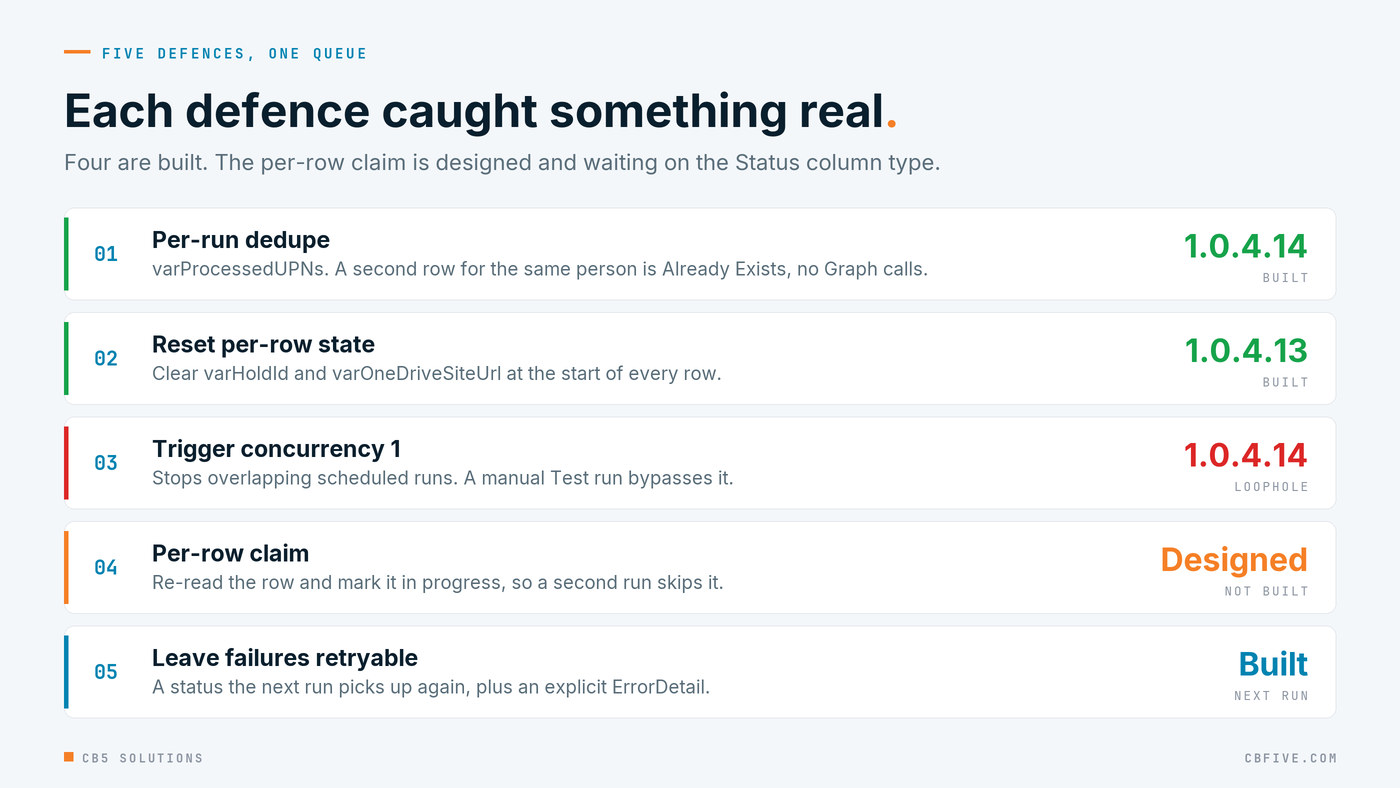
In v1.0.4.14 we added varProcessedUPNs, a list of the people this run has already handled. Each row’s UPN is checked against it before anything else happens. If the person has already been handled in this run, the row is marked Already Exists and the flow moves on without making any Graph calls.
The “no Graph calls” part is the design. The second row doesn’t ask Purview again, because Purview’s answer is exactly what can’t be trusted for those first minutes. It trusts the run’s own record of what it just did.
For that run, dedupe was the real fix. It didn’t end the 409 story. Post 2 explains that the 409 continued on single-row runs and had a different cause inside Purview. But two rows for one person in one run could no longer produce two creates.
The near miss: state carried between rows
The second problem was quieter, a near miss rather than an incident.
varHoldId was a flow-level variable. Power Automate initialises variables once per run, at the top level, not once per trip round the loop. So at the start of each row, varHoldId still held the hold the flow had last looked at, which belonged to the previous user.
That was harmless while every row either set the variable or stopped. Then v1.0.4.13 made the flow keep going after a failed create, so it could recover from a 409 by re-querying by name. Execution could now continue past a failed create with varHoldId still holding the previous person’s hold ID, and the next step attaches a mailbox to whatever hold varHoldId points at.
A stale variable could have attached one person’s mailbox to another person’s hold. For a legal hold that’s two errors in one: the right hold is missing the mailbox, and the wrong hold now carries a mailbox under a date range that was never meant for it.
The fix was to clear it at the start of every row. The same thing applied later to varOneDriveSiteUrl in v1.0.4.16, which would otherwise have put the previous person’s OneDrive in the notification.
The Remove flow had its own version, covered in post 7. In v1.0.3.1 the per-row reset chain, six Reset_var… actions, had a runAfter pointing inside a nested loop. Nothing rejected it. The chain never ran, and state from one row leaked into the next. The reset existed and still didn’t happen.
Per-row state has to be reset explicitly, as the first thing in every row, because the loop won’t do it for you.
The loophole in concurrency 1
v1.0.4.14 also set the trigger’s concurrency to 1. The idea was simple: two scheduled runs can never overlap, so they can never process the same rows.
A few versions later, still chasing the 409, we had a run where the hold wasn’t in Case B when the name check ran and appeared moments later, with no retry history on Create_Hold. Our working theory was a manual test run overlapping the scheduled one. That theory turned out not to explain the 409. It did expose a real gap.
Concurrency 1 only limits runs started by the trigger. A manual “Test” run bypasses it.
Both runs read the pending rows at the start. Each builds its own varProcessedUPNs. Neither can see the other’s work. Per-run dedupe is blind here by design: it only knows about its own run. Two runs can pick up the same row for the same person and both act on it.
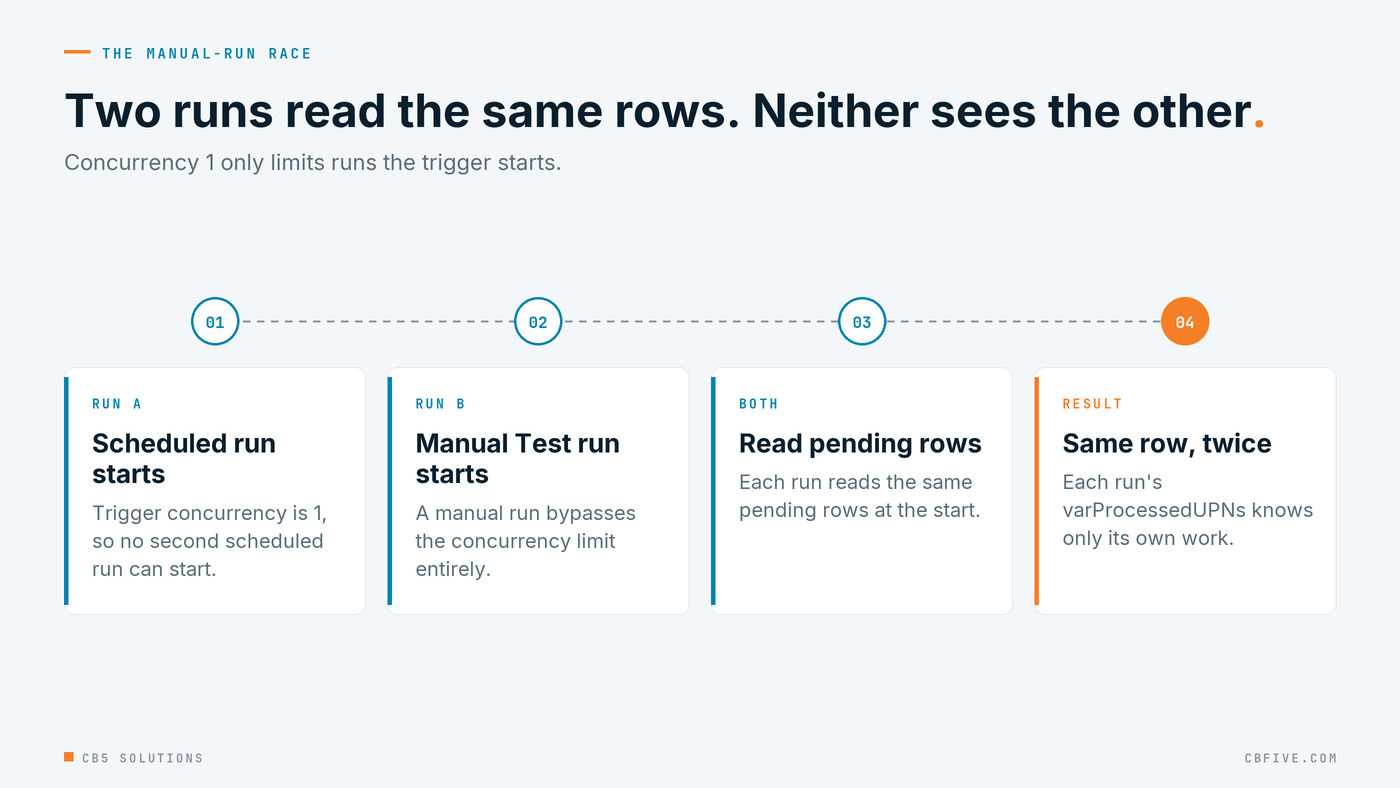
Nobody has to do anything careless for this to happen. Someone tests a fix close to the schedule, and the scheduled run starts while the test is still going. Or the other way round.
The interim rule we gave the client was plain: don’t start a manual test while the scheduled run might be running. We were clear that this is a procedure, not a control. It works as long as everyone remembers it.
The lasting fix, designed and not yet built
The lasting fix is a per-row claim. Before processing a row, re-read it and mark it in progress. A second run that reaches the same row sees the claim and skips it.
The re-read is the part that matters. Each run’s list of pending rows was taken at the start, so it’s already out of date by the time the run reaches a given row. Only a fresh read, at the moment of processing, can show that another run got there first.
We haven’t built it yet, and we want to be straight about that. The claim is a write to the SharePoint Status column, and how it has to be built depends on the exact type of that column, which still has to be confirmed. Until that’s confirmed and the claim is built, the interim rule stands, and the client knows it’s a rule rather than a mechanism.
A designed fix that isn’t built yet is a known gap, and the honest thing is to write it down as one.
Leave failures where the next run will find them
The last defence makes the others pay off. Rows that can’t finish are left with a status the next run picks up again, plus an explicit ErrorDetail saying what went wrong.
That way the schedule fixes things over time instead of piling them up. The same property lets you pause the system by turning the flows off: rows pile up, and processing resumes when the flows come back on.
Retrying is only safe when processing a row twice gives the same result as processing it once. That’s why per-row idempotency comes first. Without it, a retryable queue is just a way to repeat mistakes on schedule.
The rule to take away
The technical rule fits in one sentence. A scheduled flow over a work queue has to be idempotent per item, has to reset per-item state explicitly, and has to assume another run might be processing the same items. Not just a second scheduled run. Any run, started by anyone.
Each part caught something real in this build. Dedupe stopped two creates for one person. The reset stopped one person’s hold ID reaching the next person’s row. Assuming another run exists is why the per-row claim is designed, and why the client has an interim rule until it’s built.
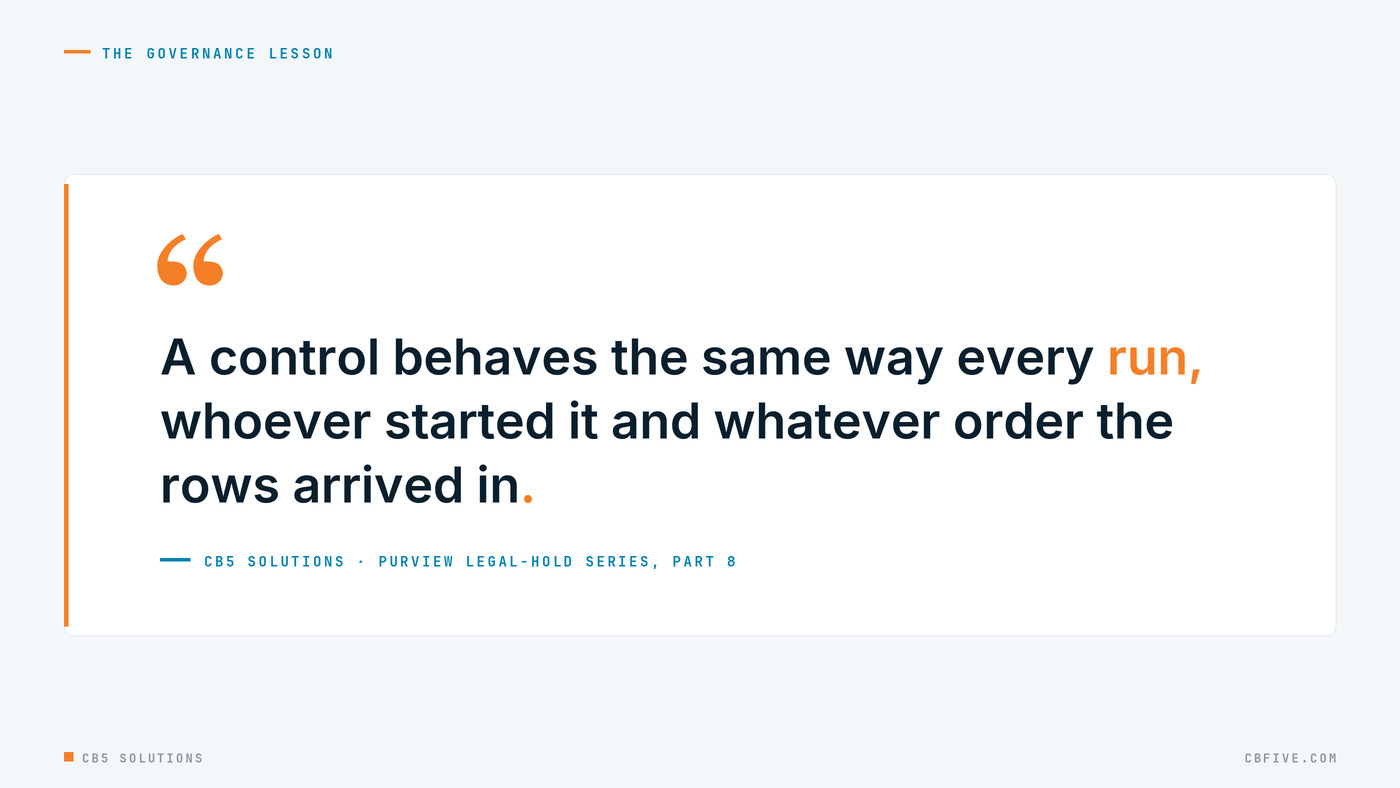
The governance lesson is the one we’d put to a CIO. A control behaves the same way every run. Legal doesn’t care whether a hold went on through the 02:00 schedule or a Test button, or whether the person appeared in the list once or twice that night. An auditor asking “how do you know this person has exactly one hold, with their own mailbox on it?” deserves an answer that doesn’t depend on row order or on who pressed what.
That’s what IT owns. Legal set the rule here, and the business keeps shaping its own automation around rules like it. Making the rule provable means it holds on the nights with duplicates and an overlapping test, not just on the quiet ones, and saying plainly where it doesn’t hold yet.
Next: treat your flows like code.
The engagement behind this series was for a large enterprise client. Names, domains, hold prefixes and identifiers have been replaced throughout. Error messages, endpoints and platform behaviour are reported exactly as observed.
CB5 Solutions helps organizations understand the layers of AI, get the most from what they buy, and build an AI program that pays back inside their IT standards. We start every engagement with one business problem and a governance baseline. Let’s pick yours.