
Every business team we talk to wants AI now, and every IT team we talk to is worried about the same thing: an assistant that can read everything a person can read, connected to mail, files and chat, with nobody quite sure what it can send or where the data goes. The pressure is to move. The risk is overexposure: of the organization, its clients and its data.
We help organizations build AI programs that the business drives and IT keeps safe, so we had to answer that question for ourselves first. This post describes how we deployed Claude, Anthropic’s AI model, inside our own Microsoft 365: the features we use, how we restricted where data can flow, and the gates every new capability passes before it’s switched on. We’ve left out our own security detail and anything that belongs to our clients.
In short
- The goal: Adopt AI at the pace the business wants, without overexposing ourselves or our data
- The setup: Claude on a business plan, connected to Microsoft 365 through each person’s own sign-in
- The controls: Delegated access, an approved tool list per connector, sharing reviewed before connecting, sensitivity labels and DLP left in force, drafts only
- The rule: Nothing leaves the firm without a person’s yes

Pace without skipping a gate
The quickest way to lose a business’s trust in AI is an incident: a draft sent to the wrong person, a confidential file summarized for someone who shouldn’t have seen it, a connector that could do far more than anyone realized. The surest way to stall AI is to treat every request as a special case.
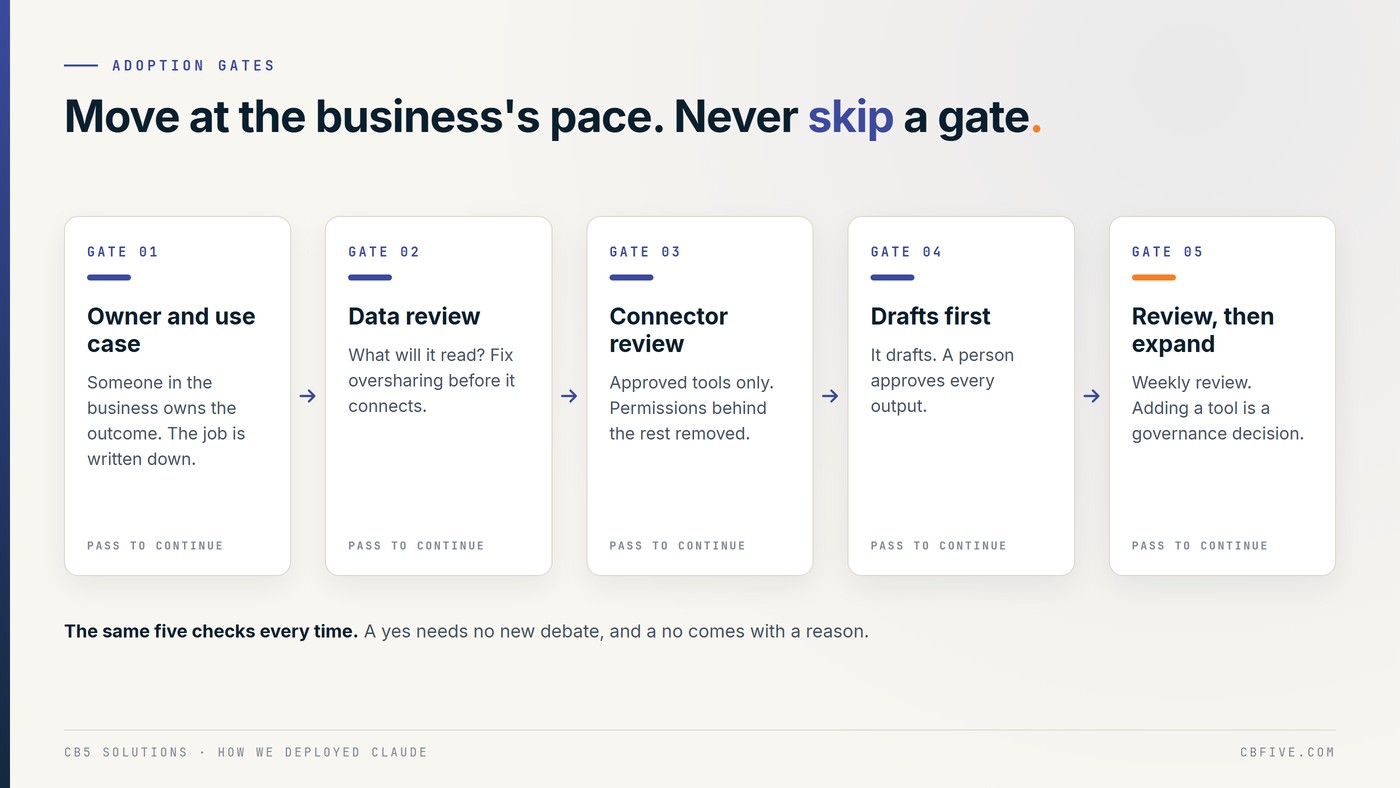
Gates solve both. Each new capability, whether a connector, a tool or a new kind of task, passes the same five checks before it’s switched on. The checks are the same every time, so a yes doesn’t need a new debate, and a no comes with a reason.
- An owner and a use case. Someone in the business owns the outcome, and the job is written down: what Claude does, what a person decides.
- A data review. What will it read, and is that data shared more widely than it should be? Fix the sharing first.
- A connector review. Which tools does it offer, which do we need, and which Microsoft permissions sit behind them? Everything else is switched off.
- Drafts first. It starts by drafting. A person reviews every output before anything leaves the building.
- Review, then expand. Failures are reviewed weekly, and each one becomes a rule or a check. Adding a tool later is a governance decision, not a setting someone flips to get past an error.
The features we use, and what each one can reach
Claude isn’t one switch. It’s a set of features, and each one reaches different data. We decided what each one is allowed to touch before we turned it on.
- A business plan. We run Claude on a business plan, which gives us administrative control over who is in our workspace. Under Anthropic’s commercial terms, our inputs and outputs aren’t used to train its models by default.
- The desktop app and projects. People work in Claude’s desktop app and in Claude projects. A project holds only the material for its job, so one piece of work doesn’t carry another’s files with it.
- Skills. A skill is a packaged set of instructions Claude loads when a task calls for it. Ours hold our house rules, including the confidentiality rules every piece of work has to pass: no client names, people, tenants or internal system names in anything that leaves.
- Connectors. Claude reaches Microsoft 365 through connectors built on the Model Context Protocol (MCP), the open standard Anthropic published for connecting AI to tools and data. Each connector is reviewed like a new application in the tenant.
- Scheduled tasks and specialist agents. Recurring work runs as scheduled tasks, and some jobs have their own agent with a narrow brief. Each one returns its findings and drafts to a person rather than acting on them.
- Browser actions that stop at the button. Where Claude works in a web page, it prepares and checks, then stops. A person makes the final click.
Restricting the data flow
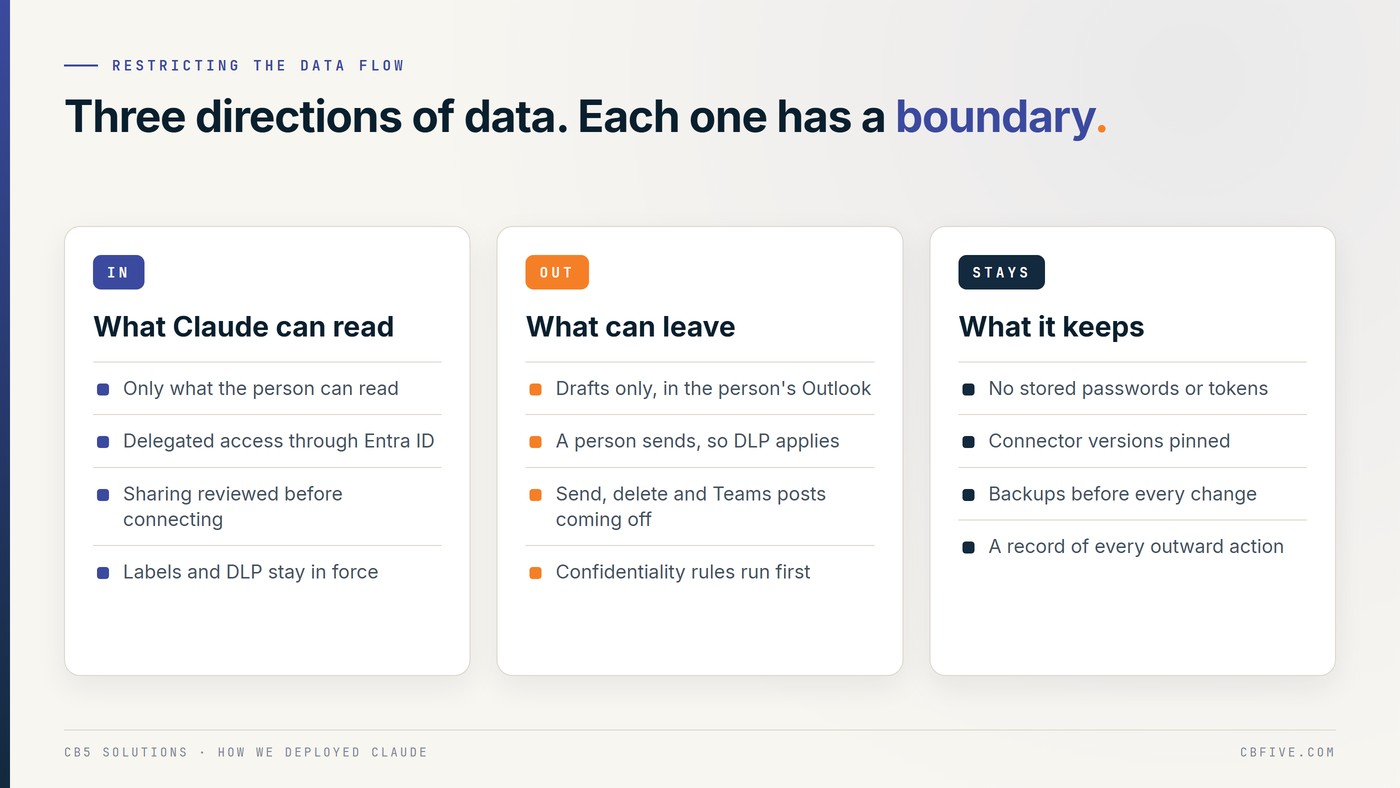
We think about governance as three directions of data flow: what comes in, what goes out, and what stays.
### What comes in
Claude signs in to Microsoft 365 through Microsoft Entra ID using delegated access. It acts as the person using it and can read only what that person can already read. There’s no tenant-wide identity, no app-only access and no shared service account.
Delegated access has one consequence every IT leader should know: the AI inherits your oversharing. If a SharePoint site is open to everyone, the AI can find it for anyone. So before we connected anything, we reviewed sharing across SharePoint and OneDrive. We’ve written about why this matters for Copilot in Copilot Inherits Your Permissions, and the same is true for any assistant on delegated access.
Our Microsoft Purview sensitivity labels and data loss prevention policies stay in force. Claude works inside them, not around them.
### What goes out
The only thing Claude writes into mail is a draft. Drafts land in the person’s own Outlook Drafts folder, and a person sends them, so every message that leaves still passes through our normal mail controls, DLP included.
Each connector carries an approved list of tools: read and search mail, calendar and SharePoint, and create a draft. Sending, forwarding, deleting and moving mail, mail rules, mailbox settings, posting in Teams and changing files are being switched off across our connectors, and the first one already runs on its approved list. We’re also trimming each connector’s app registration in Entra ID to the Microsoft Graph permissions its approved tools need, so the rule won’t depend on the tool list alone.
Before any draft is shown, the confidentiality rules run: no client names, people, tenants, internal system names or prices, and a source on every claim.
### What stays
Claude never holds passwords or tokens. Sign-ins belong to the person, and when a session expires the task stops and asks rather than finding a way around it. Connectors we run ourselves are pinned to a version we chose, so an update is a change we decide to make. Every file an agent changes is backed up first, and a record is kept of every outward action, so we can always answer what went out, when and who approved it.
How it fits the Microsoft ecosystem
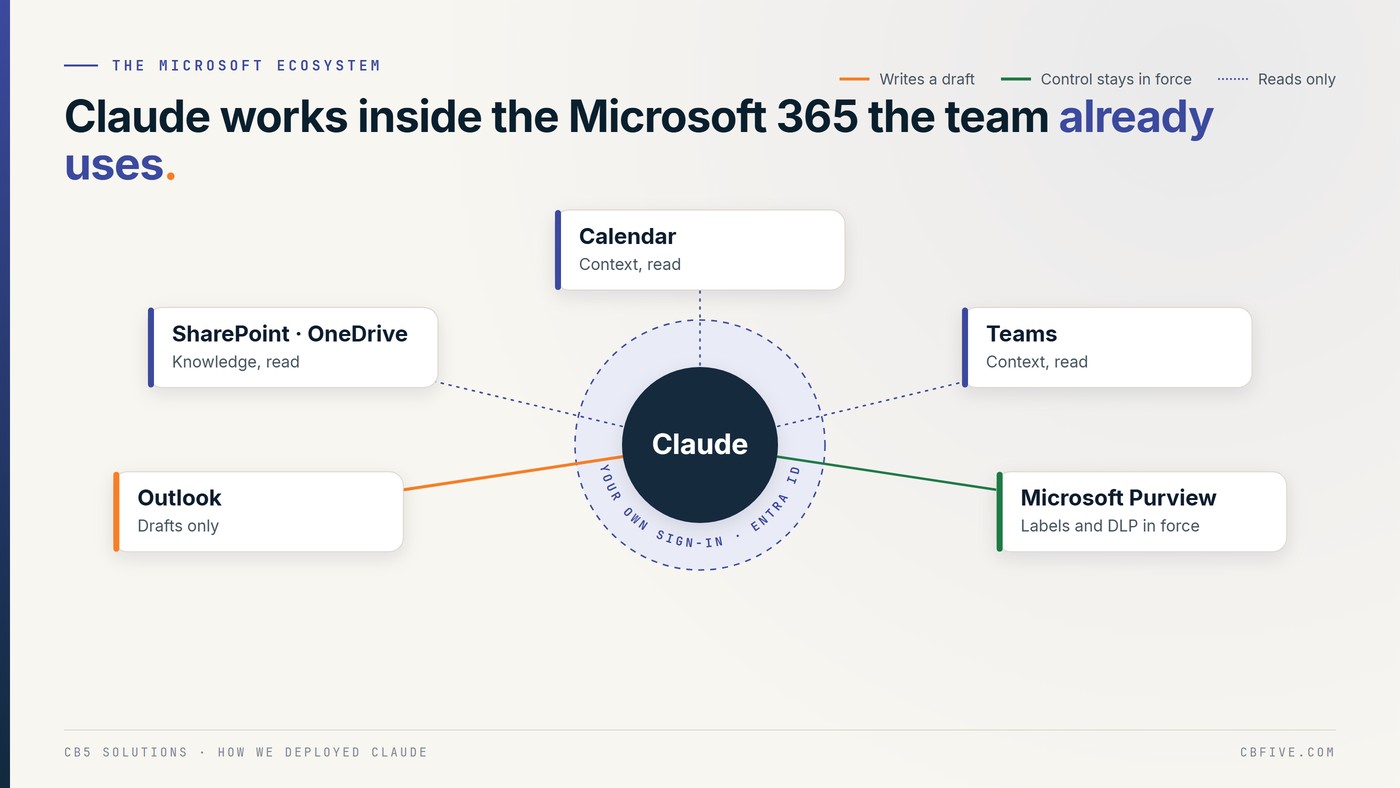
We run on Microsoft 365, so Claude works inside the controls we already have rather than beside them:
- Microsoft Entra ID is the front door. Claude uses the person’s own sign-in, and its connector apps are registered and consented like any other application in the tenant.
- Outlook is where drafts land, threaded onto the right conversation, ready for a person to read, change and send.
- SharePoint and OneDrive are the knowledge source, read with the permissions of the person running the task, after the sharing review.
- Calendar and Teams give context, read only.
- Microsoft Purview labels and DLP policies apply as they always have.
Nothing about the deployment asked anyone to learn a new system of record. The data stays where Microsoft 365 already governs it.
The gate we had to go back through
Our own connector review found tools switched on that the work never needed, including sending mail. Nothing had used them. But “we never use it” isn’t a control. Switching them off, and removing the permissions behind them, is. That work started the day we found it, and it’s the reason the connector review is now a gate rather than a one-off.
It’s also the most useful lesson for anyone adopting AI: read the tool list, not just the product page. A connector can offer far more than the job in front of you needs.
What you can take from it
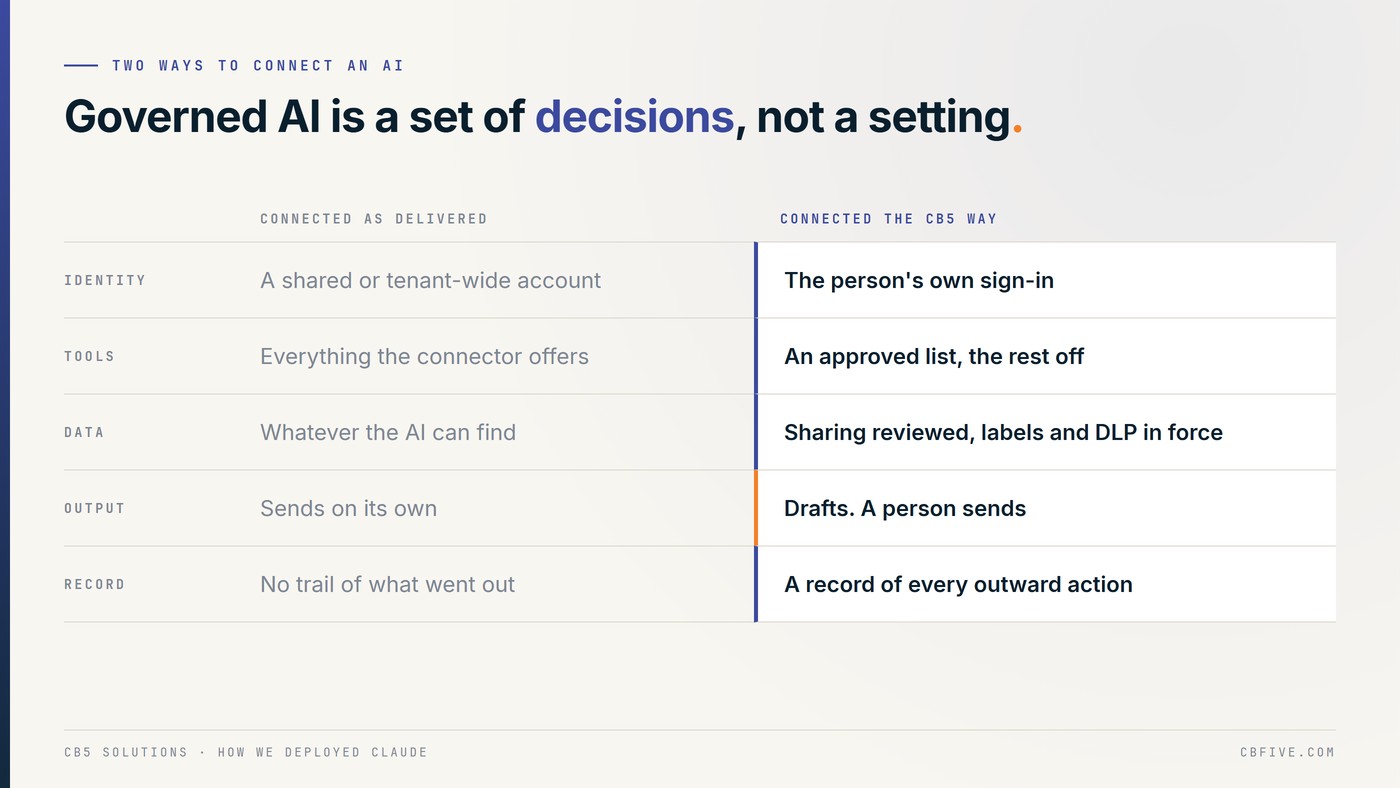
- Use delegated access. Let the AI see what the person sees, through Entra ID, and nothing more.
- Review sharing before you connect. The AI inherits every overshared site and stale link.
- Keep your labels and DLP in force, and make sure the only way out is a path they already cover.
- Review every connector’s tools and permissions, switch off what the job doesn’t need, remove the permissions behind those tools, and pin the versions you run.
- Start with drafts, put a person on every outward action, and expand only through the same gates.
This is the approach we bring to clients: the business decides what the work is, IT sets the boundaries, and the model does the drafting in between. We run it on ourselves first.
CB5 Solutions helps organizations understand the layers of AI, get the most from what they buy, and build an AI program that pays back inside their IT standards. We start every engagement with one business problem and a governance baseline. Let’s pick yours.