
The inside sales rep knows which quote eats an afternoon. The service coordinator knows which field notes take an hour to turn into a report. Nobody in IT knows either, and that’s fine. The business already knows its problems. What it usually doesn’t know is how to get its team using AI on them, and training is the answer to that gap.
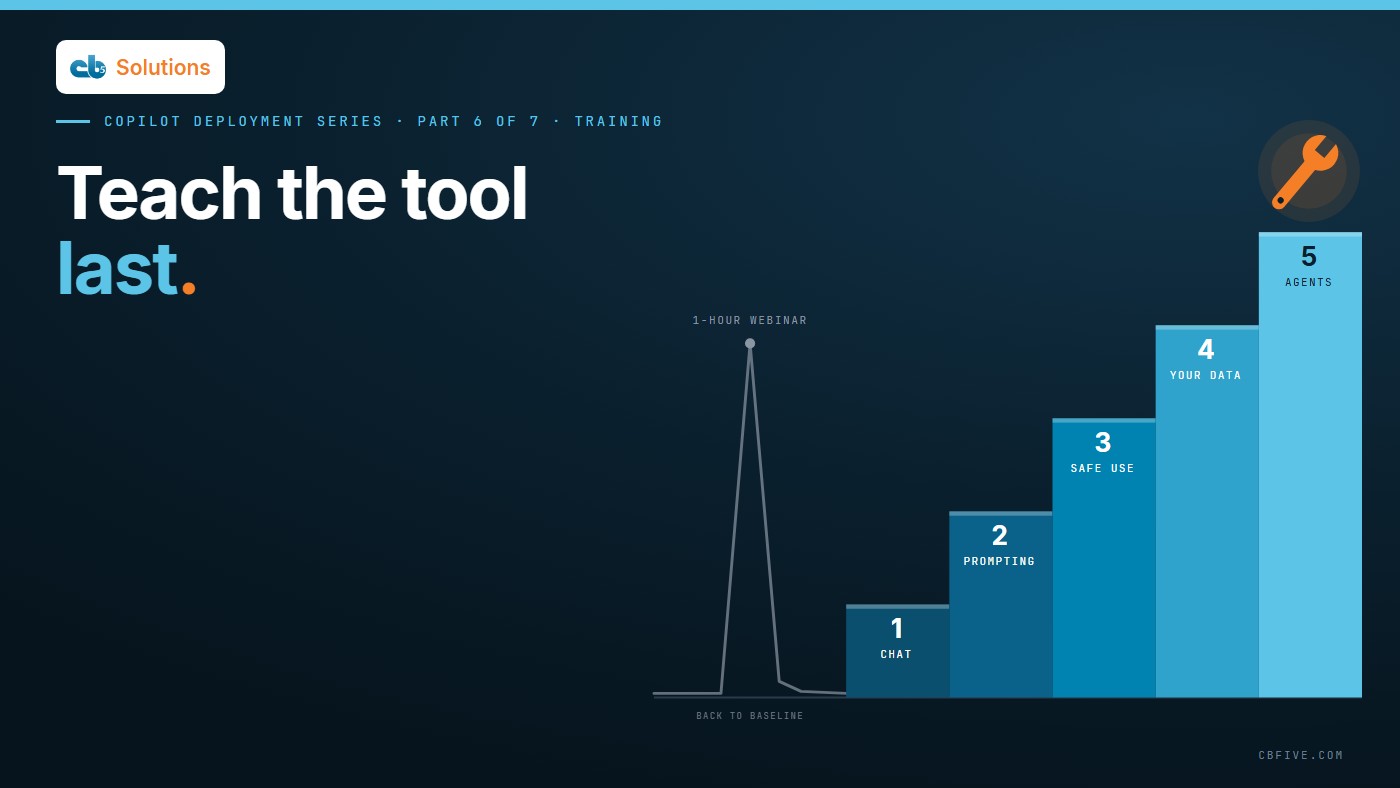
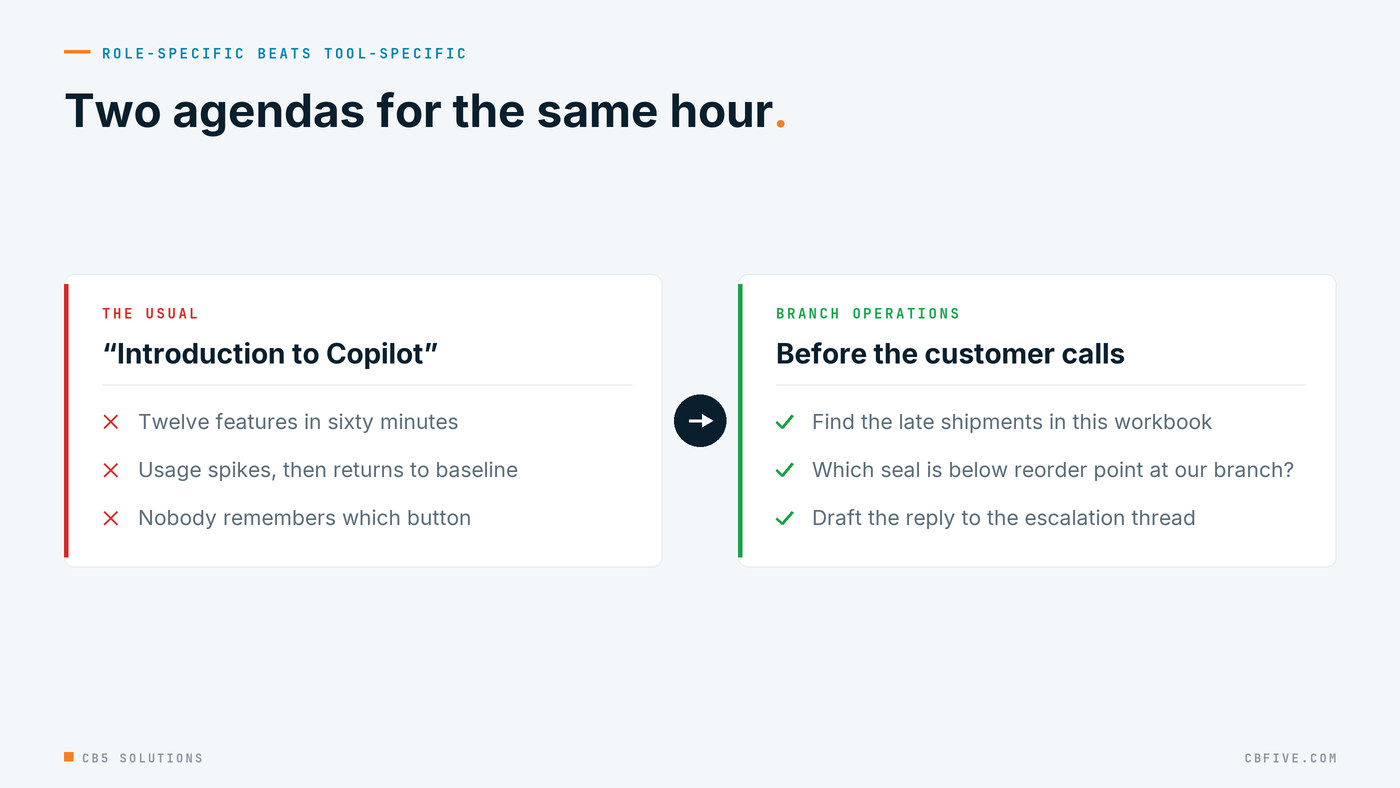
Most rollouts answer it with a one-hour webinar called “Introduction to Copilot,” twelve features in sixty minutes. Usage spikes that week and is back to baseline by month end. They taught the tool, and the tool is the last thing people need to learn.
IT can deploy Copilot, but IT can’t find the savings. The people who do the work can. What they need first is judgement: what the tool is good at, when it’s wrong, what must never go into a prompt, and which layer of the product fits the problem in front of them. Responsible use before scale. Adoption is where the return is won or lost.
When we laid out the roadmap for a pump and process-equipment distributor in the Southeast, the training plan got two slides of its own, and the demo this series has followed since post 1 was built as the first lesson in it rather than a sales event. This post is the training series as we run it: a six-step program for the organization, and five capabilities for the individual, with the tools at the end.
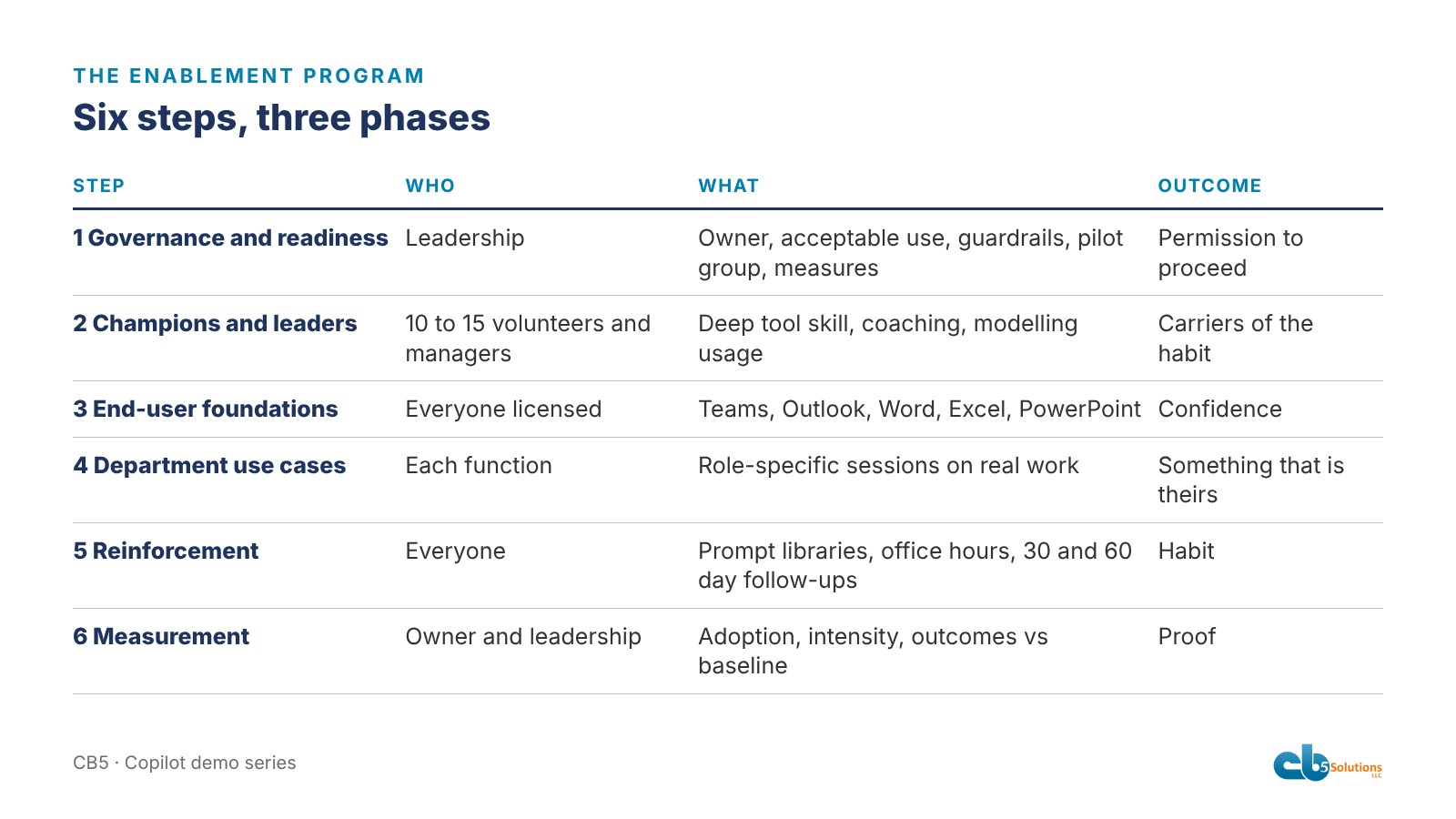
The six-step program
The program follows the same three phases as crawl, walk, run: prepare the leadership, adopt by department, sustain over time. The business owns the problems and sets the standards. IT keeps every step inside them.
- Governance and readiness. Before anyone is trained, leadership decides who owns AI, what acceptable use means, and where the data boundaries sit: which sites are in scope, which sensitivity labels block Copilot from a file, who is in the pilot, and how success will be measured. IT checks permissions on the pilot’s sites and confirms Copilot activity lands in the audit log. Every later session has to be able to answer “am I allowed to do this?”
- Champion and leader training. Ten to fifteen volunteers across departments, plus their managers. Champions learn to coach. Managers learn to model usage. In our experience, where managers visibly use Copilot, it sticks.
- End-user foundations. The core capabilities across Teams, Outlook, Word, Excel and PowerPoint. This is the one session that looks like the familiar webinar, and it’s one of six, not the whole program.
- Department use cases. Sessions built around each department’s actual work and led by its own champion. For a distributor: quote drafting, spec review, service report write-ups, vendor email triage.
- Reinforcement and support. Prompt libraries, office hours, internal success stories, follow-up workshops at 30 and 60 days. The habit forms here or not at all.
- Measurement and improvement. Adoption, sentiment and outcomes reviewed against the baseline captured in step one, and the program tuned.
The order is the content. Run step three before step one and you get the webinar problem, plus people pointing Copilot at content nobody checked. Run step four without step two and the champions who would have carried it don’t exist yet.
The five capabilities, in order
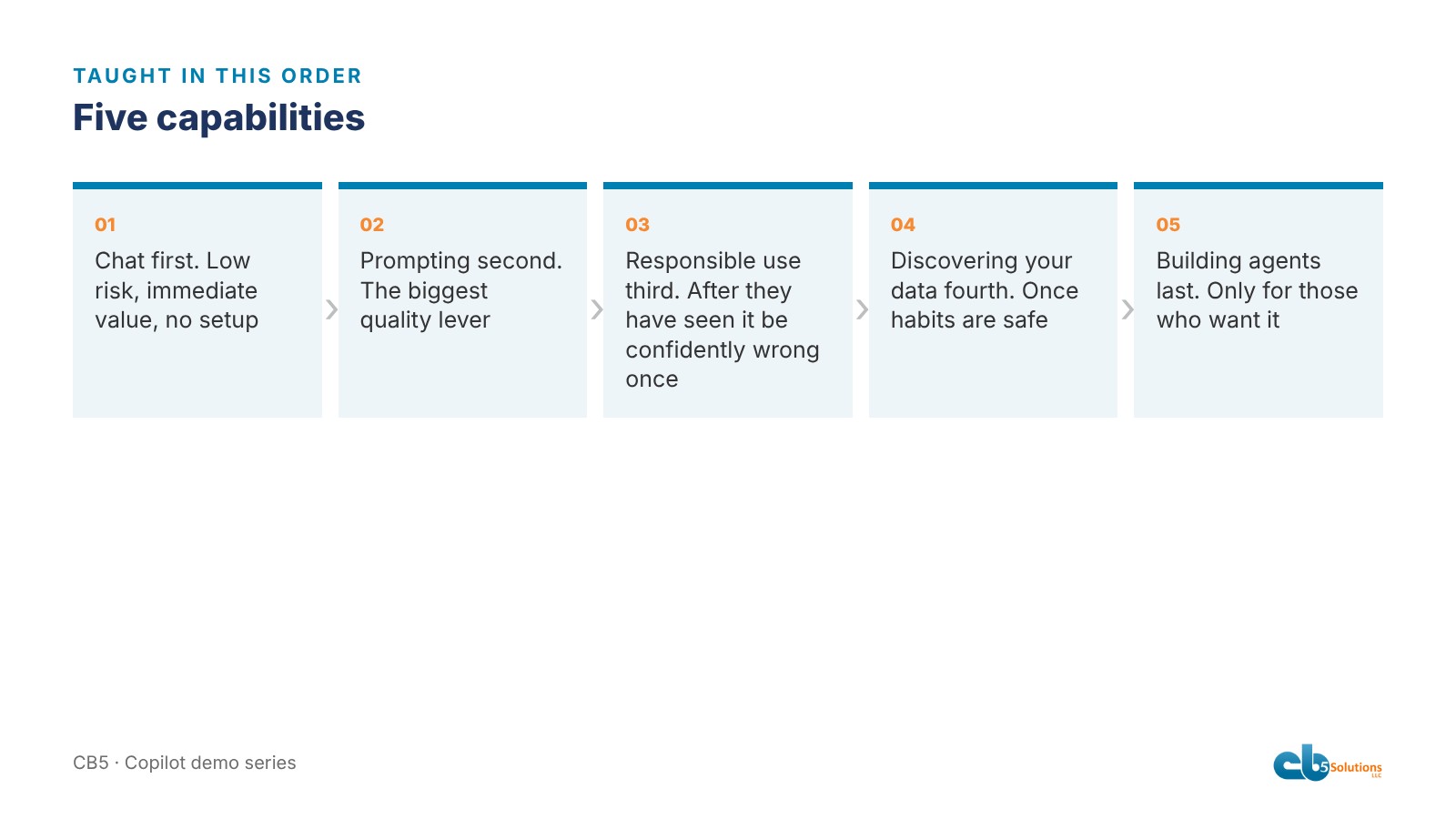
Inside the program, each person learns five things, in this sequence, and we’re strict about it. The order is designed so that judgement arrives before the situations that need it.
1. Chat first. Low risk, no setup. Summarize this, explain that, draft a reply. It builds confidence that the tool is useful, and it’s where the first small savings show up.
2. Prompting second. The biggest lever on output quality and the most under-taught. The difference between “summarize this thread” and “summarize this thread for a branch manager who needs to decide whether to send a tech tomorrow” is the difference between a paragraph and a decision.
3. Responsible use third. Before people reach sensitive data, they need to know what happens when the tool is wrong, what they’re accountable for, what must never go into a prompt, and how to check an answer against its source. Teach it first and it’s abstract. Teach it after they’ve seen the tool be confidently wrong once, and it lands. The torque-value moment from post 3, where the agent refused to guess at a number it didn’t have, is the lesson in miniature. Time saved on a wrong answer isn’t savings.
4. Discovering your data fourth. Only once habits are safe do we point Copilot at the organization’s own content. This is where the value multiplies, and where IT’s work in step one gets tested. Copilot only sees what the user can already open, so if a pricing folder is shared too widely, this is the moment it shows. Better to find that with a pilot group and fix the permission than to find it with everyone.
5. Building agents last, and only for those who want it. Most people never need to build one. The ones who do, the champions and the people who own a process, learn the layers here. Agent Builder is for a person grounding an assistant in documents they already own. Copilot Studio is for when the agent needs a connector into another system or a wider audience, and that’s a build IT reviews before it ships. Deciding which layer, which documents, and what the agent must refuse to say is the hard part, and it only makes sense to someone who has done the first four.
Role-specific beats tool-specific
The biggest risk in the walk phase of any rollout is generic training. “Copilot in Excel” teaches features. “Finding late shipments and low stock before the customer calls” teaches the same features inside a problem the branch team already has, and they remember it.
That’s why the demo was built around a repeat seal-failure scenario any distributor would recognize, using sample data, rather than a feature list. The sales people saw the margin outlier. The service people saw the repeat failure pattern. The marketing lead saw the campaign kit. Each of them left with one thing that was theirs.
That’s the point where the business takes the lead. Nobody in IT knows which task costs the service team the most time on a Monday. The service manager does. Once the team can prompt well and knows what not to trust, they go find it themselves, inside the standards the business set and IT enforces.
For a distributor, the department sessions we’d build start from work that is high volume, text heavy, and already has a quality standard people recognize: first-draft quotes for inside sales, long customer specifications cut to the requirements that matter for applications engineering, field notes turned into service reports, vendor threads summarized with commitments and dates pulled out for purchasing. Each saves the first hour of a task someone already knows how to finish and check.
How you know it worked
The program ends in measurement because that’s the part most rollouts skip, and without it next year’s budget conversation has nothing to stand on. The baseline comes before deployment: how long key tasks take today, volumes and cycle times. At 90 days you track active usage by department, which use cases stuck, and what the champions are hearing, while IT reviews the audit log for anything that shouldn’t be there. At six months you measure outcomes against the baseline and tie them to business numbers.
Usage data tells you who is using it. Only a baseline tells you whether it mattered.
The general rule
Teach judgement before tools, and teach tools inside the work. The demo was a first taste of that. The training series turns it into a program, with an owner, a baseline and a cadence so it doesn’t evaporate by Friday.
That’s the standard behind this post: responsible use before scale. Skip it and you get one of two failures. Either nobody uses the tool, or people use it on data and decisions they shouldn’t. Both cost you the return.
IT’s job is to make Copilot safe, available and understood, within the standards the business sets. The savings come from the people who know the business, once they know how to use it.
Tomorrow, the last in the series: what the room actually asked during and after the demo. It wasn’t about features.
CB5 Solutions helps organizations understand the layers of AI, get the most from what they buy, and build an AI program that pays back inside their IT standards. We start every engagement with one business problem and a governance baseline. Let’s pick yours.