
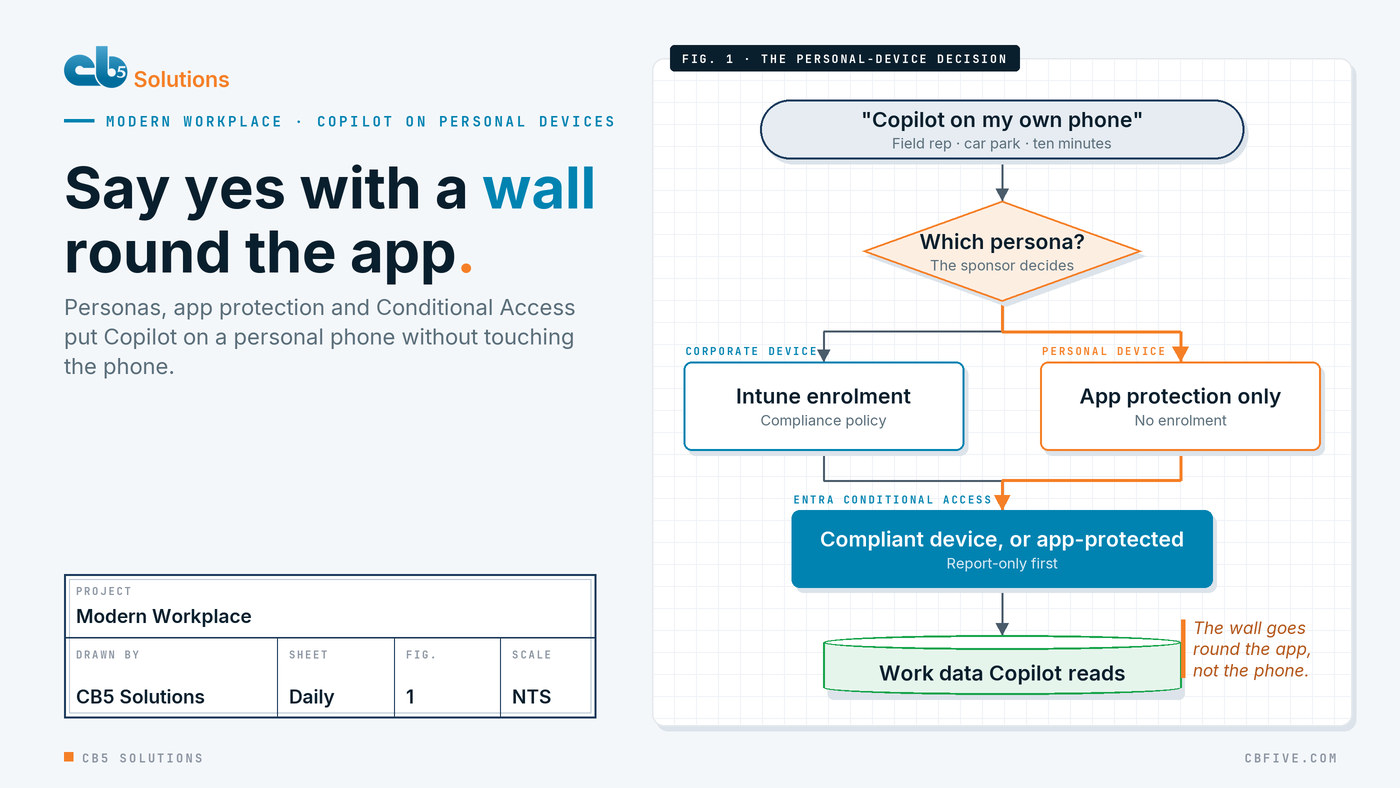
A field sales rep is sitting in a customer’s car park with ten minutes to spare. Everything she needs is in the tenant: the last six emails with this account, the open service ticket, the price list that changed last month. What she wants is to ask one question on the phone in her hand and walk in prepared. It is her own phone, because the company stopped issuing handsets years ago.
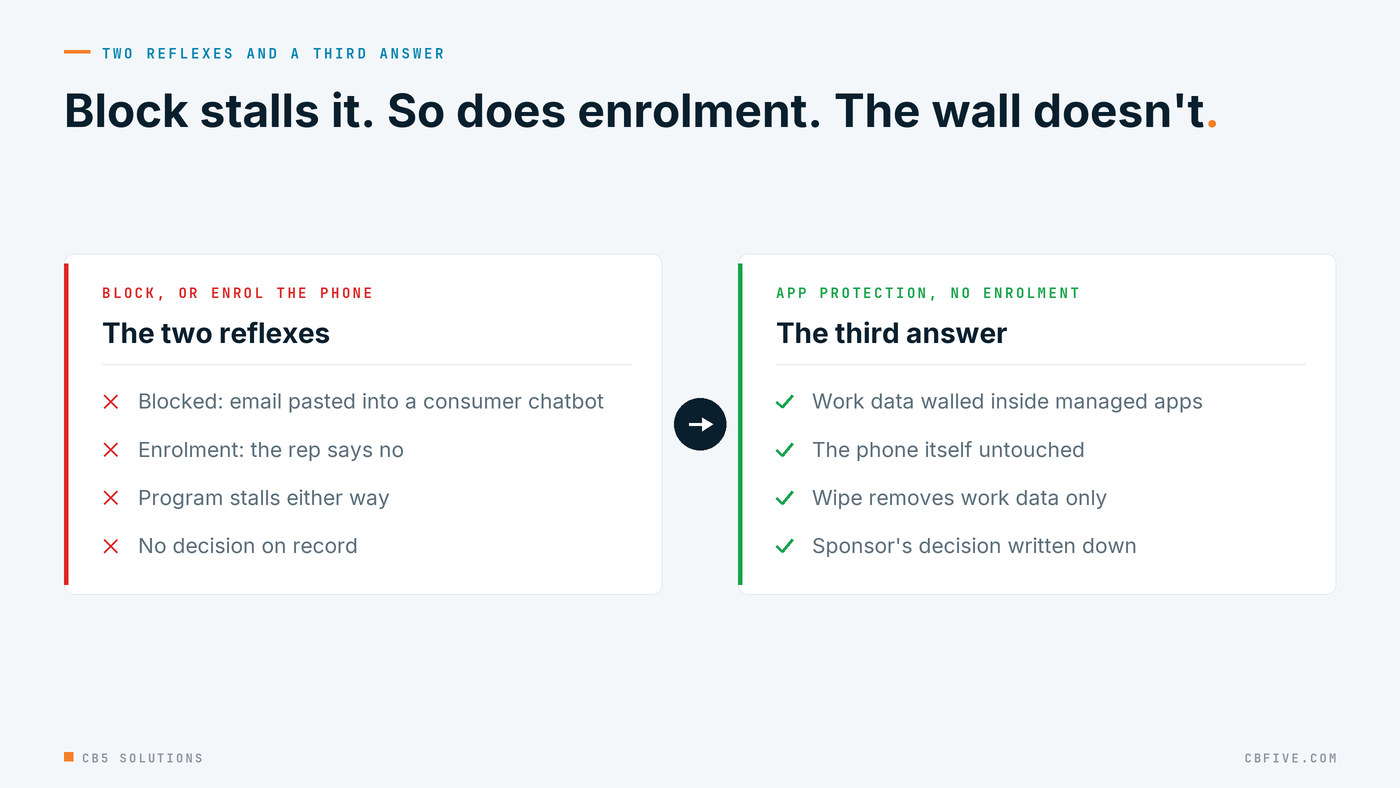
IT has two reflexes here, and both stall the program. The first is to block work AI on anything the company doesn’t own, which sends the rep to a consumer chatbot with the email pasted in. The second is to insist on enrolling her personal phone in device management, which she declines, as most people do when asked to hand a company control over the device that holds their family photos. The program needs a third answer: a yes with a wall around it. On Microsoft 365 that wall is built from three things IT already owns, personas, Intune app protection and Entra Conditional Access, and the decision that shapes all three is made by the business, not the endpoint engineer.
Start with personas, not phones
Every device program we have run starts with the same workshop, and it isn’t about hardware. It is about who holds the device and what they do with it. The personas that come out are familiar: corporate users on company laptops, personal-device users who want mail, Teams and now Copilot on their own phone, frontline staff on shared or rugged devices, and a handful of people who handle data sensitive enough to need a stricter standard.
Each persona gets a row in a workbook with two columns that matter for this post: is the device managed, and what protection applies to the apps on it? For corporate phones the answer is enrolment, a compliance policy, and app protection on top. For personal phones the answer in almost every design we write is app protection only, with no enrolment, so the organization never touches the device, only the work data inside a handful of apps.
The one decision the business sponsor has to make is whether a persona is allowed to use a personal device at all, and if so, under app protection or not at all. That is a risk decision, not a technical one. The head of sales knows whether her team will enrol their phones. The head of HR knows which data her team opens on the move. IT’s job is to present the options honestly and then build whichever the business picks.
The wall goes round the app, not the phone
Intune app protection policies, which Microsoft’s documentation shortens to APP, put a boundary around the organization’s data inside specific apps on a device the organization doesn’t manage. Inside the boundary, the work account’s data is encrypted and behind its own PIN or biometric. Copy and paste only works into other managed apps. Save-as to the phone’s local storage is blocked. If the person leaves, IT wipes the work data and nothing else; the photos and the personal mail are untouched.
That matters more for Copilot than it did for email, because the thing being protected is the answer. When the rep asks for a summary of the account, Copilot draws on everything her permissions can reach and assembles it into one tidy block of text. Microsoft’s own Zero Trust guidance for Copilot makes the point directly: app protection can stop Copilot-generated content being copied into apps outside the permitted list, and limits the blast radius of a compromised device. The wall contains the summary, not just the sources.
Two details catch teams out. First, the Microsoft 365 mobile app is now the Microsoft Copilot app, and Copilot can no longer be switched off inside it with an app configuration key; if you want to restrict Copilot on mobile, you block the app or use the Integrated Apps settings for the tenant. In other words, the decision really is “in, behind the wall” or “out”, which is why the persona decision has to be made first. Second, the strength of the wall is a choice. Microsoft publishes a three-level data protection framework for app protection, and recommends level two, enhanced data protection, for most users accessing work data. The persona handling sensitive data gets level three, with the tighter PIN and mobile threat defence that come with it.
And none of this fixes what sits behind the wall. If the permissions in SharePoint are wrong, Copilot on a managed phone will summarise the wrong document just as readily as Copilot on a laptop. We wrote about that in Copilot inherits your permissions; the device program and the data program have to land together.
Conditional Access turns the design into a gate
A persona workbook and an app protection policy are intentions. Entra Conditional Access is what enforces them at sign-in. The pattern we build for the personal-device persona is a single policy aimed at iOS and Android that grants access to Microsoft 365 only if one of two controls is met: the device is marked compliant by Intune, or the app satisfies an app protection policy. Corporate phones pass on the first test, personal phones on the second, and a device that is neither gets nothing. Microsoft’s guidance also recommends a companion policy that blocks unknown or unsupported platforms, so the gate can’t be walked around with a device type the policy never named.
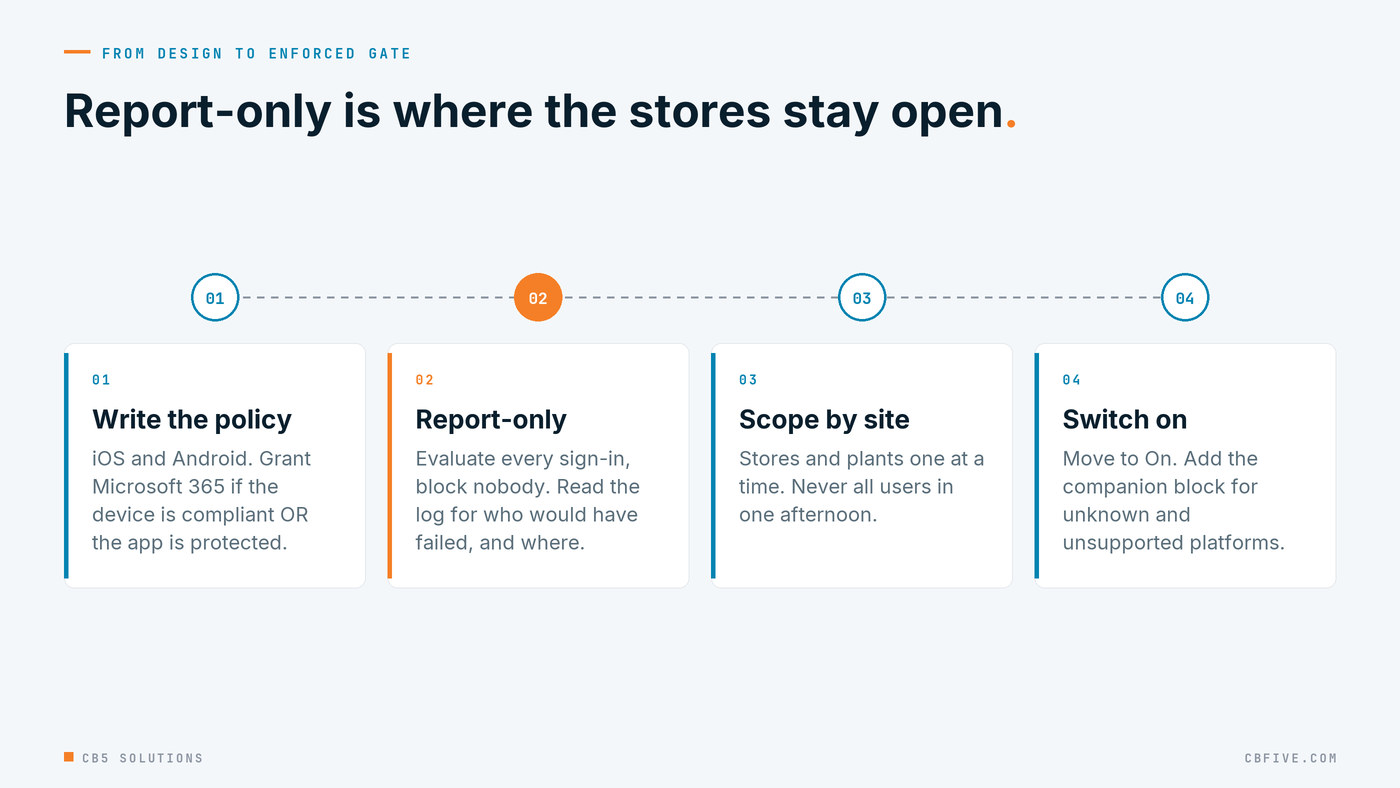
The part that protects the business is how the policy is switched on. Conditional Access has a report-only mode that evaluates every sign-in against the policy and records what would have happened, without blocking anyone. We always start there, then read the sign-in log for the people and locations that would have failed. In a retailer or a manufacturer the surprises are usually at the sites: a store tablet nobody knew was signing in as a user, a plant floor where the Company Portal was never installed. Scoping the policy site by site, instead of to all users on one afternoon, is the difference between a controlled rollout and a help desk queue that ends the program’s credibility.
One documented trap is worth repeating. If a policy requires app protection on its own and it is pointed at devices that are already managed by MDM, it blocks them, because the app protection check cannot be satisfied on a managed device. The “one of the selected controls” setting is what lets the two personas share a policy.
Small rings, run twice
A design the review board approved is still a hypothesis until real people use it. The pilot structure we use has four rings: IT and test devices of every model, a pre-pilot with a few devices from each persona, a pilot with real business users in real locations, and then production waves sized by device counts per persona. Each ring has a written go/no-go with a numeric threshold agreed in the pilot plan, and no ring grows until the previous one met it. In practice that has meant small rings per capability, run twice, because a second run on the same ring catches the things the first run quietly tolerated.
The business writes the pilot tests, not IT. The sales persona’s test is the car park question: open the Copilot app on a personal phone, ask for the account summary, try to paste it into a personal note, confirm the paste is refused, confirm it works into Outlook. The HR persona’s test includes opening a document that carries a sensitivity label and checking the label is honoured. IT turns the organization’s standards into the checks that sit alongside: the PIN prompt appears, the selective wipe removes only work data, the sign-in log shows the policy that granted access. When both sets of tests pass, the ring grows.
Deployment waves then run on a countdown, with communications before each wave, an enrolment guide for corporate devices, a guide for setting up the managed apps on personal ones, and a known-issues note written from the previous wave. The help desk sets the wave size, because the help desk is who the rep calls when the PIN prompt confuses her.
What each side gets back
The rep gets Copilot on the phone she already carries, with no company profile on the device and a clear promise about what IT can and cannot see or wipe. Her manager gets a team that walks into meetings prepared instead of pasting customer email into a consumer tool nobody controls.
IT gets a design it can hand to an auditor: a persona workbook that says who was allowed what and who decided, an app protection policy at a named framework level, a Conditional Access policy with a report-only history showing it was tested before it was enforced, and pilot results with the thresholds that were met. That is the point of the CB5 standard here. The business decided where AI goes; IT made the guardrails concrete enough to be read back.
Getting Started
If a team is already asking for Copilot on their own phones, you don’t need a tenant-wide device program to answer them. You need one persona done properly.
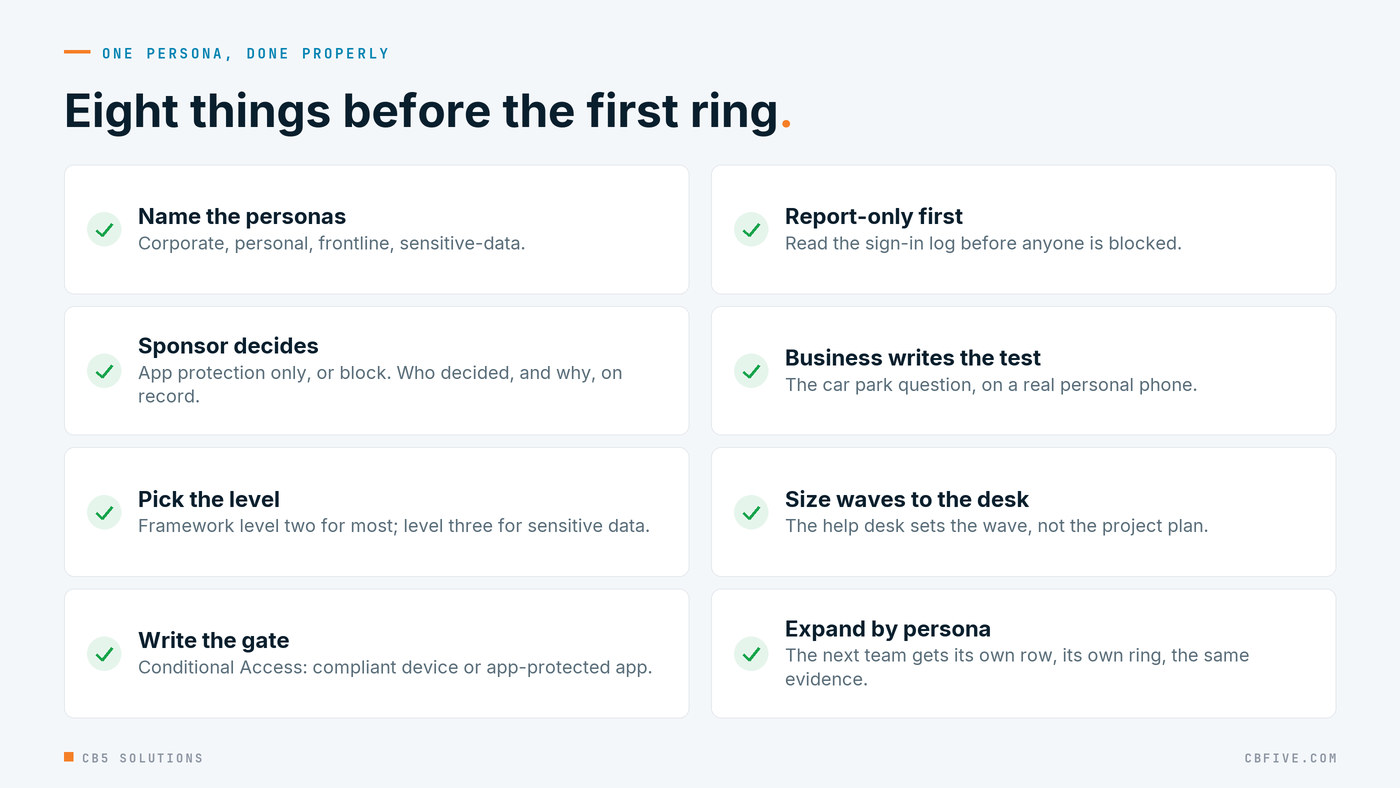
- Pick the persona that asked. Usually sales or field service. Write down what they open on the move and what they must never be able to do with it.
- Put the decision in front of the sponsor. App protection only, or block. Record who decided and why; that line is the first entry in the governance baseline.
- Set the framework level. Level two for most personas, level three for the one handling sensitive data, and write down which level each persona received.
- Build the gate in report-only. One Conditional Access policy for iOS and Android, compliant device or app-protected app, read the sign-in log for a measurement period before you turn it on.
- Let the business write the pilot test. The car park question, on a real personal phone, in the first ring.
- Expand by persona, not by headcount. The next team gets its own row in the workbook and its own ring, and the same evidence trail.
Most organizations already pay for every component in this post. The gap is rarely licensing. It is the unmade decision about personal devices, and the pilot discipline that turns a decision into something an auditor and a sales rep can both trust.
CB5 Solutions helps organizations understand the layers of AI, get the most from what they buy, and build an AI program that pays back inside their IT standards. We start every engagement with one business problem and a governance baseline. Let’s pick yours.