
The question we get asked most about Copilot is some version of “is it secure?” Our team has spent a lot of years on the Exchange, identity and permissions side of Microsoft 365, and our honest answer is usually “it depends on your permissions,” which isn’t the answer people are hoping for. Every Microsoft 365 tenant has a few years of sharing decisions baked into it. A project site opened to “everyone” so a deadline could be met. A link set to “anyone with the link” that never expired. A department folder that kept its permissions after the department got reorganized. None of it felt risky at the time, because finding those files took effort.
Microsoft 365 Copilot takes that effort away. It answers from whatever the person asking can already open, in seconds, in plain language, and nobody needs to know where the file lives. The permissions didn’t change on launch day, but how easy they are to use did. That’s how oversharing goes from a quiet hygiene problem to an AI risk pretty much overnight.
This is the fourth post in our series on applying AI with discipline. In part one we said the data has to be governed before AI can see it, so in this post let’s look at how to actually do that. This is the part of an AI program IT should own outright. The business should be free to point Copilot at its own problems, and it can only do that safely when IT has the permissions, labels and audit trail in place underneath it.
Copilot Does Not Bypass Security. It Exposes It.
Let’s start with what Copilot doesn’t do. Microsoft’s documentation is clear that Copilot only surfaces organizational data the individual user has at least view permission to. It doesn’t reach around your access controls or give anyone new rights. When content is encrypted with a sensitivity label, Copilot also respects the usage rights in that label.
That’s reassuring, and it’s also where the problem comes from. If your permissions are right, Copilot is safe. If they’re wrong, Copilot will find every mistake for you, and it never gets tired of looking. So the question we’d rather ask is whether everyone in the organization has exactly the access they should. In most of the tenants we assess, the honest answer is no.
Agents raise the stakes a bit. An agent built on SharePoint content answers within the same permission model, but agents get shared, copied, and hooked up to other systems. We think every agent needs a named owner, a defined data scope, and an approval step before it goes out to a wider audience. The owner should come from the business that built it, because they know what it’s for. The data scope and the approval step belong to IT.
The Test: One Question, Three Answers
The simplest way we know to judge readiness is to ask the same question as three different people. Picture someone asking Copilot: “Summarize where we landed on this year’s compensation review.”

The HR director should get the full picture: decisions, ranges, and the exceptions still open. That’s her job.
A department manager should get his own team’s outcomes and the published policy, but not the figures for other departments.
A new analyst in finance should get the policy that went out to all staff, and nothing more.
If all three get the same answer, your permissions aren’t doing their job, and Copilot will make that obvious to anyone who asks. Keep in mind that Copilot doesn’t add permission-aware answers on its own. They come from the access model you already have. In a well-governed tenant, three different answers is what you’d expect, and that’s what readiness looks like.
The Readiness Sequence: Restrict, Label, Detect, Isolate
In the deployments we run, cleanup goes in the same order every time. Each step makes the next one easier, and we’ve found that skipping ahead usually means doing work twice.

1. Restrict. Find the overshared content and cut the exposure first. SharePoint Advanced Management’s data access governance reports show sites shared with “Everyone except external users,” heavy use of sharing links, and sites with broken permission inheritance. Site access reviews send those findings to the site owners, who actually know who should be there. While cleanup runs, Restricted Content Discovery keeps flagged sites out of Copilot and organization-wide search without changing anyone’s permissions. Its predecessor, Restricted SharePoint Search, is being retired, so new rollouts should plan around Restricted Content Discovery.
2. Label. Apply Microsoft Purview sensitivity labels so the platform knows what each item is, not just where it lives. Labels that apply encryption carry usage rights that Copilot honors. New content Copilot creates from labeled sources can inherit the highest-priority label, so the classification follows the data. We like the idea of starting with a short taxonomy people will actually use, then adding automatic labeling for the content you can reliably detect.
3. Detect. Purview Data Loss Prevention now covers Copilot itself. A DLP policy using the Microsoft 365 Copilot and Copilot Chat location can stop Copilot from processing prompts that contain sensitive information types, like account or Social Security numbers. It can also keep files with chosen labels out of Copilot’s responses. Run new policies in simulation first, tune out the false positives, then enforce.
4. Isolate. Some content should be out of reach for almost everyone, no matter how it’s shared: board materials, investigations, merger work, executive compensation. Restricted Access Control limits a SharePoint site to a defined group, so people outside that group can’t open it even if someone sent them a link. Where whole groups have to stay separate, information barriers draw the line.
Then monitor and audit. Readiness is an ongoing thing rather than a one-time project. Microsoft Purview Data Security Posture Management (DSPM) for AI and Purview Audit show who’s using Copilot, which sensitive data shows up in prompts and responses, and where the policies fire. Run the access reports again every quarter, because new sites and new sharing links will keep turning up. We see this a lot.
Locking Copilot Down Is Not the Safe Option
Some organizations look at all this and decide to hold off on Copilot until everything’s perfect. We understand the instinct, and it feels careful, but it often just moves the risk somewhere you can’t see. People don’t stop using AI because the approved tool isn’t ready. They paste work into consumer tools instead.
Source: IBM, Cost of a Data Breach Report 2025 (July 2025).
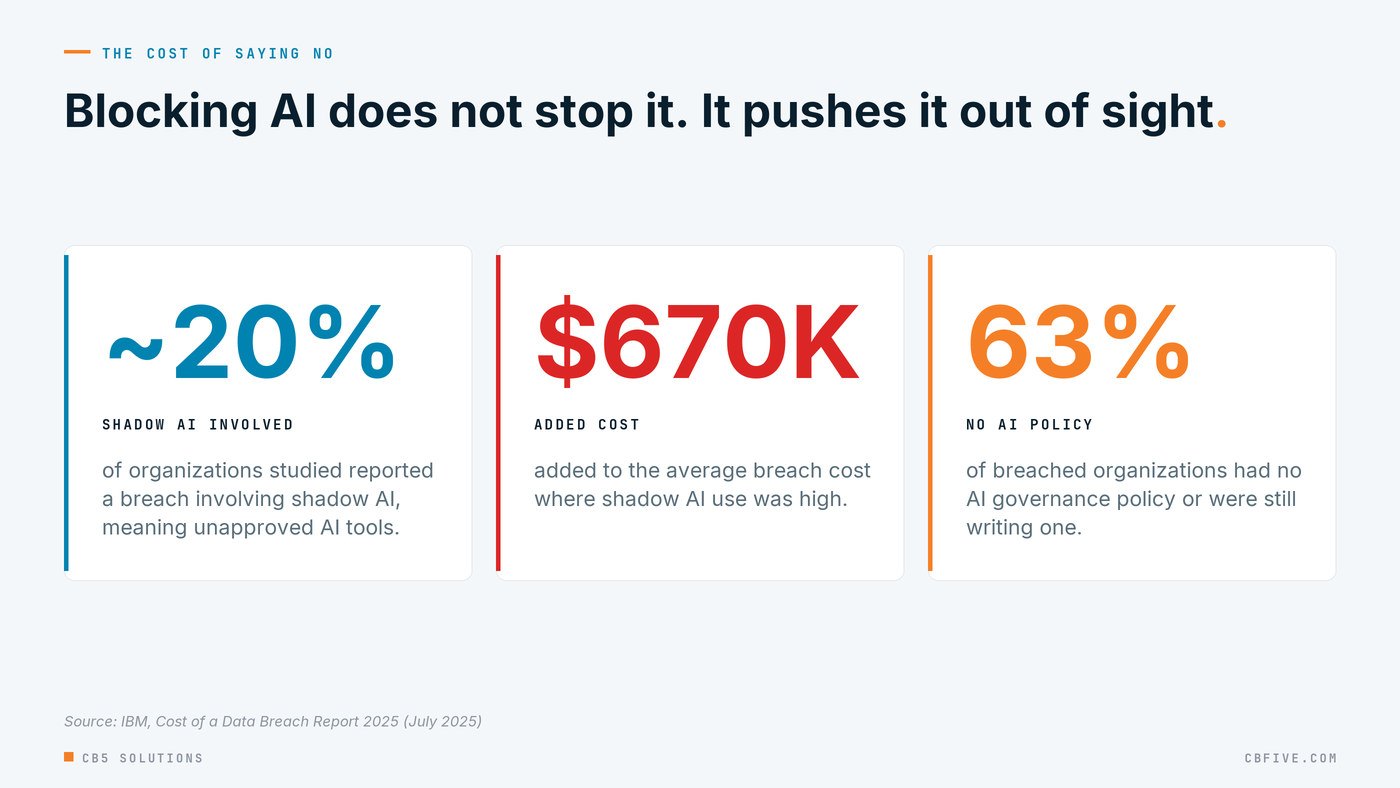
IBM’s 2025 Cost of a Data Breach report puts numbers on that risk. One in five organizations studied reported a breach involving shadow AI, meaning tools employees use without approval or oversight. Where shadow AI was heavily used, it added around $670,000 to the average cost of a breach. And 63% of breached organizations had no AI governance policy or were still writing one.
With that said, we think the goal should be a governed tool people actually want to use. That also means matching the layer to the job. Copilot Chat, licensed Microsoft 365 Copilot and custom agents each see different data and need different controls, and a lot of the cleanup above only matters for the layers that reach into your tenant. A properly scoped Copilot rollout, backed by Endpoint DLP rules that warn or block when someone pastes sensitive data into third-party AI sites, gives people a safe path. It also gives your security team visibility it would never get into a consumer chatbot.
Getting Started
If Copilot or agents are on your roadmap for the next two quarters, here’s where we’d start:
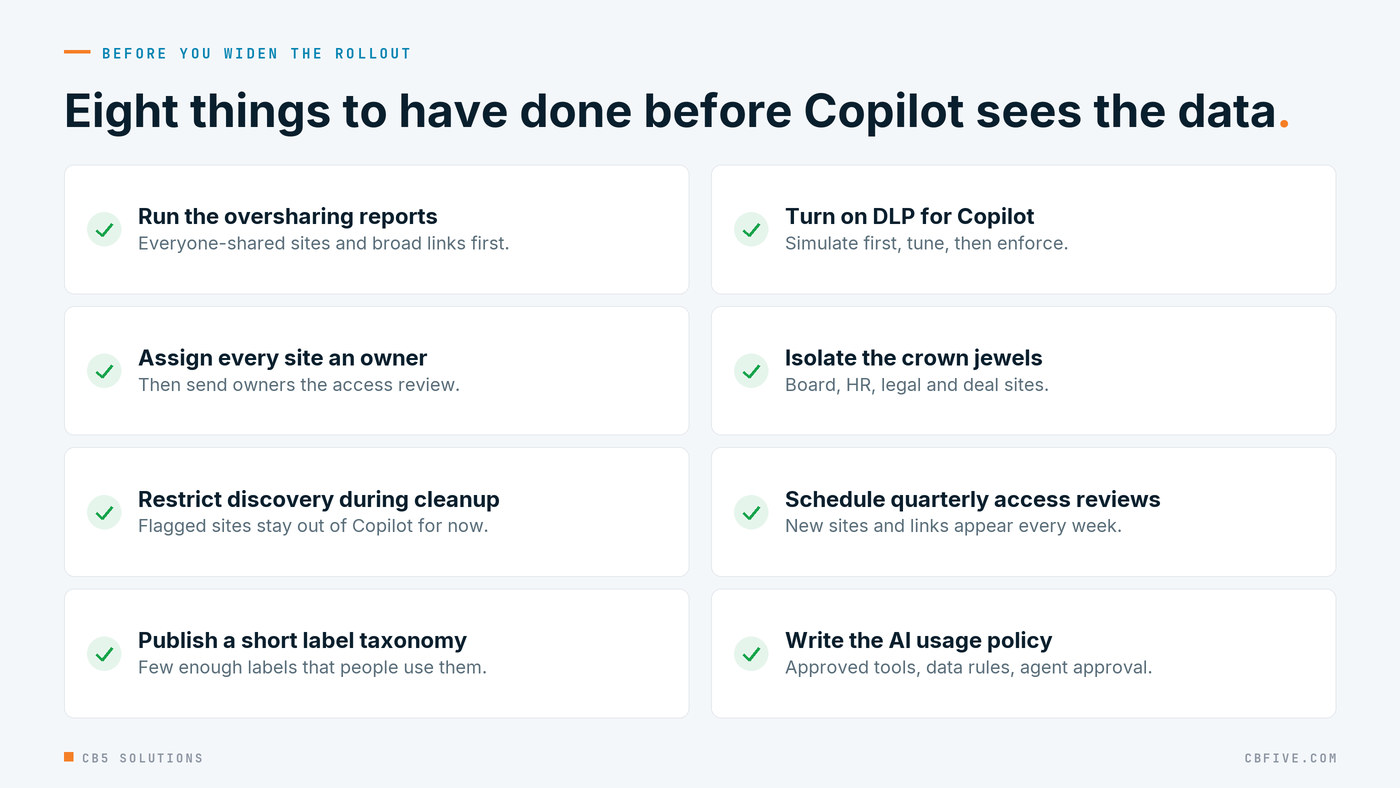
- Run the oversharing reports before you buy more licenses. Start with the sites shared to “everyone” and the sites with sensitive content and broad links. That list is your cleanup backlog.
- Give every site an accountable owner and send them the access review. Ownerless sites are where oversharing piles up.
- Run the three-role test on five real questions about compensation, customers, and strategy, using test accounts that match real roles.
- Publish a short label taxonomy and turn on DLP for Copilot in simulation mode, then enforce once you’ve tuned out the noise.
- Write the AI usage policy now. Cover which tools are approved, what data can go where, and who approves new agents.
Talk to Us
CB5 Solutions helps organizations understand the layers of AI, get the most from what they buy, and build an AI program that pays back inside their IT standards. We start every engagement with one business problem and a governance baseline. Let’s pick yours.
Tomorrow: AI or Process?: A Five-Question Filter Before You Fund Anything — how to tell when the fix is a simpler process, not a model.