
I’m writing this one because whenever I describe Diamond Elite to other engineers, the questions are always about the model. Which one, what does the prompt look like, how do you evaluate it. Nobody asks about video, and honestly, video is where most of my weeks went.
This post covers four specific failures in the media layer of an AI application. None of them involve the model. All of them broke the product in ways that were hard to diagnose, and three of them looked like something other than what they were, which is really why they cost so much time. If you’re building anything that processes user-uploaded media, I’d expect you to run into at least two of these.
One: The File That Will Not Seek
The symptom: a video uploads successfully and plays fine from the start, but scrubbing does nothing and frame capture produces garbage or hangs. On a fast connection it looks fine, and on a slow one it’s broken. Same file.

The swing window frame capture samples across — start, end, and the frames the model will actually be shown. Demo data.
The cause: MP4 and MOV files contain a metadata atom, the moov atom, that holds the index of where every frame lives. If that atom sits at the front of the file, a player can seek right after downloading a few kilobytes. If it sits at the end, the player can’t seek to any position until the entire file has downloaded, because it doesn’t know where anything is yet.
For a four-second clip you’d never notice. For a multi-gigabyte 4K video, it means the seek-based frame capture that the whole analysis pipeline depends on just doesn’t work until the entire file has transferred.
Two things made this one especially frustrating. First, you can’t see it in local development, where files load instantly from disk. Second, and this is the part that sent me in circles, our own test clips were the problem. Generating a test file with a stream copy, the standard fast path, puts the moov atom at the end by default. I was creating broken files and then trying to diagnose the application.
Once you know what’s going on, the fixes are small:
- When you generate or transcode any file meant for browser playback, pass the flag that moves the index to the front. It costs one extra pass and makes the file seekable right away.
- Don’t assume uploads are consistent. Real phone footage varies by device and capture mode. Two files from the same family’s phones had the atom in different places, one at the front and one at the end. Test both, because your users will send both.
Two: The Progress Bar That Stops at Zero
The symptom: thumbnail generation starts, reports zero percent, and stays there. There’s no error, no timeout, and no network activity. The tab just sits at the first step indefinitely.
The cause: the filmstrip capture loop is driven by requestAnimationFrame, and requestAnimationFrame doesn’t fire in a hidden tab. Browsers stop servicing animation frames when the page isn’t visible, which is correct behavior and great for battery life. It also stops any work you’ve scheduled through that callback.
What made this one expensive was that I blamed the wrong thing. It looked exactly like a hung capture loop or a bad video file, and I went looking for both. The real cause was the environment: the page wasn’t visible, so the loop never got a tick.
There are two lessons here, and personally I think the second one matters more.
The narrow lesson is that requestAnimationFrame is for rendering, and if you schedule non-rendering work through it, that work picks up visibility behavior you probably didn’t intend. If the job has to finish whether or not anyone is looking at it, drive it with a timer, a worker, or a promise chain.
The broader lesson is about diagnosis. Before you believe anything you observe about frame-driven behavior, check whether the page was actually visible at the time. We now check document.visibilityState before trusting that kind of observation, because “the code is broken” and “the browser correctly declined to run the code” look identical from the outside and are completely different problems.
Three: The 250 MB Limit and the 4.3 GB Reality
The symptom: this wasn’t really a bug. It was a product decision that was wrong from day one.
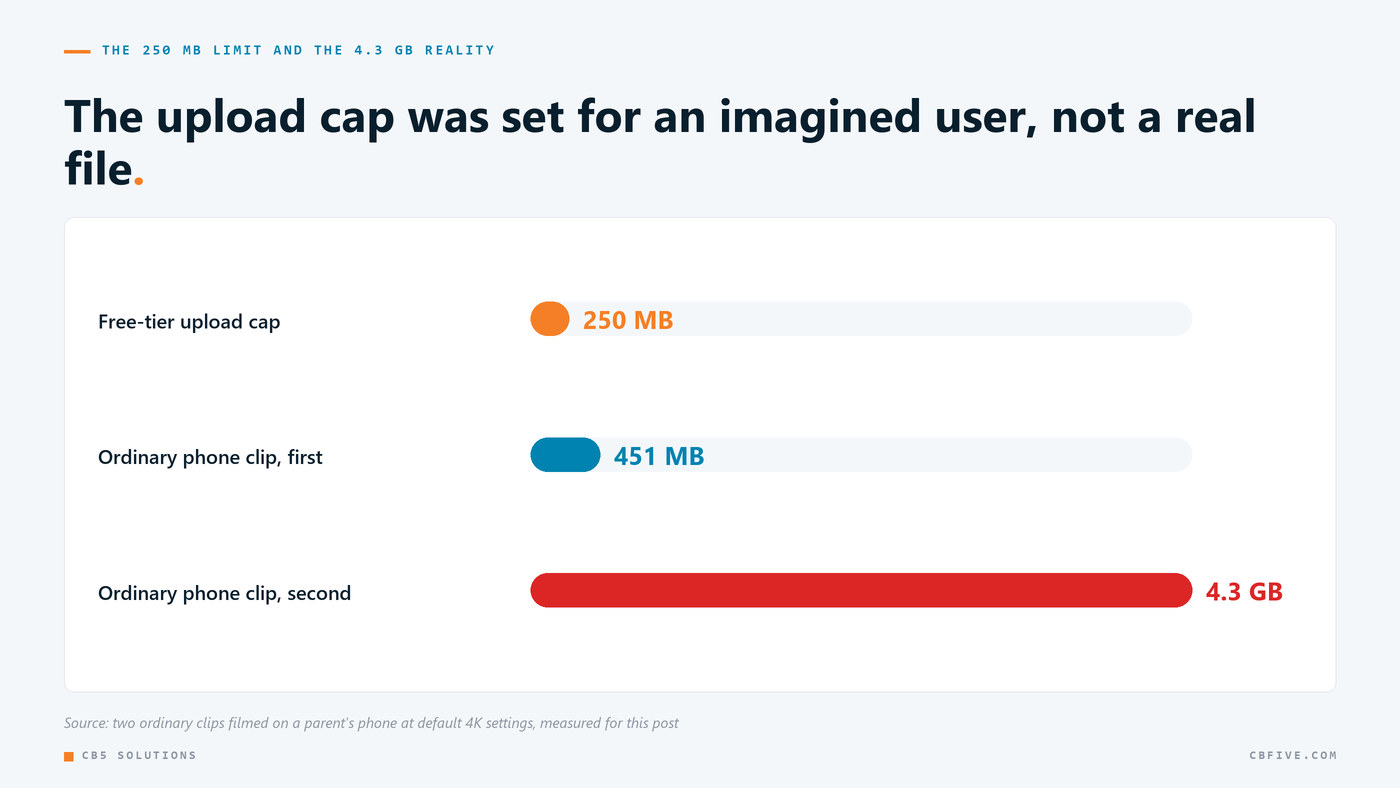
The free tier caps uploads at 250 MB. That number got picked the way these numbers usually do: it sounded generous, and nobody measured anything.
Then we measured. Two ordinary clips filmed on a parent’s phone, exactly the kind of footage the product exists to analyze, were 451 MB and 4.3 GB. These weren’t edge cases or hour-long recordings. It was normal footage from a modern phone shooting 4K, which is the default on hardware most families already own.
So the free tier, which is where every new user lands, would have rejected a typical upload from a typical device, right when a first-time user is deciding whether the product works at all. In my experience the failures that hurt a product most usually aren’t crashes. They’re limits that were set for an imagined user and never checked against a real file.
With that said, the answer isn’t just a bigger number, since bandwidth and storage are real costs. It’s client-side downscaling before upload, so a 4.3 GB source becomes a manageable file without the user ever knowing, plus an honest error that names the actual constraint when a file really can’t be handled. What you don’t want is a default that rejects your median user’s median file.
Four: The Frame That Is One Frame Behind
The symptom: subtle and rare. Phase analysis occasionally describes body positions that don’t match the frame shown next to the text.
The cause: setting currentTime on a video element doesn’t mean the pixels are ready. Even after the seeked event fires, the decoded frame isn’t guaranteed to have been painted. If you draw to canvas at that instant, you may capture the previous frame.
In most applications that’s a cosmetic glitch. Here it means the frame labeled “contact” holds the position from a few milliseconds earlier, the model accurately describes what it was shown, and the user sees analysis that doesn’t match what they can see with their own eyes. The model isn’t wrong, it was just handed the wrong frame.
The fix is to wait for the seeked event and then wait one more animation frame before drawing. That’s roughly sixteen milliseconds, completely invisible to the user, and it gets rid of this whole class of off-by-one-frame capture bug.
Everything around that seek needs defensive handling too. Some files never fire the event at all, so each seek has a two-second ceiling and the whole capture run has an overall ceiling, currently forty-five seconds, after which it gives up loudly instead of hanging. The canvas is created once and reused across every capture instead of per call, and it’s created with the hint that tells the browser we’ll be reading pixels back frequently. These are small choices, but capture runs across dozens of frames and the per-call allocation adds up.
What This Adds Up To
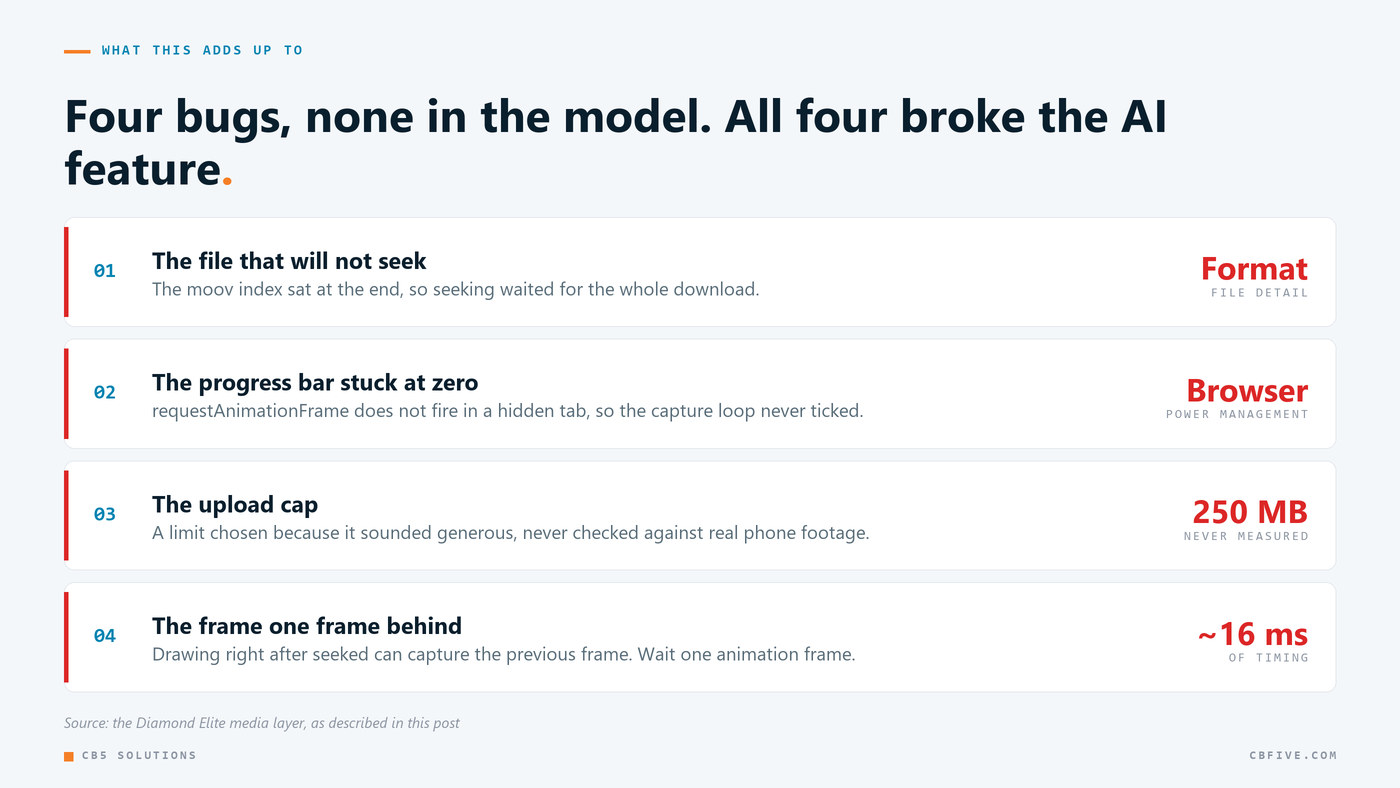
So that’s four bugs. One was a file format detail, one was browser power management, one was a number nobody checked, and one was sixteen milliseconds of timing. None of them were the AI, but all of them broke the AI feature, because the model can only work with the pixels it’s given.
If I had to sum it up: in an applied AI product, the model is the part with the best documentation, the best tooling, and the most people thinking about it. I’ve found that the hard problems tend to be in the less exciting layer that feeds it, and that layer deserves the same engineering attention you’re giving the prompt.
Getting Started
If you’re building on user-uploaded media, here’s where I’d start:
- Test with real files from real devices. Not clips you generated yourself. Your own test files carry your own tooling’s defaults, and those aren’t what a phone produces.
- Check your size limits against actual output from current hardware. Shoot a video on a recent phone at default settings and look at the file size before you set a cap.
- Audit what requestAnimationFrame is doing in your codebase. Anything in there that isn’t rendering will quietly stop in a background tab.
- Assume every media operation can hang. Use per-operation and overall timeouts, with a clear failure state. Personally, I’d take an error over a hang, because nobody gets paged for a hang.
The series wraps up on Monday with the lesson that has the most direct financial consequences: what it takes to actually enforce a spending limit on AI usage, and why the one I wrote didn’t work.
If you’re putting user-generated media through an AI pipeline and want the media layer reviewed by people who have already run into these, feel free to contact us.
CB5 Solutions is a Microsoft Solutions Partner specializing in Microsoft Security, Data & AI, Modern Workplace, and Azure Infrastructure.